
Asset management software built around PS 3150
An asset register that actually posts. Amortisation, disposals, betterments and work-order costs all reach the general ledger, and the asset file carries the whole history in one place.
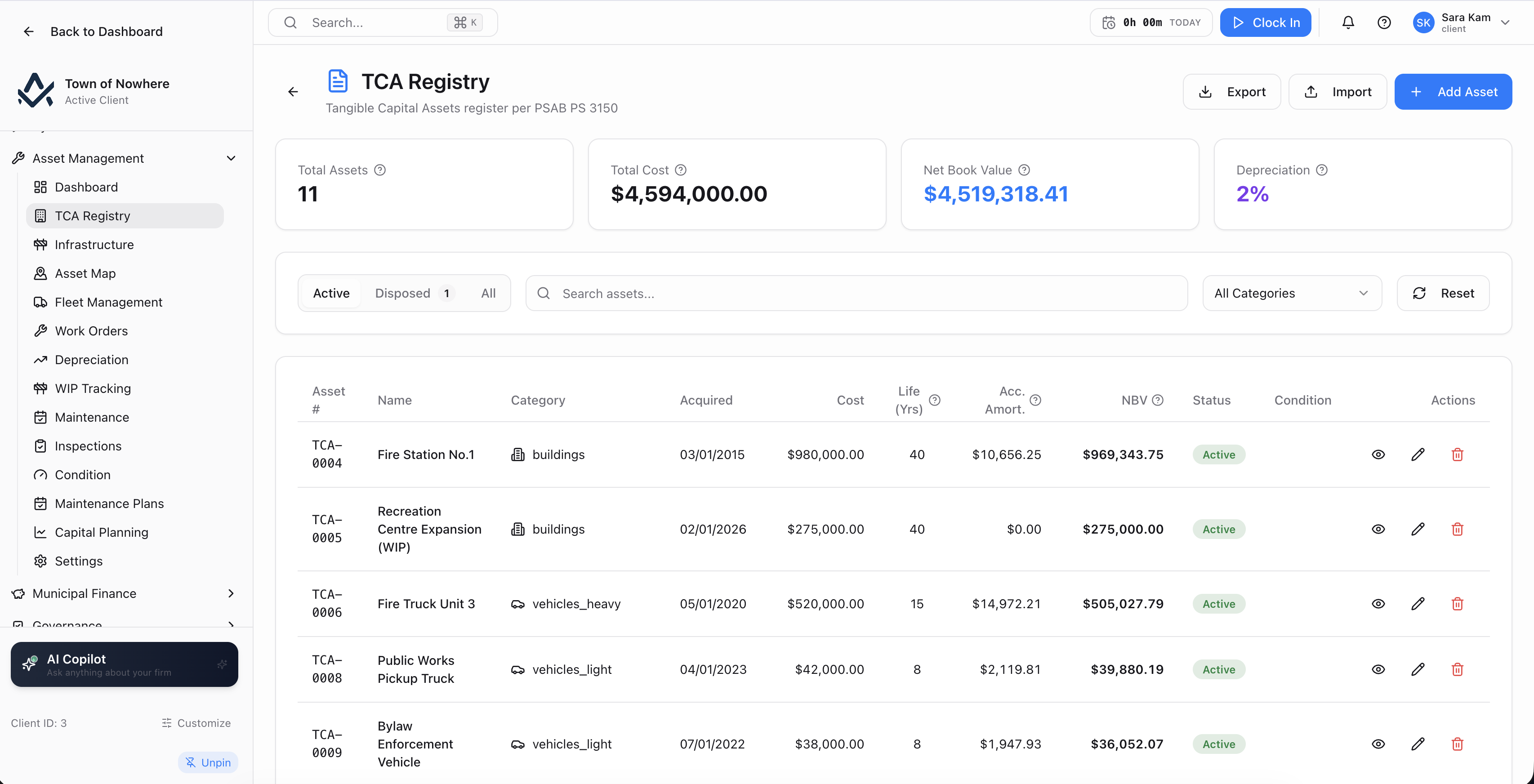
The tangible capital asset register with cost, status and condition per asset.
An asset register that posts, not a spreadsheet that ages
Amortisation runs overnight and lands in the ledger. Work order costs come back to the asset. Condition scores drive the next work order. The PS 3150 schedule is a button rather than a week of assembly.
14
Screens across the module
3
Amortisation methods including sinking fund
3
Condition scoring methods: PASER, PCI, generic
9
Work types from preventive to replacement
Amortisation that posts itself
Schedules are generated, approved and posted, with a nightly job on a day of month you choose and a regenerate-all action when something changes.
Real cost on the asset
Complete a work order with hours, labour and material, post the cost, and link the supplier bill line so invoiced cost lands on the asset rather than an estimate.
Condition on industry scales
PASER, PCI and a generic scale with their own thresholds, per-asset trends, and a backfill that proposes numeric scores from existing qualitative ratings.
Maintenance that schedules itself
Plans trigger on a time interval, a usage interval in kilometres or hours, or a condition threshold, and a nightly job generates the work orders.
The register and the schedules, both live
The PS 3150 register, with amortisation schedules that are generated, approved, posted and regenerated rather than maintained in a spreadsheet.
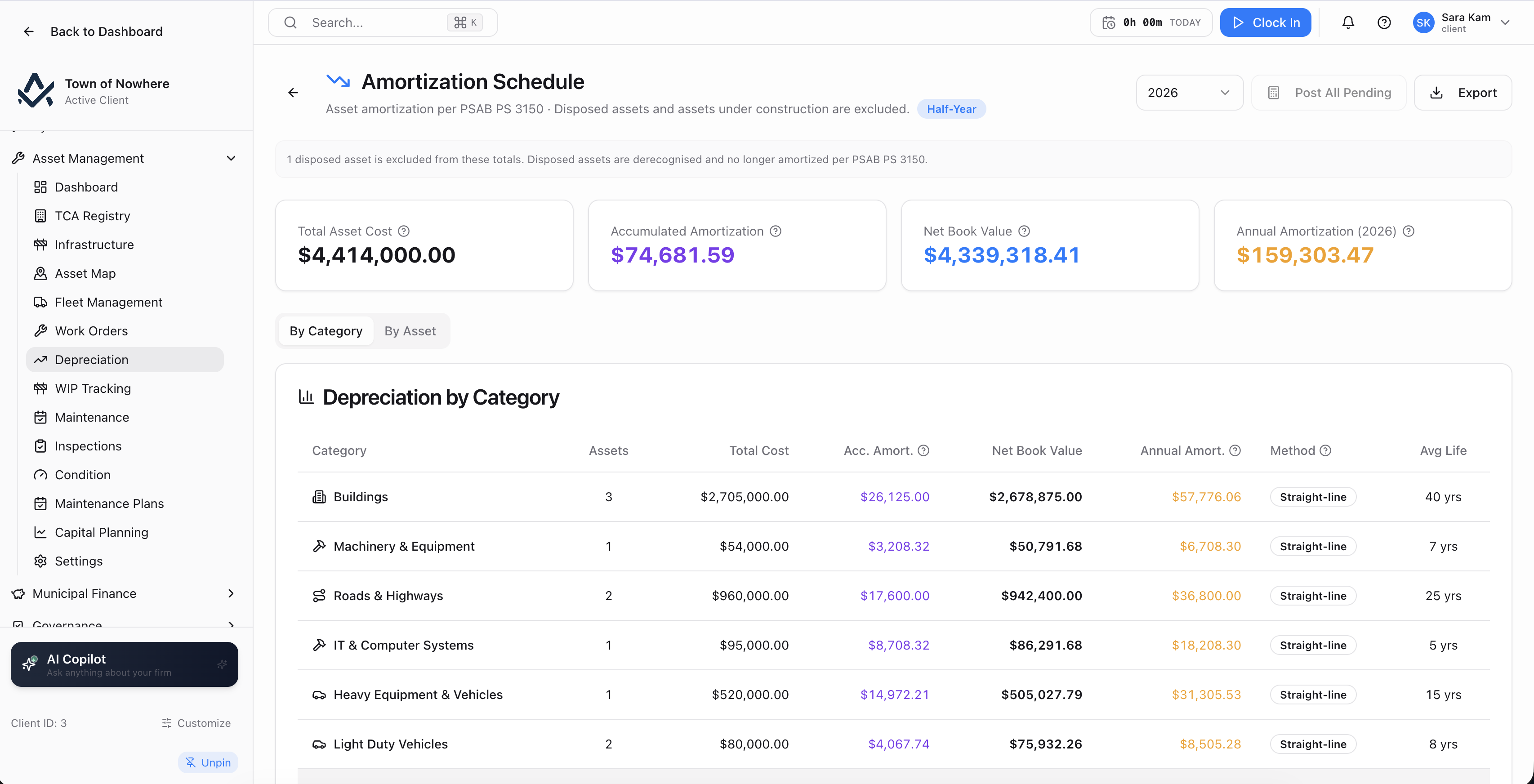
By category and by asset, with approve, post and post-all-pending actions.
What an asset carries. Category, name, acquisition date and cost, amortisation method of straight line, declining balance or sinking fund, useful life in years, salvage value, opening accumulated amortisation, in-service date, amortisation start date, location, department, condition, status including work in progress, serial number, funding source, description and notes.
Five-tab asset file. Details, amortization showing period, amount, closing net book value and status, cost history, work orders and inspections.
Disposals. Full disposal by method covering sold, donated, scrapped, traded, transferred and written off, with proceeds, disposal date, estimated net book value removed and notes. Partial disposal by percentage of the remaining base is supported, and both keep a disposal history alongside the cost-change history.
Betterments. A Record Addition action captures betterments against an existing asset so the capitalised cost and the schedule both move.
Depreciation screen. By category showing assets, total cost, accumulated amortisation, net book value and average life, and by asset showing cost, accumulated amortisation, NBV and last posted. Regenerate one schedule or all of them, approve an entry, post an entry, or post all pending. A nightly job processes auto-amortisation on a configurable day of month.
WIP tracking. Construction-in-progress assets listed with days in WIP, and a Transfer to Active Service action that sets the target category, in-service date, useful life, amortisation method and salvage value, starting amortisation from that point.
Also included
The network and the vehicles that maintain it
Roads, bridges, water, sewer and storm networks alongside the vehicles and equipment that maintain them.
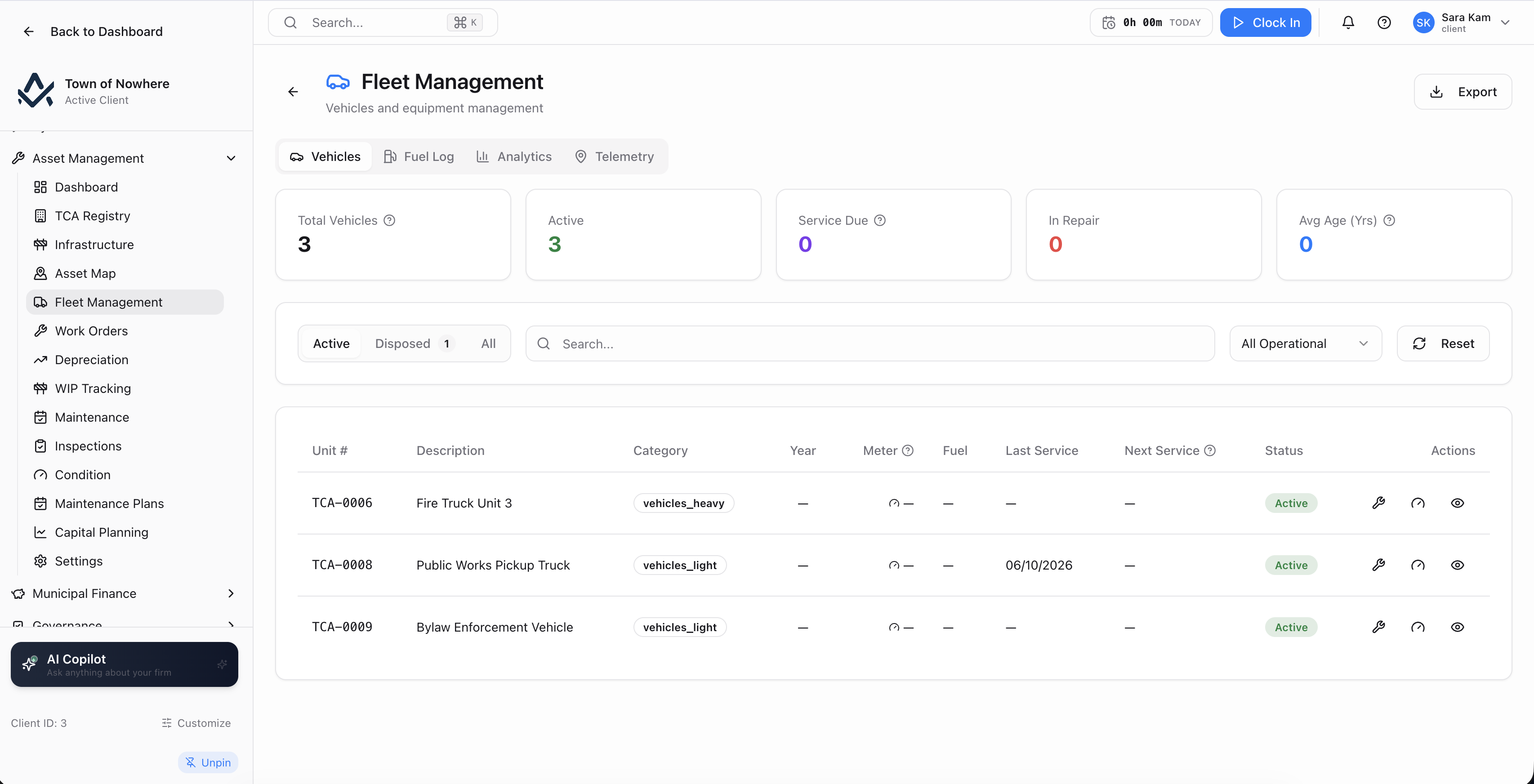
Vehicles, fuel, analytics and telemetry in four tabs.
Infrastructure view. Linear and network assets filtered by type across roads, bridges, water, sewer and storm, and by condition, with installed date and status.
Asset map. Where GIS is licensed, the network themed by condition or category, with a geometry editor, a search across mapped and unmapped assets, and a Set asset length from the drawn line action that computes a linear asset’s length directly from its geometry.
Fleet vehicles. Unit number, description, category, year, fuel, last service and status, with service records covering service date, type, mileage at service, cost, vendor, next service date and description, plus current mileage and hours updates.
Fuel logs and card imports. A per-vehicle fuel log with date, volume and unit, unit cost, total, vendor, reference and notes, plus a fuel-card import path with named profiles, asset lookup by unit number, date format, default volume unit, column mapping, a dry-run preview, an apply step and a run audit.
Analytics and telematics. Fuel and cost analytics by month and vehicle over a selectable window, and a telematics ingestion seam with an ingest URL and rotatable API key feeding a latest-positions view on the map.
Also included
Maintenance that carries its cost home
Maintenance work that carries its cost back to the asset, draws parts from live inventory, and generates itself from a plan.
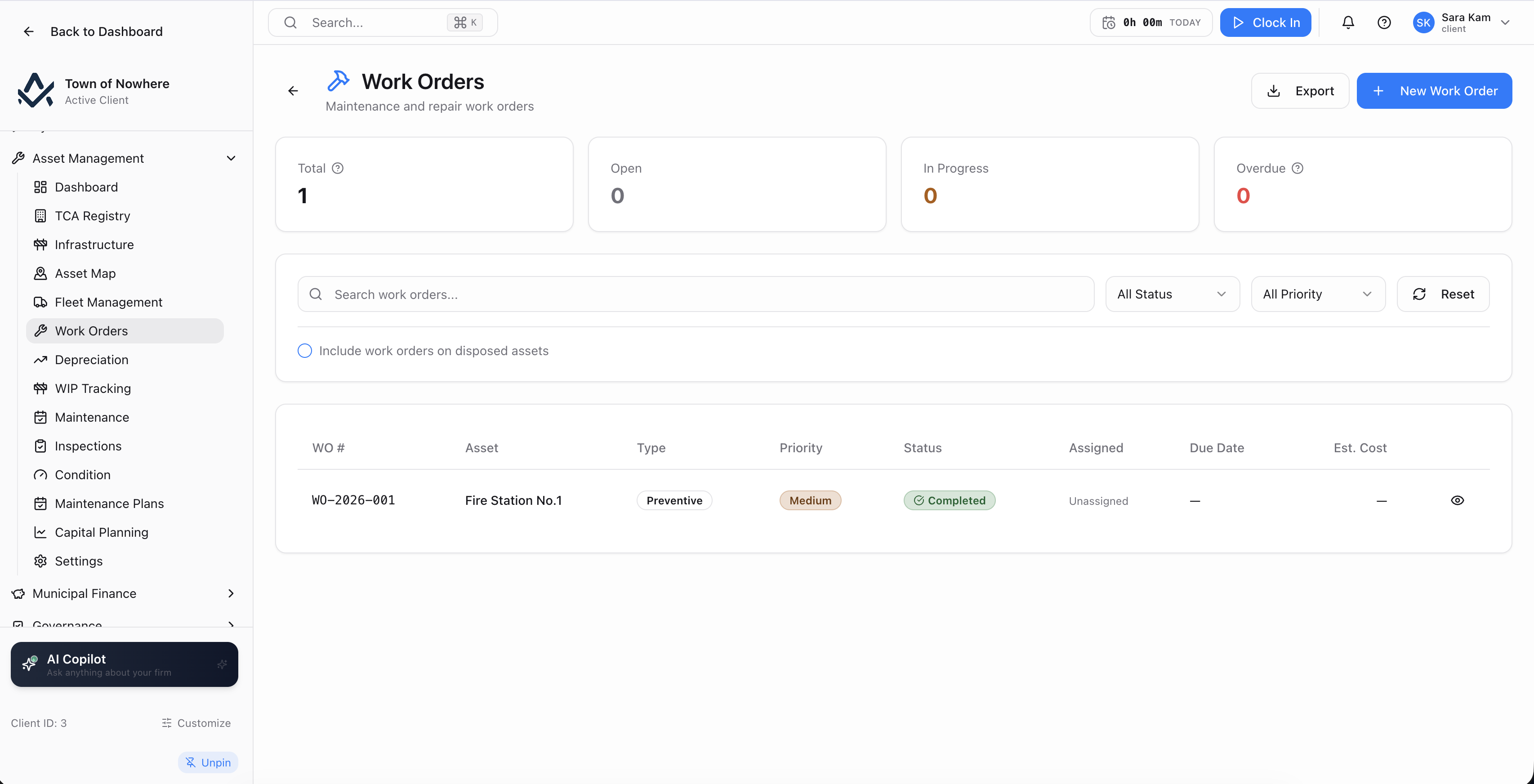
Work orders with estimated cost up front and actual cost posted on completion.
Work orders. Nine work types covering preventive, corrective, emergency, inspection, assessment, service, rehabilitation, replacement and upgrade, with priority, scheduled and due dates, assignee, vendor, estimated cost and hours.
Completion that costs out. Complete with hours worked, labour cost, material cost, resulting asset condition and resolution notes. Post the cost to the GL. Link a supplier bill line to the work order through a candidate search across bill number and supplier, so actual invoiced cost lands on the asset.
Parts and materials. Work-order parts draw on the bookkeeping Inventory module. Reserve a part with an item search, quantity and notes, then issue, return to stock or cancel the reservation, with requested, issued, returned and net quantities tracked per line.
Condition scoring. PASER on 1 to 10, PCI on 0 to 100 and a generic 1 to 10 scale, each with its own excellent, good, fair, poor and critical thresholds and step size. Views cover condition by category, an average-score-by-category chart and a per-asset trend, with a backfill tool that proposes numeric scores from existing qualitative ratings and previews them before applying.
Maintenance plans. A plan targets a single asset or a whole category and triggers on a time interval in days, a usage interval in kilometres or hours, or a condition-score threshold under a chosen method. It carries lead time, work type, priority, an optional title template and an assignee. Generate work orders on demand, or let the nightly job run it on schedule.
Usage logs. Meter and odometer readings per asset with reading date, unit, reading, source and reference, which is what drives usage-based triggers.
Also included
What needs replacing, and what it will cost you
What needs replacing, when, what it will cost, and how far short the funding falls.
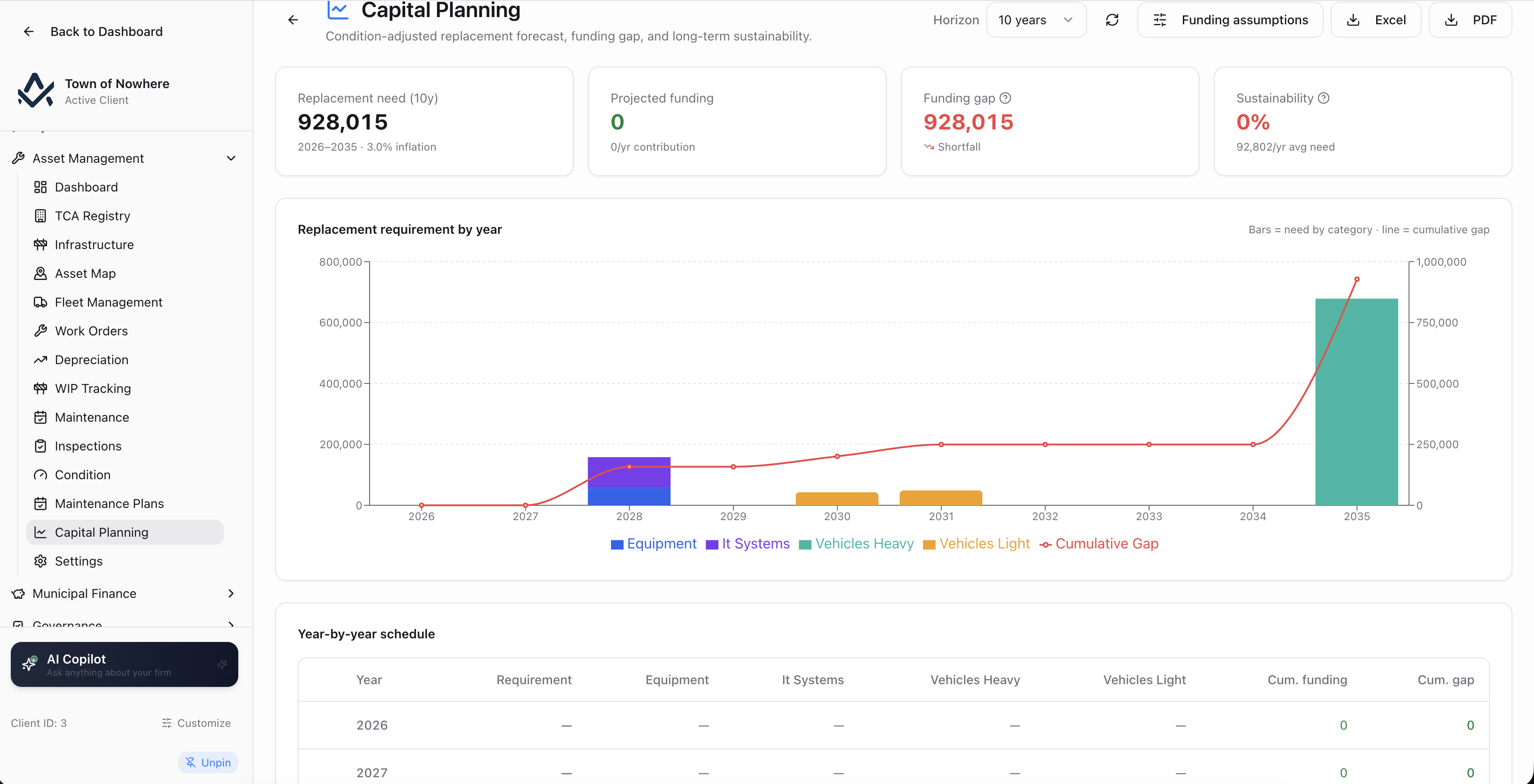
Requirement against funding, year by year, with the cumulative gap made explicit.
The forecast. Over a selectable horizon, showing year, requirement, cumulative funding and cumulative gap, with an asset table listing replacement cost, useful life, in-service date, missing data and alternatives.
Funding assumptions. Maintained per category with annual contribution, opening reserve balance, expected grants and notes, plus an all-categories fallback for anything unmapped.
Forecast overrides. A planner can set a planned year, a planned cost, or exclude an asset from the forecast entirely, so the model reflects council decisions rather than pure arithmetic.
Data quality. A dedicated view lists exactly what is missing to make the forecast reliable, with a bulk update action to fill the gaps.
Exports. The forecast exports to Excel and PDF, alongside the asset register, amortisation schedule and PSAS TCA schedule.
Also included
Asset management questions
Straight line, which is the PSAS default and the shipped default, declining balance, and sinking fund. Posting frequency is configurable as monthly or annually, alongside a capitalisation threshold, fiscal year start month, amortisation convention, a journal entry memo template with merge tokens, and a switch to group entries.
Yes. Partial disposal takes a percentage of the remaining base, and the system records it alongside full disposals in the disposal history, with the cost-change history showing how the capitalised cost moved over the asset’s life.
Three trigger types. A time interval in days, a usage interval in kilometres or hours read from the asset usage log, or a condition-score threshold under a chosen scoring method. Each plan carries a lead time in days so the work order appears before the trigger date rather than on it.
Yes. A work order posts its cost to the GL, and a supplier bill line can be linked to the work order so the actual invoiced amount lands against the asset rather than an estimate. Parts drawn from inventory track requested, issued, returned and net quantities per line.
Six generated documents: the asset register in PDF and Excel, the amortisation schedule in PDF and Excel, the PSAS TCA schedule in PDF, and the work-order report in PDF. A PS 3150 compliance notes panel sits on the depreciation screen itself.
The rest of the platform
Every module posts to the same ledger, so these are not integrations. They are the same system.
Municipal finance
Municipal Finance
Fund accounting, PS 3410 grant tracking and thirteen PSAB statements generated from live ledger data.
ExploreCitizen services
Citizen Services
Service requests that become work orders, recreation registration, facility bookings and cemetery records.
ExploreGIS & mapping
GIS & Mapping
Your own base map, GeoJSON layer import, parcel matching and maps inside every module that needs one.
ExplorePermits & licensing
Permits & Licensing
Six permit categories with applications, inspections, day routing, contractors and plan review markup.
ExploreGovernance
Governance
Meetings, agendas, minutes, resolutions with recorded votes, bylaw readings, committees and elections.
ExploreLoad your asset register and see the schedules
Bring a category list and a handful of assets. We will import them, generate the amortisation schedules and show the journal entries the nightly job would post.