
Permit and licensing software with inspections built in
Six permit categories on one shared engine covering application intake, review, fee posting, issue, inspection, renewal and expiry, with the fee landing in the general ledger the moment it is posted.
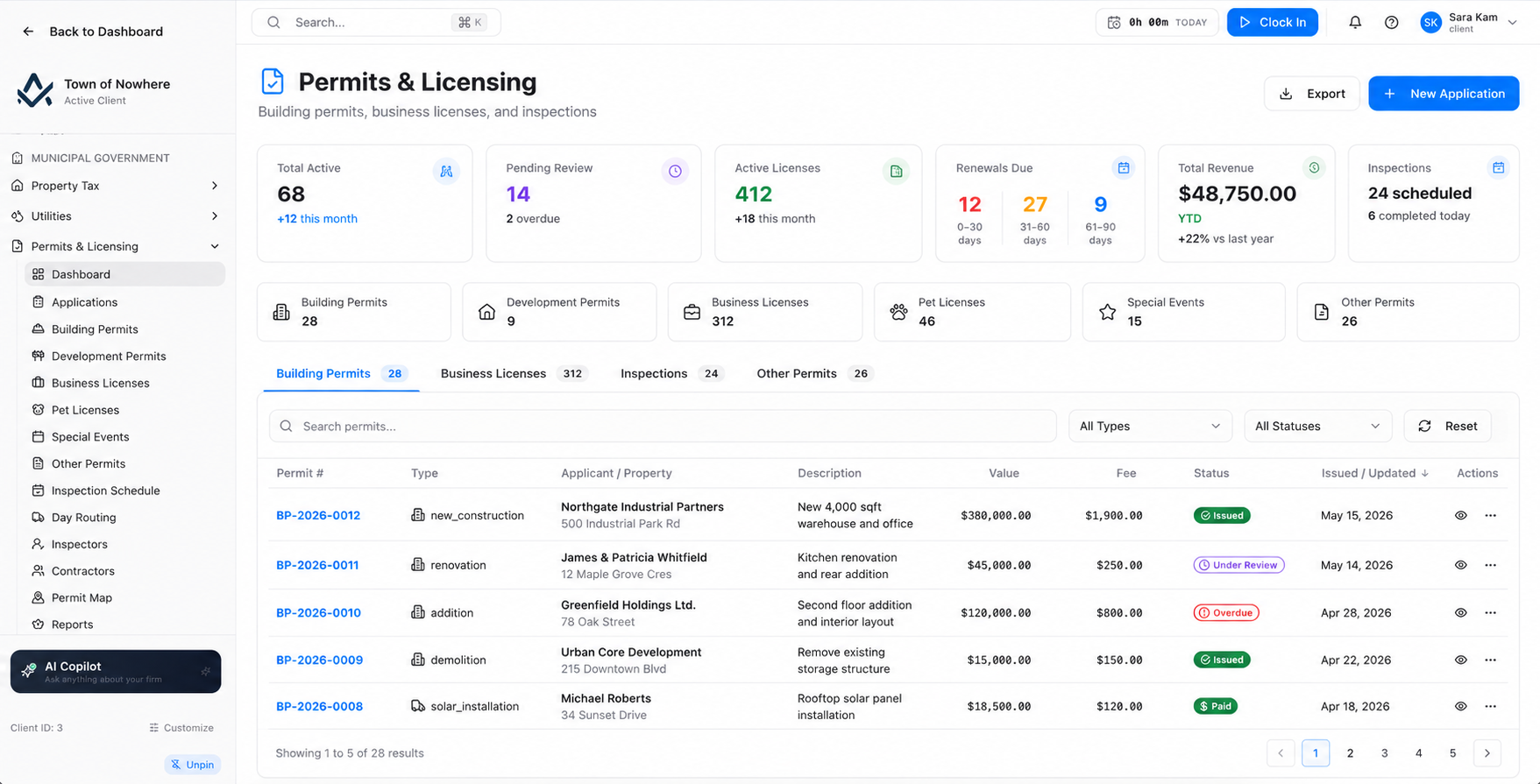
The staff review queue for portal-submitted applications, across every category.
The counter, the office and the field on the same record
A resident applies online, the application lands in the staff queue, the fee posts to the ledger, the inspection gets scheduled and routed, and the certificate prints. Nobody emails a spreadsheet to finance.
15
Screens across the module
6
Permit categories on one engine
9
Work types on inspections and follow-up
4
Settings tabs from GL accounts to automation
Six categories, one engine
Building, development, business, pet, special event and fully custom permits share the same workflow while keeping their own fields and numbering.
Inspection days that route themselves
Assign inspectors on a board, then optimise a day of located stops by nearest-neighbour ordering, or drag the order by hand.
Lapsed insurance blocks issue
The contractor registry tracks insurance, bonds and trade tickets with expiry, and enforcement can refuse to issue a permit when coverage has lapsed.
Reviews with the drawing attached
Multi-department review cycles with resubmission dates, an on-screen PDF annotation layer and a threaded comment list beside the drawing.
Six categories that behave the same way
Every category shares the same spine: search, status and type filters, customer linking, optional property-unit linking, fee amount, application and expiry dates, fee posting to the GL, status transitions, document upload and a downloadable permit certificate PDF.
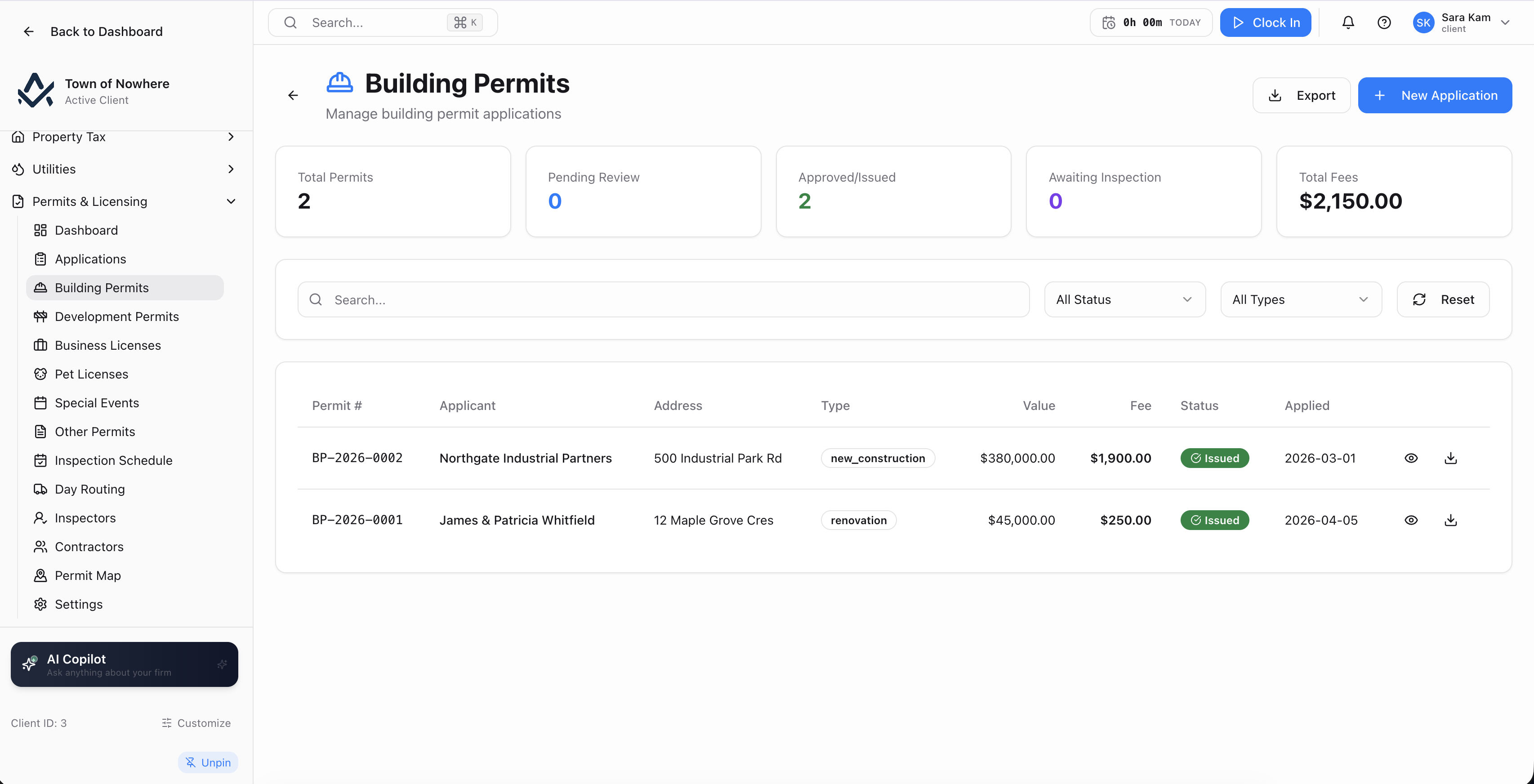
One category view. Every other category shares the same spine with its own fields.
Applications queue. A single staff review queue across every category, filtered by pending review, pending approval and approved, with an Advance action that moves an application through its state machine.
Payments and posting. A cross-category payment register with record, void and post-to-GL actions, plus automation settings for auto-posting on issue and auto-posting payments.
| Category | Category-specific fields | Extra actions |
|---|---|---|
| Building permits | Applicant name and phone, property address, permit type covering new construction, renovation, addition and demolition, estimated value, contractor, project description | Issue, plus the full inspection lifecycle |
| Development permits | Applicant and contact, property address and legal description, application type covering subdivision, rezoning, variance, site plan and annexation, project description, number of lots, hearing date, current and proposed zoning | Public-hearing status |
| Business licences | Business name, owner name, phone, business address, business type covering food service, retail, automotive, professional services and home occupation | Issue and renew |
| Pet licences | Pet name, species, breed, colour, owner name, phone, address, rabies vaccination expiry | Issue, renew and rabies-expiry tracking |
| Special events | Event name and type, organiser, contact phone, event date, expected attendees, location, description, insurance flag | Insurance requirement enforcement |
| Other permits | A free-text permit name such as sign permit or fence permit, applicant details, address, property address and description | Fully user-defined categories |
Also included
Schedule the week, route the day
A scheduling board across every permit, an optimised route for a single inspector’s day, and results recorded against the inspection with deficiencies and photos.
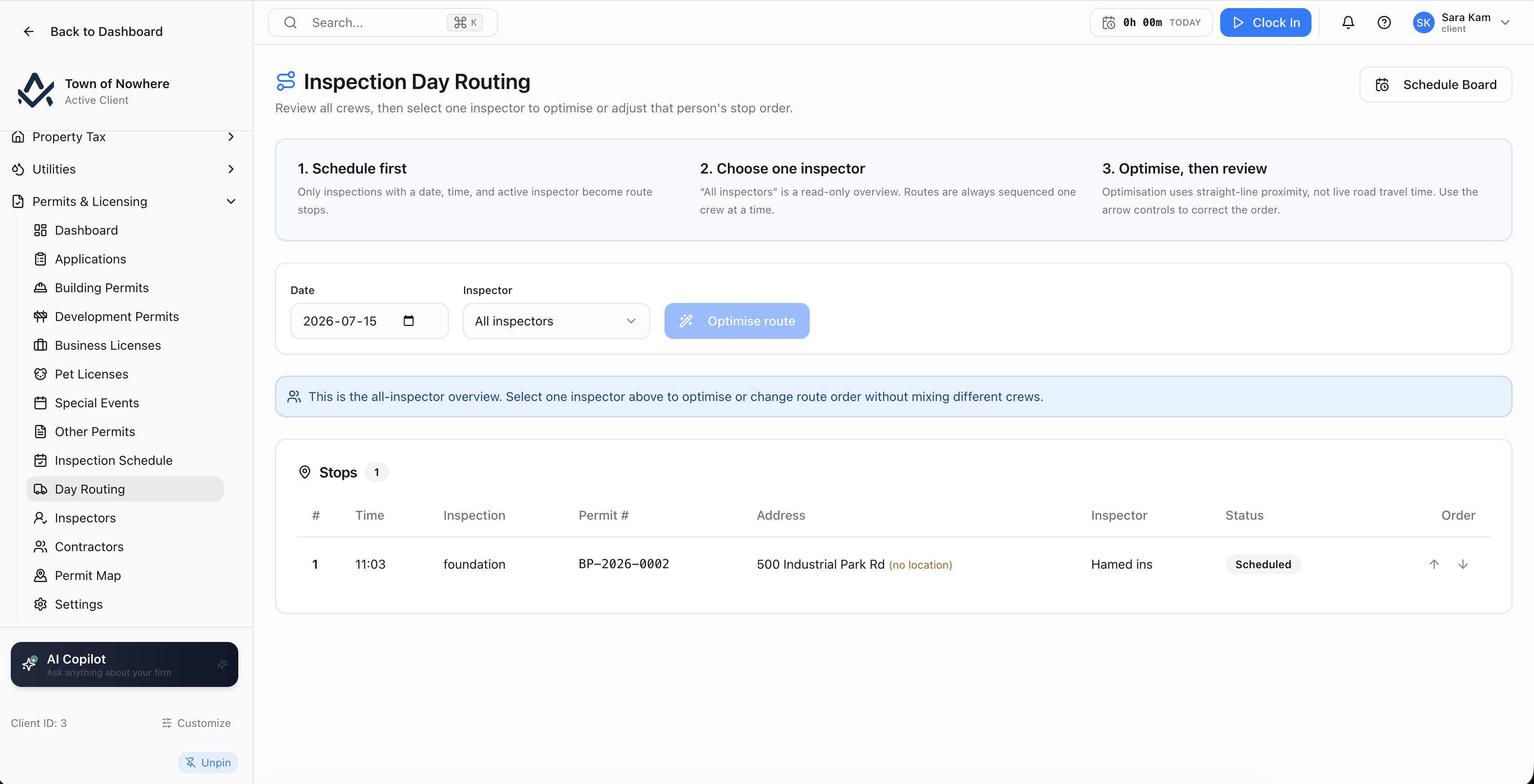
One inspector, one day, reordered by nearest-neighbour routing or by hand.
Inspection schedule. Filter by inspector, search by permit or address, create an inspection with permit search, inspection type, date and internal notes, then schedule it with an inspector and a duration in minutes. Inspectors can be assigned or re-assigned from the board.
Results. Recorded per inspection with a pass or fail result, notes, a deficiency list and photo upload. Applicants can request a reschedule, and staff resolve the request.
Day routing. One inspector, one date. Columns for time, inspection, permit number, address, inspector, status and order. An Optimize action reorders the day’s located stops by nearest-neighbour routing, and the order can also be dragged manually.
Inspector roster. Built from payroll workers, employees or contractors, with an overridable schedule display name.
Inspection settings. Working day start and end, default duration in minutes, resident reminder days, and the inspection workflow settings that decide whether an inspection is required before issue.
Also included
Know who is covered before you issue
Track who is licensed to work in the municipality, what coverage they carry, and whether a permit can be issued to them today.
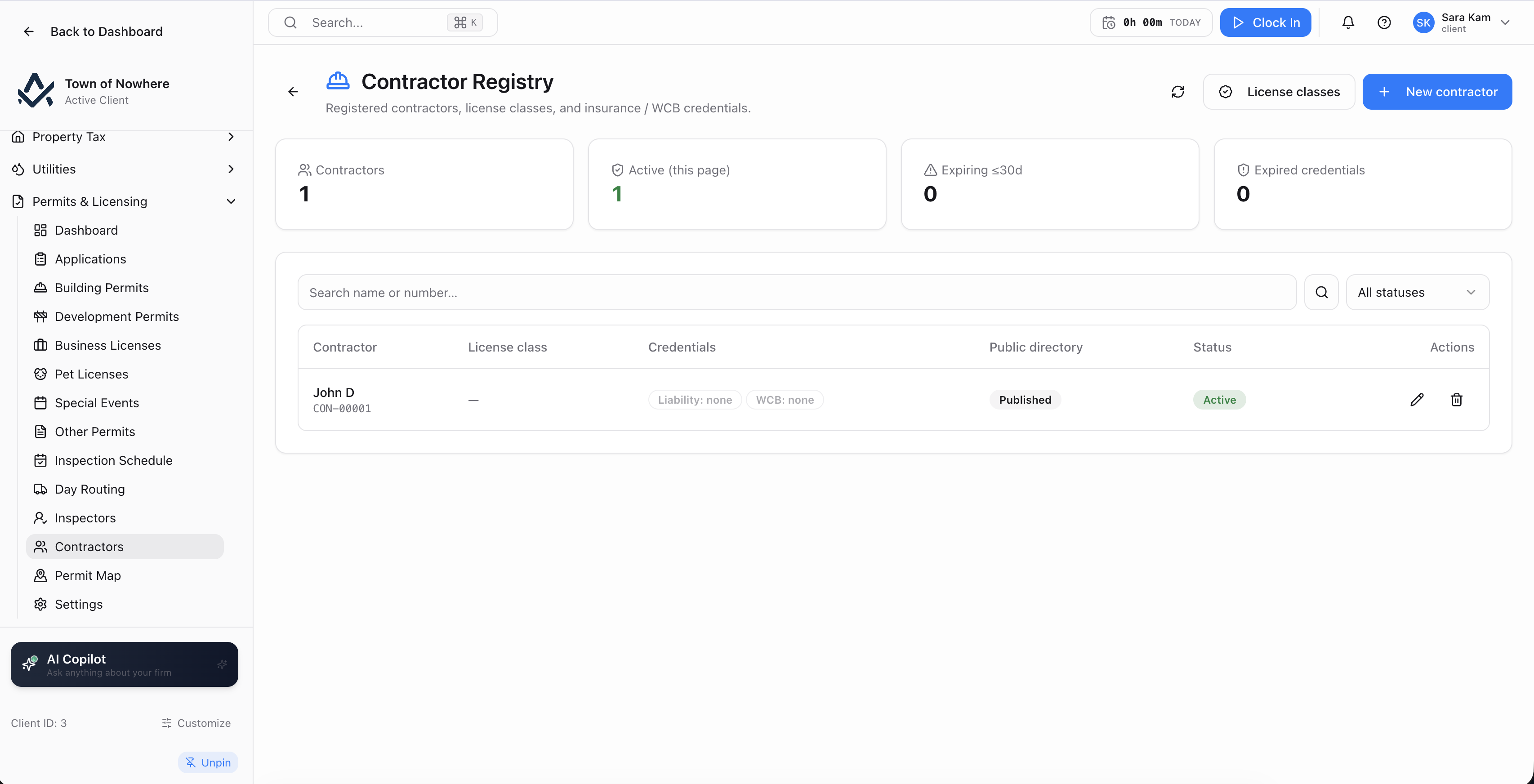
Credentials with expiry tracking, and an enforcement mode that can block issue outright.
The register. Name, legal name, contact person, email, phone, address, licence class, a link to the business licence, status, notes and a publish-in-citizen-portal switch.
Credentials with documents. Per contractor, a list of credentials by kind with policy or reference number, issuer, coverage amount, effective date, expiry date and a verified flag, each with document upload and download for insurance certificates, bonds and trade tickets.
Licence classes you define. Code, label, scope notes and an active flag, so the classes match your own bylaw rather than a fixed list.
Enforcement, three modes. The permit settings carry a contractor credential enforcement mode of off, warn only, or block issue. Set to block, a permit cannot be issued to a contractor whose insurance has lapsed.
Expiring view and public directory. An expiring view surfaces credentials approaching their expiry date, and the verified contractor directory can be published to the citizen portal as a searchable public list.
Also included
Mark up the drawing where the permit lives
Versioned permit-document management with multi-department review cycles and an annotation layer over the drawing itself.
The drawing, the annotation layer and the comment thread in one panel.
Review cycles. Opened against a permit with a department list and a resubmission due date. Each department records its own decision, so a cycle closes only when every reviewer has responded.
Markup panel. The PDF drawing renders with an annotation layer. Annotations are created, edited and deleted, and a threaded comment list sits beside the drawing so the discussion stays attached to the mark.
Versioned documents. Resubmissions are held as versions against the permit rather than overwriting the file, so the review history stays intact.
Also included
Permits and licensing questions
Yes, where the citizen portal is enabled and permit applications are published. The public form carries the category-specific fields such as description of work, estimated project value, business name and employees, pet breed and age, event name and expected attendees, current zoning and start and end dates. Applications and renewals can be paid online, and submitted applications land directly in the staff Applications queue.
Yes. The Other Permits category takes a free-text permit name, so sign permits, fence permits, encroachment permits and anything else your bylaws define are handled as first-class records with numbering, fees, GL posting and certificate PDFs.
Yes. The contractor credential enforcement setting has three modes: off, warn only, and block issue. Set to block, the system refuses to issue a permit to a contractor whose credentials have lapsed. An expiring view surfaces upcoming expiries before they become a problem.
Through the communications engine, where it is licensed. Inspection reminder is a scheduled event swept hourly, and inspection scheduled and inspection result are immediate events fired the moment they happen. Each rule picks its channels, an offset in days, a repeat throttle and its templates, and respects email opt-out and SMS opt-in.
Yes. A nightly licence expiry job expires permits and licences past their expiry date. Settings carry default expiry months and renewal reminder days before expiry, and business and pet licences have an explicit Renew action.
The rest of the platform
Every module posts to the same ledger, so these are not integrations. They are the same system.
Bylaws & enforcement
Bylaws & Enforcement
Registry, complaints, violations, tickets, fines, appeals, payment plans and a late-fee rules engine.
ExploreCitizen portal
Citizen Portal
A white-label public site on your own domain for balances, payments, applications, 311 and council information.
ExploreGIS & mapping
GIS & Mapping
Your own base map, GeoJSON layer import, parcel matching and maps inside every module that needs one.
ExploreAsset management
Asset Management
PS 3150 registry, amortisation, disposals, infrastructure, fleet, work orders and capital planning.
ExploreProperty tax
Property Tax
Assessment roll, mill rates, notices, collections, arrears, penalty rules, tax sales and certificates.
ExploreWalk a permit end to end
From the resident’s online application to the inspection result, the fee posting and the certificate PDF, on your own permit categories and fee schedule.