
Bylaw enforcement software with its own receivable
The full path from a resident complaint through investigation, violation or ticket, fine, payment plan or appeal, with accounts receivable and GL posting instead of a spreadsheet of outstanding fines.
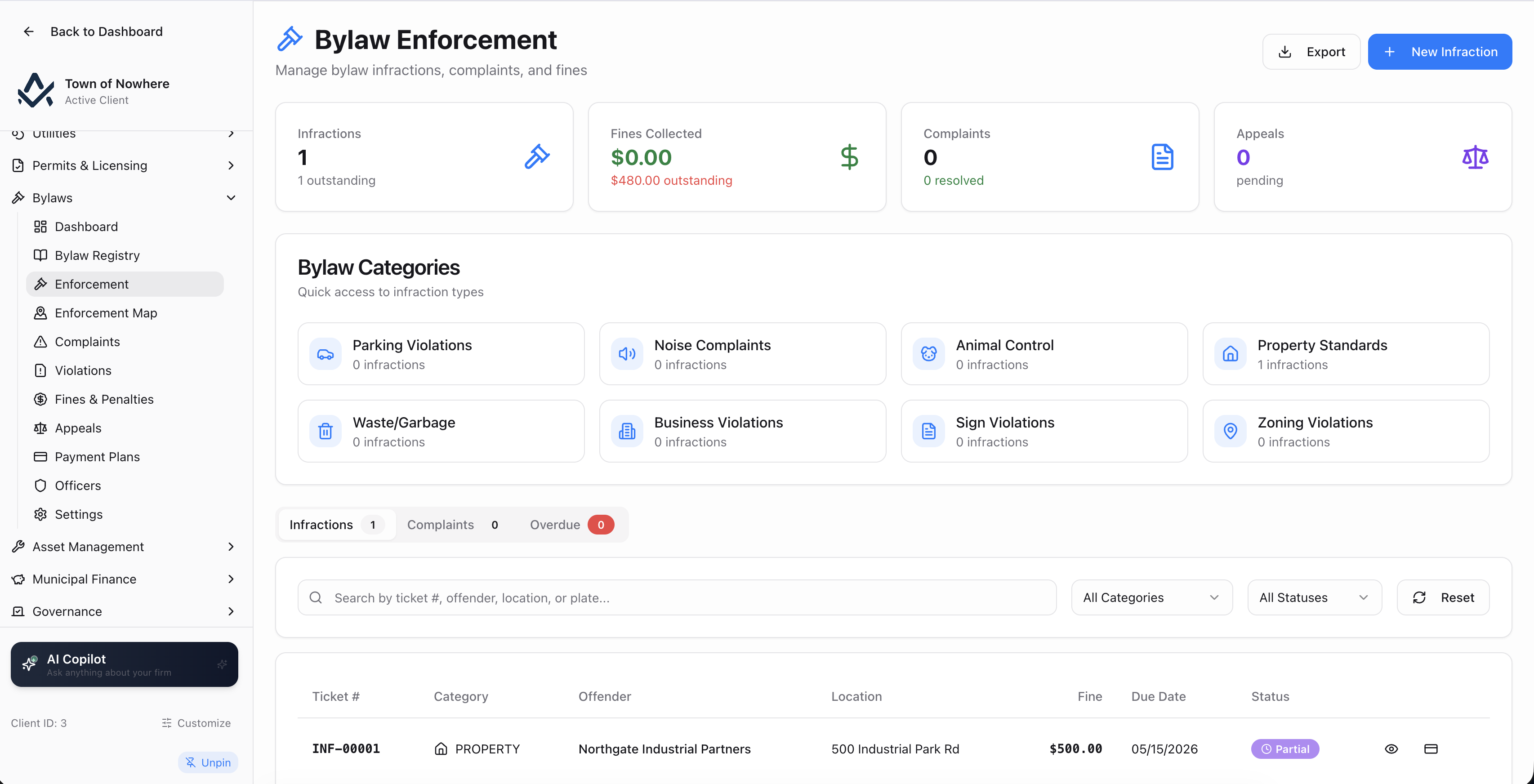
Infractions, complaints and overdue fines in one working console.
An unpaid fine should be a receivable, not a note in a binder
Complaint, investigation, violation or ticket, fine, payment or appeal. Every step is a record, the fine posts to the ledger, and the thresholds for late fees, collections and court referral are settings rather than someone remembering.
11
Screens across the module
6
Appeal statuses from filed to dismissed
5
Batch operations from late fees to demand letters
4
Severity levels on a violation
One path from report to payment
A complaint escalates to a violation, the fine posts to accounts receivable, and payment, a plan or an appeal closes it out with a receipt or a decision PDF.
Thresholds do the chasing
Late-fee method and cap, grace period, reminder days, collection-agency threshold, court-referral threshold and demand-letter trigger, all configured once.
Repeat offenders charged properly
A repeat-offence multiplier with a lookback in months applies the higher rate automatically instead of relying on someone spotting the pattern.
Appeals with a recorded decision
Schedule the hearing, record the outcome as upheld, reduced with an adjusted amount, or overturned, and the fine follows the decision.
Your bylaws as records, not a folder of PDFs
Your municipality’s bylaw library, held as structured records rather than a folder of PDFs, and publishable to the citizen portal.
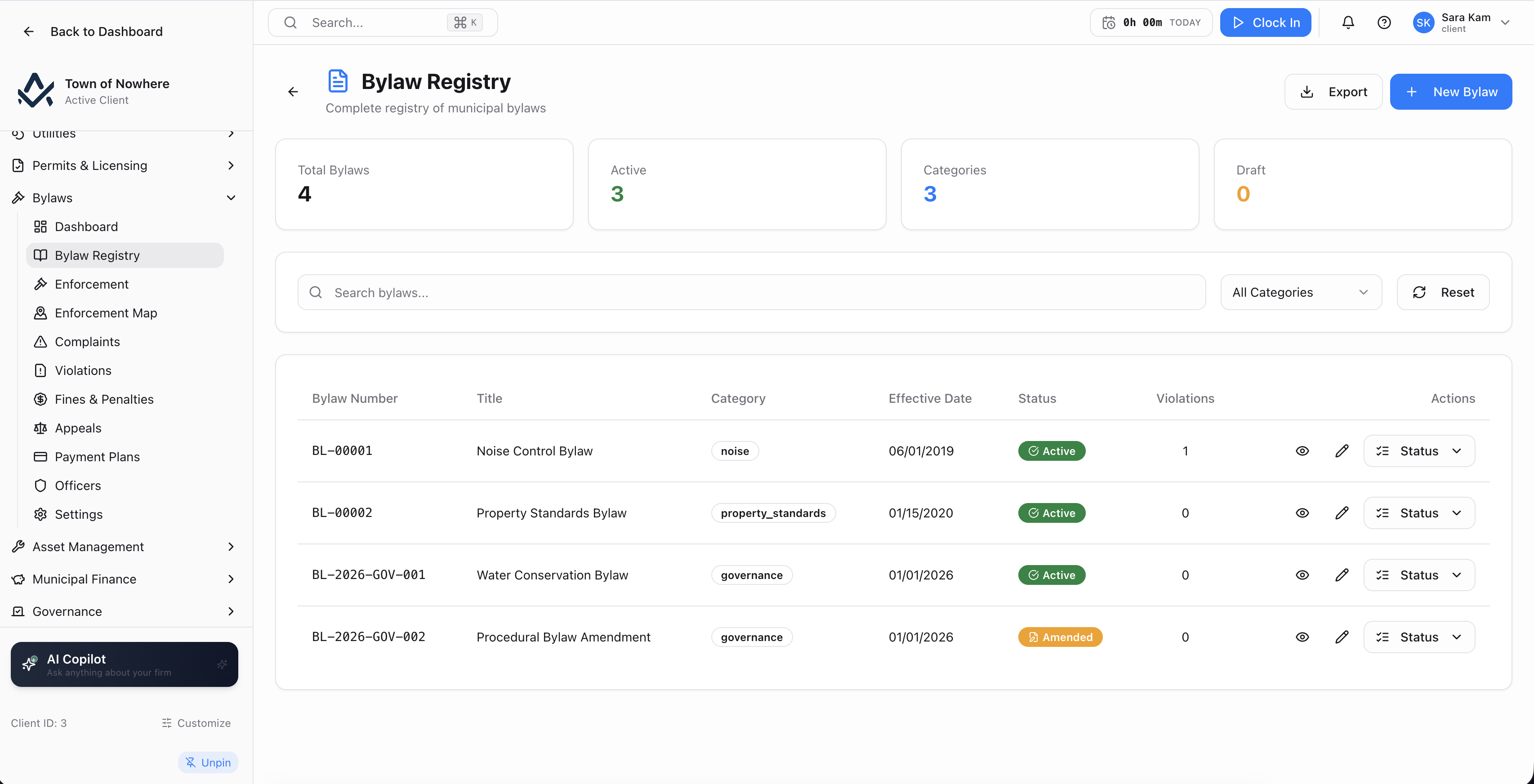
The library, with violation counts showing which bylaws are actually enforced.
What a bylaw record carries. Number, category, title, authority, department, jurisdiction, section reference, effective date, default fine amount, maximum fine amount, description, full legal text, enforcement notes and a named contact with email and phone.
Attachments. Supporting documents upload, download and delete against the bylaw record.
Public publishing. The registry can be published to the citizen portal, where residents search bylaws and resolutions by number, title, category and keyword.
Violation count in view. The registry list shows how many violations each bylaw has generated, so the bylaws that actually drive enforcement are visible at a glance.
Also included
Complaints, violations and tickets in one console
Three related record types: a complaint is a report to investigate, a violation is a formal notice tied to a bylaw, an infraction is a ticket.
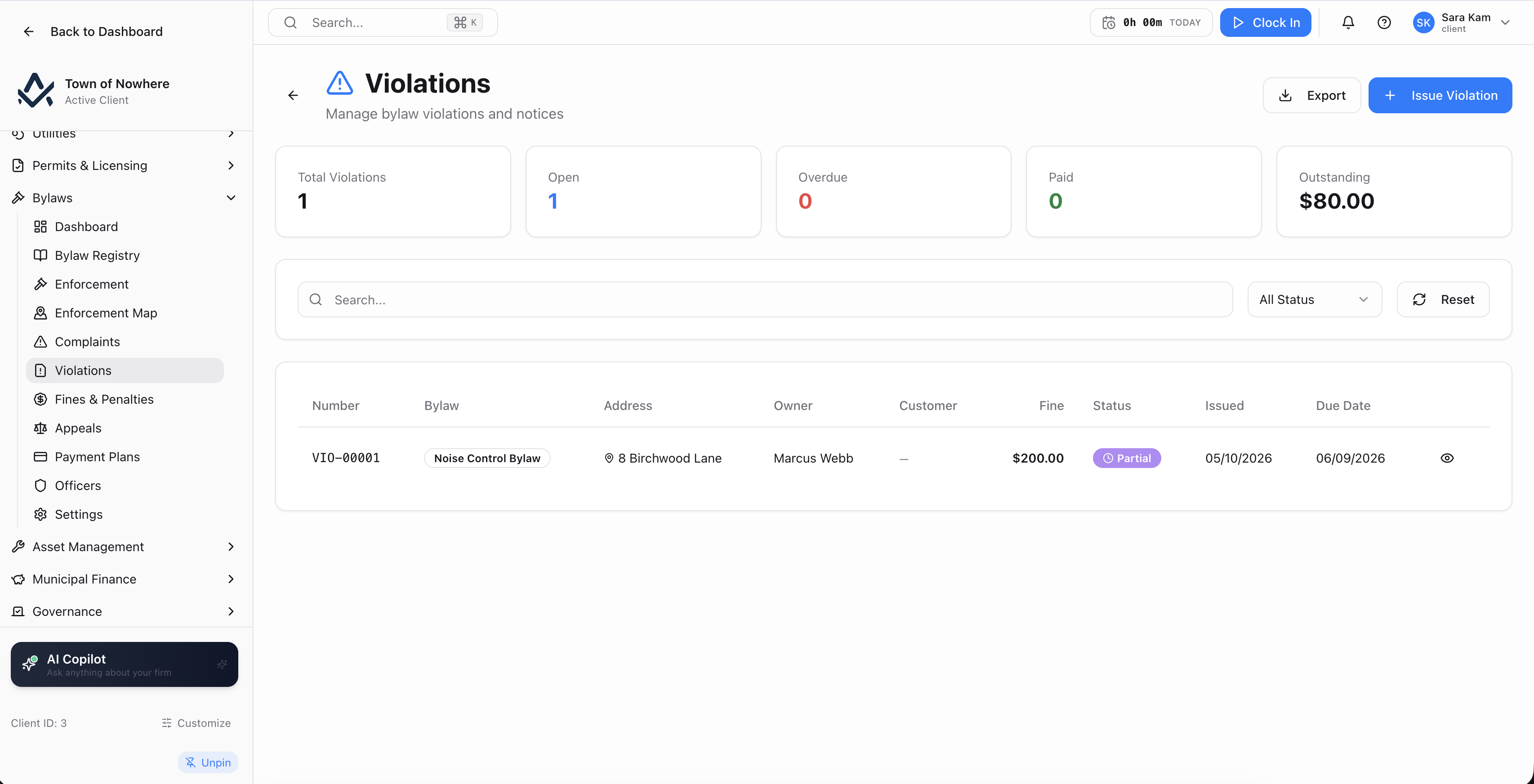
Formal violation notices tied to the bylaw they were issued under.
Complaints. Type, priority of high, medium or low, location, complainant name and phone, description, assigned officer and an optional subject customer link. Status transitions run through received, notice sent, inspection scheduled, resolved, dismissed and escalated, each carrying notes or resolution detail. A complaint can be escalated into a violation.
Violations. Tied to a bylaw, with property address, severity of minor, moderate, major or critical, owner name and email, fine amount, due date, description, assigned officer and customer link. Actions include post fine to GL, change status, send to collections, refer to court, and generate a violation notice PDF or a demand letter.
Infractions. Ticket-style enforcement with category, offender name, licence plate, location, description, officer, issue date, due date and fine amount. Search by ticket number, offender, location or plate, and filter by category and status covering unpaid, paid, overdue, disputed and warning.
Fines and penalties. A collections view spanning both violations and infractions, with payment recording by method and date and receipt PDFs. An overdue tab shows the original fine, late fees, total due and days overdue.
Officers. A roster of full name, badge number, email, phone, title and status, with an optional setting that requires officer assignment on every record.
Also included
Appeals, plans and the rules that chase the money
What happens after the fine is issued, and the settings that decide when late fees, collections and court referrals kick in.
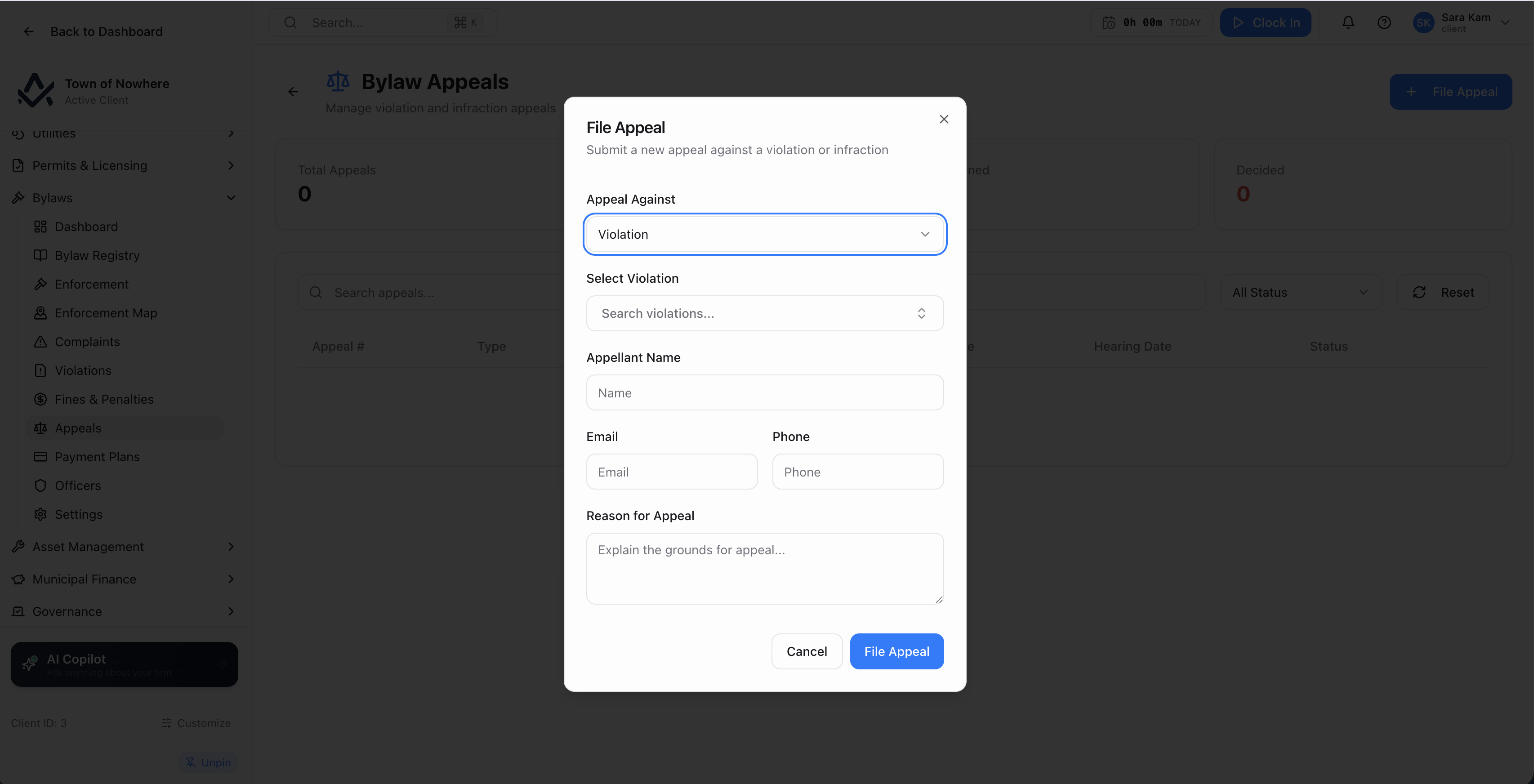
Hearing scheduling and recorded decisions, with the fine adjusted automatically on a reduction.
Appeals. Against a violation or an infraction, with appellant, reason, filed date and status covering filed, hearing scheduled, under review, decided, withdrawn and dismissed. Schedule a hearing with date, time, location and hearing officer, then record the decision as upheld, reduced with an adjusted amount, or overturned with the fine removed, and generate the decision PDF.
Payment plans. Instalment agreements on a violation or infraction with total amount, number of instalments, frequency of weekly, bi-weekly or monthly and a start date, tracking paid, remaining, next due and a status of active, completed or defaulted.
The late-fee rules. Method of flat percentage, per diem or compound. Late-fee rate and a cap percentage. Grace period days. A repeat-offence multiplier with a lookback in months. Appeal deadline days. Payment-plan minimum amount, maximum instalments and interest rate. Collection-agency threshold and court-referral threshold in days overdue. Reminder days before due, and a demand-letter trigger in days overdue.
Five batch operations. Apply late fees, update overdue statuses, bulk post fines to the GL, send reminders and send demand letters.
Numbering and posting. Prefixes and next numbers for bylaws, complaints, violations, infractions, appeals, payment plans and receipts, plus automation for auto-post on issue, auto-post payments and auto-calculated late fees on a daily, weekly or monthly schedule.
Also included
Bylaw enforcement questions
A violation is a formal notice tied to a specific bylaw, carrying severity, owner details, a fine amount, a due date and an assigned officer, and it can be sent to collections or referred to court. An infraction is ticket-style enforcement carrying a category, offender, licence plate and location, and is intended for on-the-spot ticketing such as parking. Both feed the same fines and penalties collections view, and both can be appealed or put on a payment plan.
Yes. Fines post to a primary accounts receivable account with revenue mappings you configure, either manually or automatically on issue depending on the automation setting. Payments post as well, and receipts generate as PDFs.
Yes. The rules tab carries a repeat-offence multiplier with a lookback in months, so a second or third offence within the window is charged at the multiplied rate rather than requiring a manual adjustment.
Residents submit service requests through the citizen portal, including anonymous 311 intake with a photo and a location pin where Public 311 is licensed. Bylaw complaints themselves are staff records, and a service request can be escalated into a complaint and then a violation as an investigation progresses.
Yes, where GIS is licensed. Bylaw complaints and infractions plot geographically on the enforcement map, which is a single shared screen reachable from either the Bylaws or the Permits menu.
The rest of the platform
Every module posts to the same ledger, so these are not integrations. They are the same system.
Permits & licensing
Permits & Licensing
Six permit categories with applications, inspections, day routing, contractors and plan review markup.
ExploreCitizen services
Citizen Services
Service requests that become work orders, recreation registration, facility bookings and cemetery records.
ExploreGIS & mapping
GIS & Mapping
Your own base map, GeoJSON layer import, parcel matching and maps inside every module that needs one.
ExploreGovernance
Governance
Meetings, agendas, minutes, resolutions with recorded votes, bylaw readings, committees and elections.
ExploreCitizen portal
Citizen Portal
A white-label public site on your own domain for balances, payments, applications, 311 and council information.
ExploreSee enforcement from complaint to collection
A resident complaint, an investigation, a violation notice, a late fee, an appeal hearing and the journal entry behind the fine, walked through on your own bylaws.