
Council meeting and agenda software for clerks
The clerk’s workspace. Roster, meetings, agendas, minutes, resolutions with per-member recorded votes, the statutory three-reading bylaw workflow, committees, elections and a moderated public comment queue, all publishable to the citizen portal.
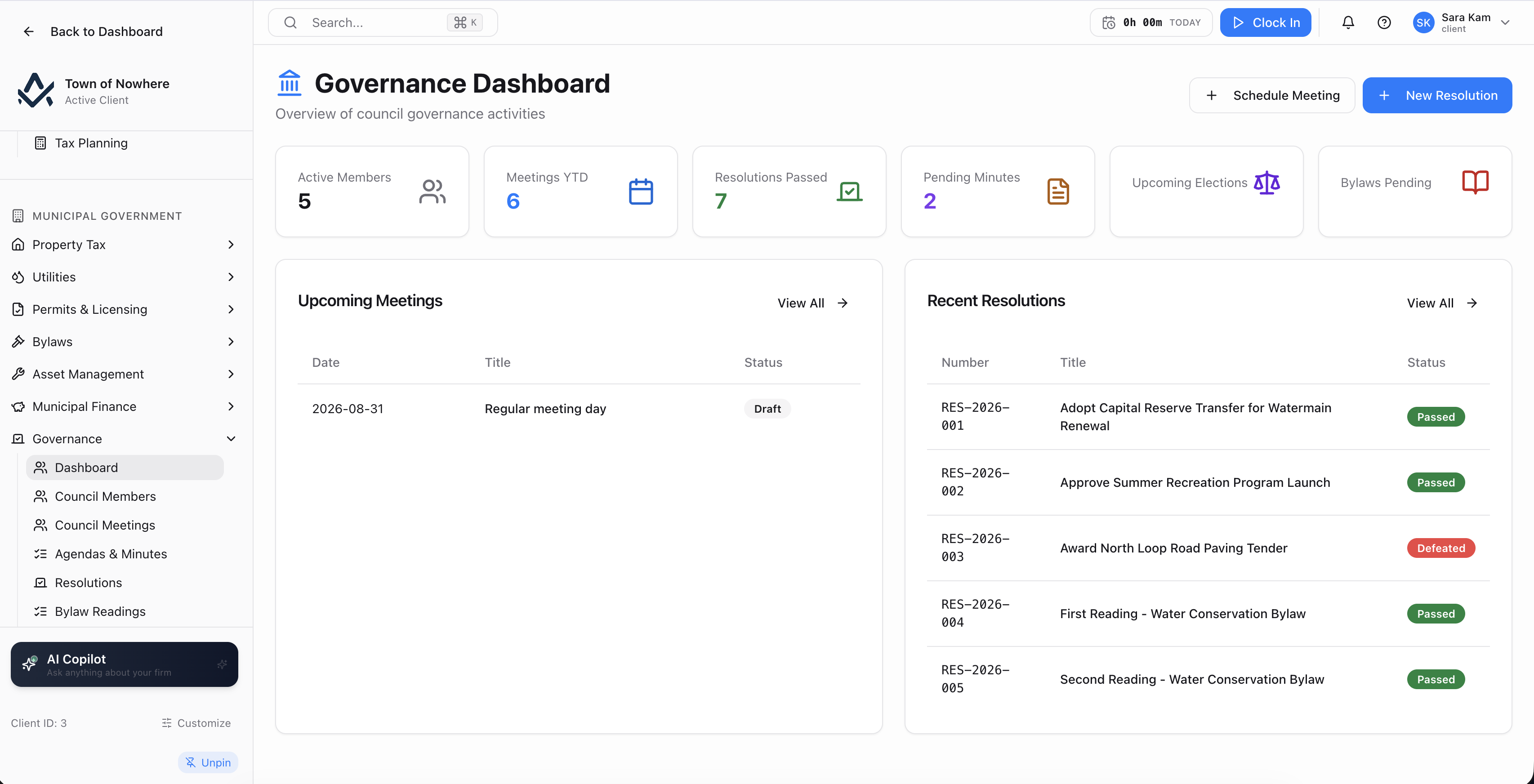
Agenda items with presenter and duration, drag reordering and per-item attachments.
The clerk’s whole week, in one workspace
Build the agenda, send the notice, run the meeting, record the votes, publish the minutes. Everything a resident is entitled to see appears on the public portal without anyone re-typing it into a website.
13
Screens across the module
8
Meeting types from regular to organizational
6
Resolution types including bylaw readings
4
Quorum bases: majority, fixed, percentage, two-thirds
Agenda to minutes in one place
Ordered items with presenters, durations and attachments, drag reordering, an agenda PDF, then a minutes editor with a draft-to-published workflow.
Votes on the record
Resolutions capture full text plus a per-member roll call of for, against, abstain and absent, and generate the resolution PDF.
Three readings, tracked
Record first, second and third readings with a result, see each bylaw’s position in the sequence, and list what is awaiting its next reading.
Publishing is a switch
Publish a meeting and the agenda, attachments, minutes, bylaw search and committee rosters appear for residents. E-comments come back through a moderation queue.
Schedule it, notice it, publish it
From scheduling the meeting to publishing the minutes, with the public portal as an output rather than a separate re-keying exercise.
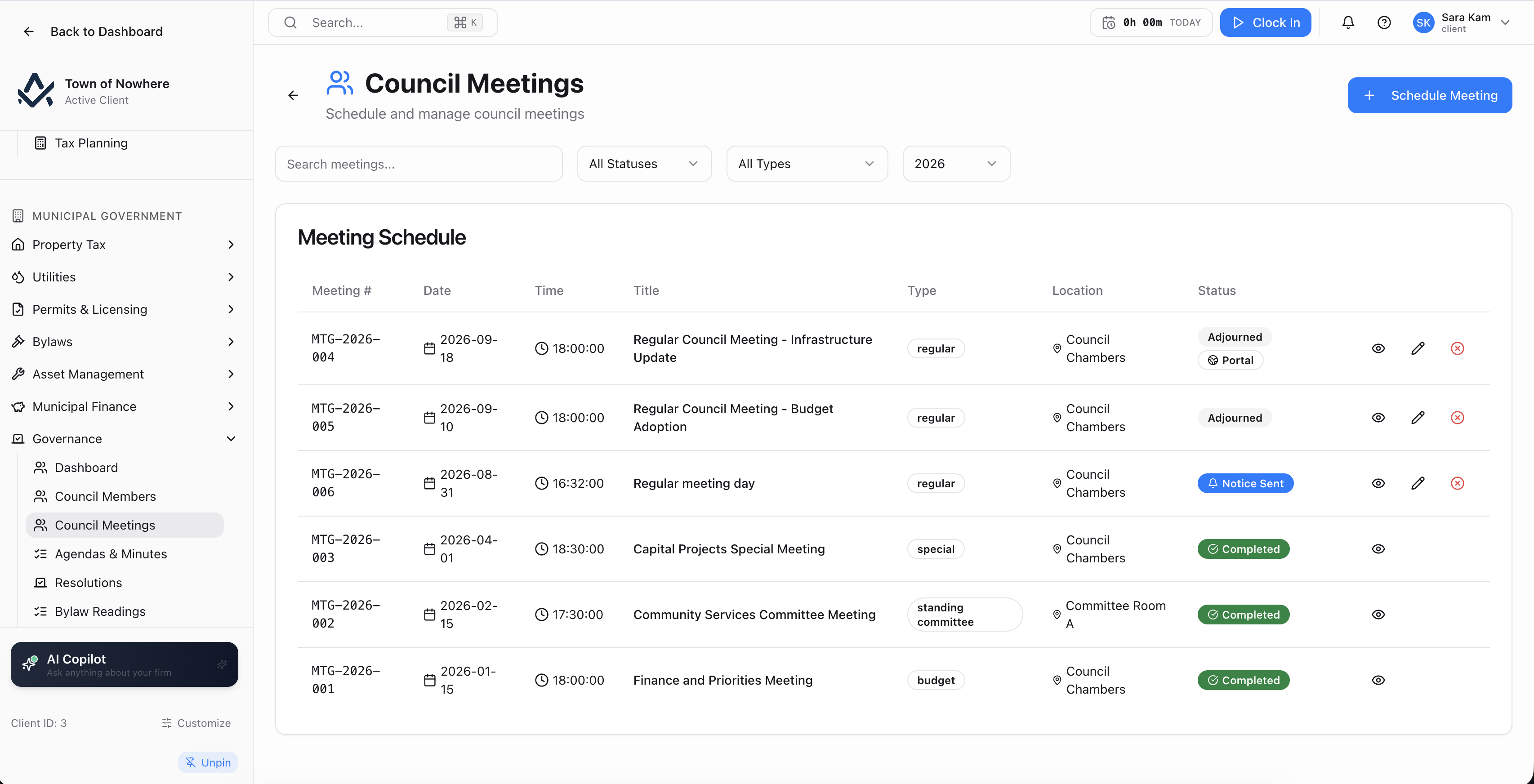
The meeting schedule, with publication control per meeting.
Meeting schedule. Eight types covering regular, special, public hearing, committee of the whole, emergency, budget, organizational and standing committee, with statuses of draft, scheduled, notice sent, completed and cancelled. Each meeting carries a title, date and time, location and a video or stream URL.
Meeting actions. Update status, control publication to the public portal, send notice to members, cancel with a reason and record attendance.
Agenda builder. Ordered items with title, type, presenter and duration, drag reordering, per-item attachments that upload, download and delete, and an agenda PDF.
Minutes. An editor with a draft-to-published status workflow, a generate PDF action and a download. Published minutes appear on the public portal.
Council roster. Name, title covering mayor, reeve, deputy mayor, deputy reeve, councillor, alderman and warden plus a free-text ward or position label, email, phone, term and status. An attendance report summarises each member’s meeting attendance.
Also included
Resolutions, roll calls and three readings
The formal record: motions and resolutions with a per-member roll call, and the statutory three-reading sequence tracked to adoption.
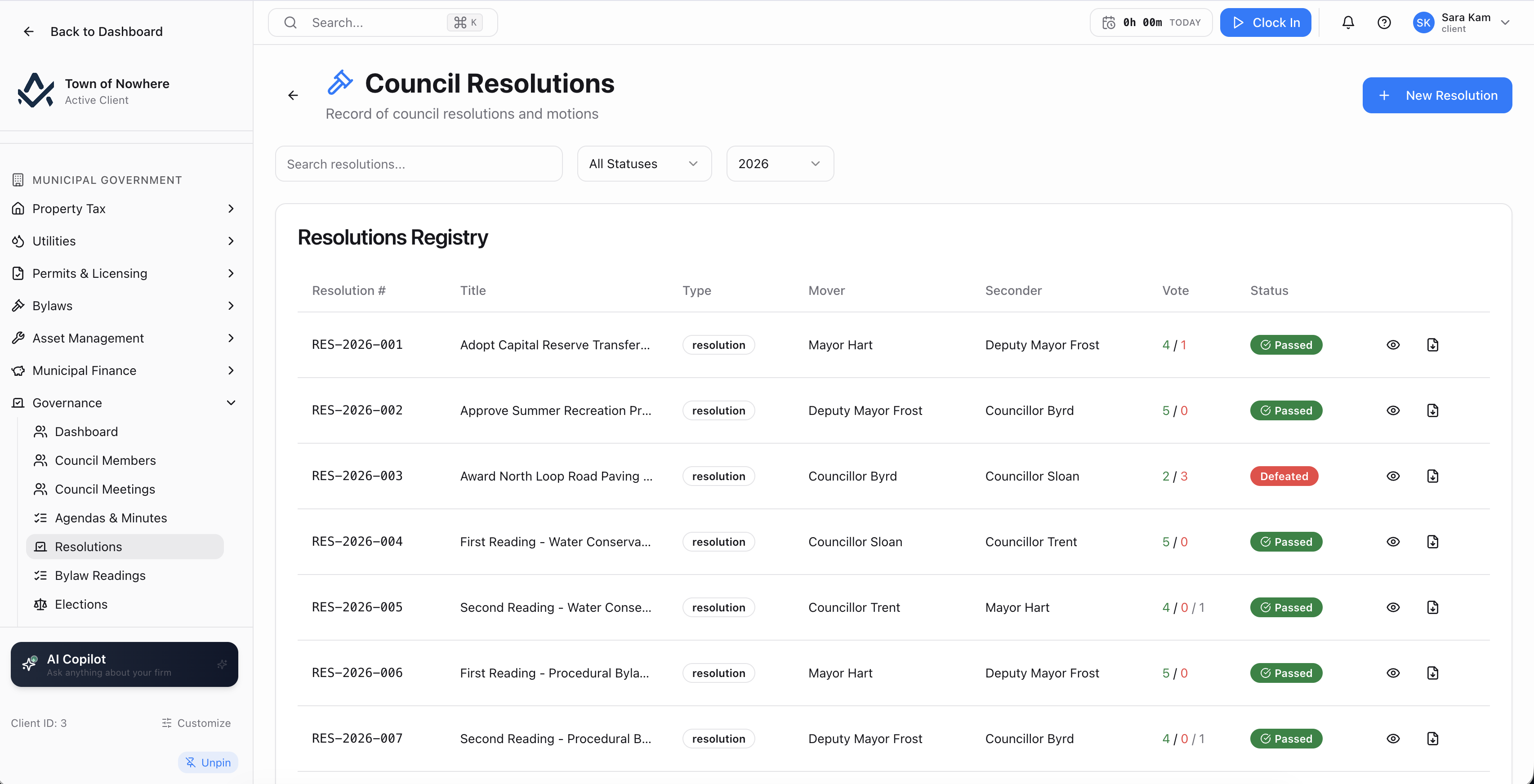
Resolutions with the full text captured and each member’s position recorded.
Resolution registry. Resolution number, title, type covering motion, resolution, bylaw reading, policy, proclamation and appointment, mover, seconder, vote and a status of moved, passed, defeated or tabled. Full resolution text is captured, including the WHEREAS and BE IT RESOLVED THAT structure.
Recorded votes. A Record Vote action captures each member’s position as for, against, abstain or absent, as a per-member roll call, and generates the resolution PDF.
Three-reading workflow. Tabs for all, in progress, adopted and defeated, with a Bylaw Reading Progress panel showing each bylaw’s position in the sequence. Record a reading as first, second or third with a result of passed, defeated or deferred, and a pending-bylaws view lists what is awaiting its next reading.
Committees and boards. Name, type covering standing, ad hoc, board and authority, members and status, with a purpose and scope description. Members join as either a council member or an external appointee, with a role of chair, vice chair, member or secretary and term dates. Rosters can be published to the public portal.
Meeting rules. Quorum basis of majority, fixed number, percentage or two-thirds, with per-meeting-type defaults for regular, special, committee of the whole and organizational meetings.
Also included
Run the meeting from the screen
Run the meeting from one screen while a public display mirrors it for the gallery and the portal.
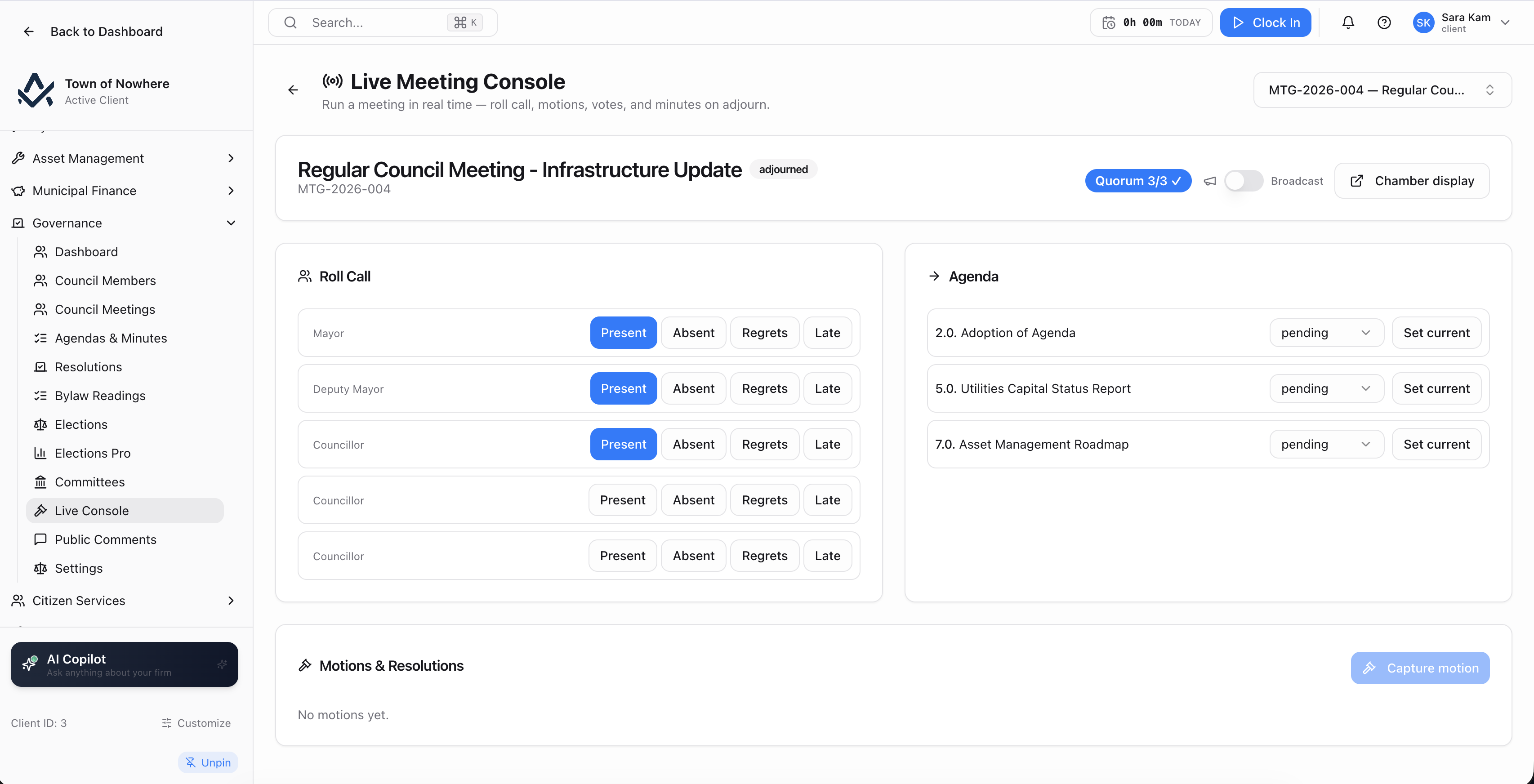
The clerk drives the meeting here, and the public display follows.
Running the session. Select the meeting, start the session and toggle Broadcast to drive the public live view.
During the meeting. Set the current agenda item, record a disposition per item, stamp attendance, capture a motion with motion text, mover, seconder and majority required as either simple majority or two-thirds, record the vote as for, against or abstained, then adjourn.
The public display. A separate screen renders the public-facing view of the session, showing what is being discussed now, and the citizen portal exposes a live meeting state feed for residents watching from home.
Public comments. An e-comment moderation queue collects comments submitted on published meetings from the portal. Each comment is moderated to pending, approved, rejected or withheld before it appears publicly.
Also included
Wards, polls, tabulation and a public board
Base election management for every municipality, and full election administration where Elections Pro is licensed.
Results by polling place, tabulated with ties flagged rather than resolved automatically.
Base elections. Three tabs covering overview, candidates with name, position, nomination, incumbent flag, votes and status, and results. Election types include general election, by-election, school board, plebiscite and referendum, with statuses from upcoming through nominations open, campaign period, counting, certified and archived, and term lengths of one, two, three, four or six years.
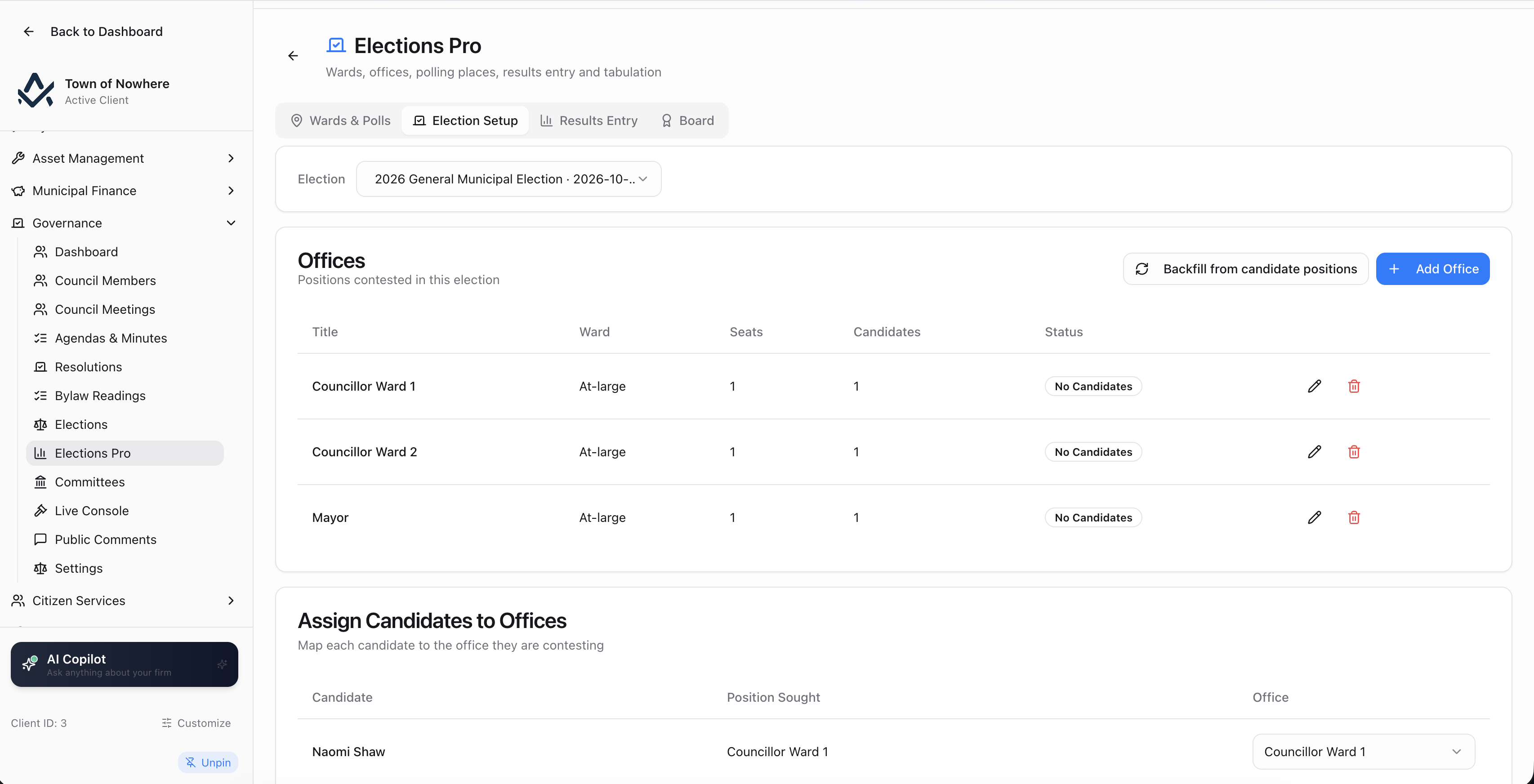
Wards and offices. Ward name, code, seats, polls and active flag, plus offices per election with title, candidates and status, a backfill tool that builds offices from candidate positions, and an assign-candidates-to-offices grid.
Polling places with import. Name, external ID, address and ward, loaded through reusable named import profiles with a delimiter choice of comma, semicolon, tab or pipe, a header-row flag, column mapping for ward code and active status, defaults, a downloadable template, a preview with a per-row action and detail log, and an apply step.
Results and tabulation. A results-entry grid by polling place or consolidated across all polls, a results import with preview then apply, and a Tabulate action that ranks candidates by votes, elects the top N for the office’s seat count, marks acclamations and flags ties at the cutoff for the clerk to resolve rather than auto-electing. Voter turnout is recomputed from ballots cast.
The results board. Mirrored to the public portal, showing ballots cast, voter turnout, per-office results, acclamations and a clear unofficial or certified marker.
Also included
Governance questions
Yes, where the portal is enabled and governance is published. Residents get the published meeting list, per-meeting agendas with downloadable attachments, minutes PDFs, bylaw and resolution search across number, title, category and keyword, public committee rosters, and a live meeting view when the console is broadcasting.
Yes, through e-comments on a published meeting, submitted with name, email, comment and a declaration. Every comment lands in the staff moderation queue and is set to pending, approved, rejected or withheld before it appears publicly. Residents can also subscribe by email to council notifications, with a double opt-in confirmation and one-click unsubscribe.
Each reading is recorded as first, second or third with a result of passed, defeated or deferred. A Bylaw Reading Progress panel shows where each bylaw sits in the sequence, a pending-bylaws view lists what is awaiting its next reading, and each bylaw exposes its own reading status.
Tabulation flags it. The tabulate action ranks candidates by votes, elects the top N for the office’s seat count and marks acclamations, but a tie at the cutoff is flagged for the clerk to resolve manually. The software does not decide an election.
No. Meetings, agendas, minutes, resolutions, recorded votes, bylaw readings and committees are part of the governance module. The Live Meeting console and its public display are a separately licensed add-on for municipalities that want to run the meeting itself from the screen and broadcast the state publicly.
The rest of the platform
Every module posts to the same ledger, so these are not integrations. They are the same system.
Bylaws & enforcement
Bylaws & Enforcement
Registry, complaints, violations, tickets, fines, appeals, payment plans and a late-fee rules engine.
ExploreCitizen portal
Citizen Portal
A white-label public site on your own domain for balances, payments, applications, 311 and council information.
ExploreMunicipal finance
Municipal Finance
Fund accounting, PS 3410 grant tracking and thirteen PSAB statements generated from live ledger data.
ExploreCitizen services
Citizen Services
Service requests that become work orders, recreation registration, facility bookings and cemetery records.
ExploreProperty tax
Property Tax
Assessment roll, mill rates, notices, collections, arrears, penalty rules, tax sales and certificates.
ExploreRun a council meeting in the demo
Build the agenda, record the votes, publish the minutes and watch it appear on the resident-facing portal, using one of your own past meetings.