
PSAB financial reporting, straight off your ledger
The statutory reporting layer. Funds, grants and the full PSAB statement set are generated from live ledger data, with per-report settings a treasurer controls rather than a consultant.
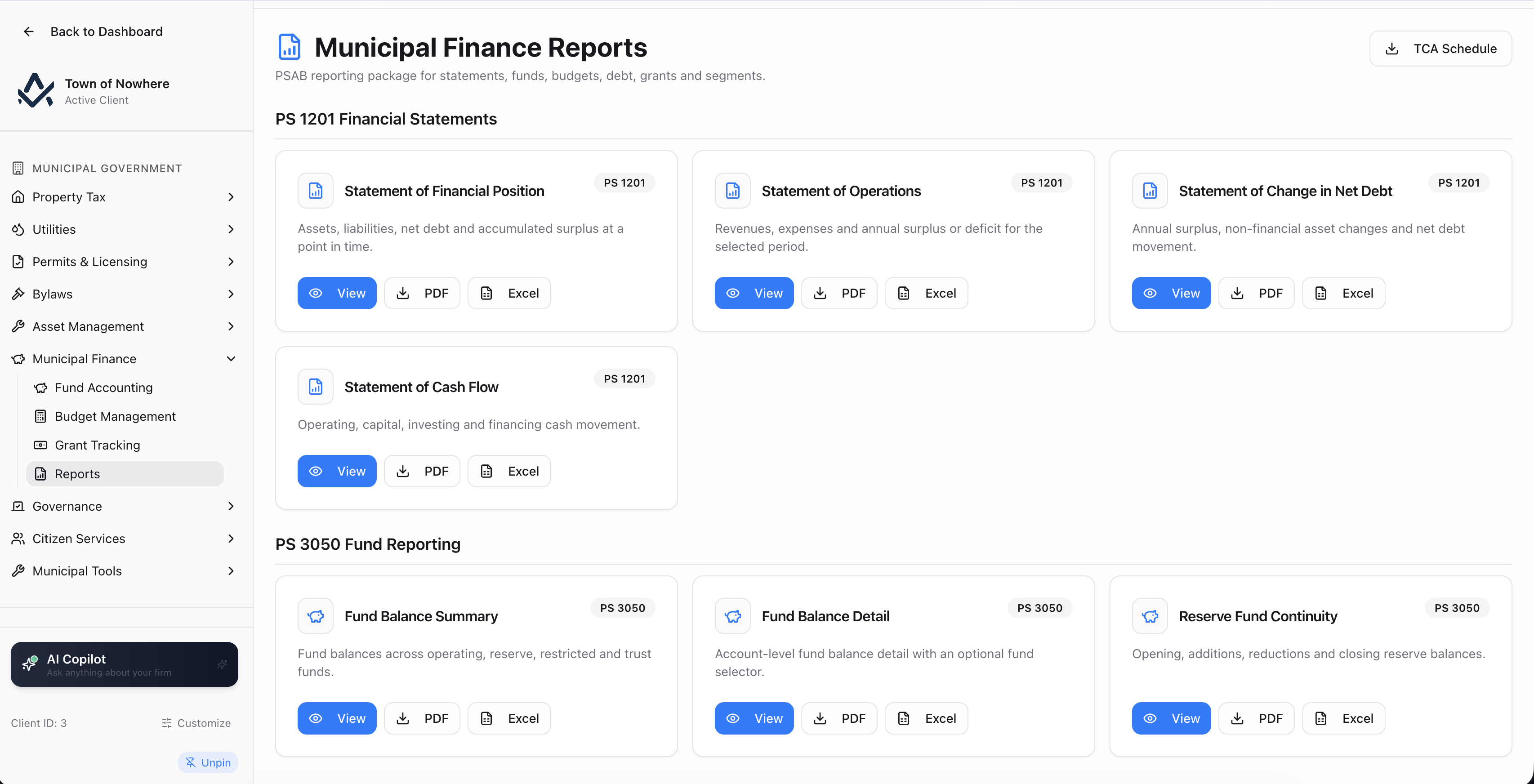
Thirteen PSAB statements and schedules, generated from live ledger data.
Year-end stops being an assembly job
Because every module posted to one ledger, the statement set is generated rather than compiled. Funds are structural, grants recognise revenue as eligible spending happens, and each report carries settings that match how your municipality actually reports.
13
Statements and schedules
8
PSAB standards covered
19
Screens across the module
14
Municipal custom report data sources
Thirteen statements, one click each
Financial Position, Operations, Change in Net Debt, Cash Flow, fund balances, reserve continuity, budget versus actual, debt, deferred revenue, grants and segments.
Settings a treasurer controls
Segment basis, deferred revenue source and long-term debt source are saved per report, so the output matches your reporting rather than a fixed template.
Grants that recognise correctly
Eligible expense accounts drive automatic revenue recognition against the deferred balance, so the split reflects what was actually spent.
Funds without the workaround
Accounts are assigned to funds with bulk actions, and a restate-history option re-attributes prior activity when an account moves fund.
The whole statutory set, off the ledger
Every statement carries its own filter and its own saved settings panel, so the output matches how your municipality reports rather than a generic template.
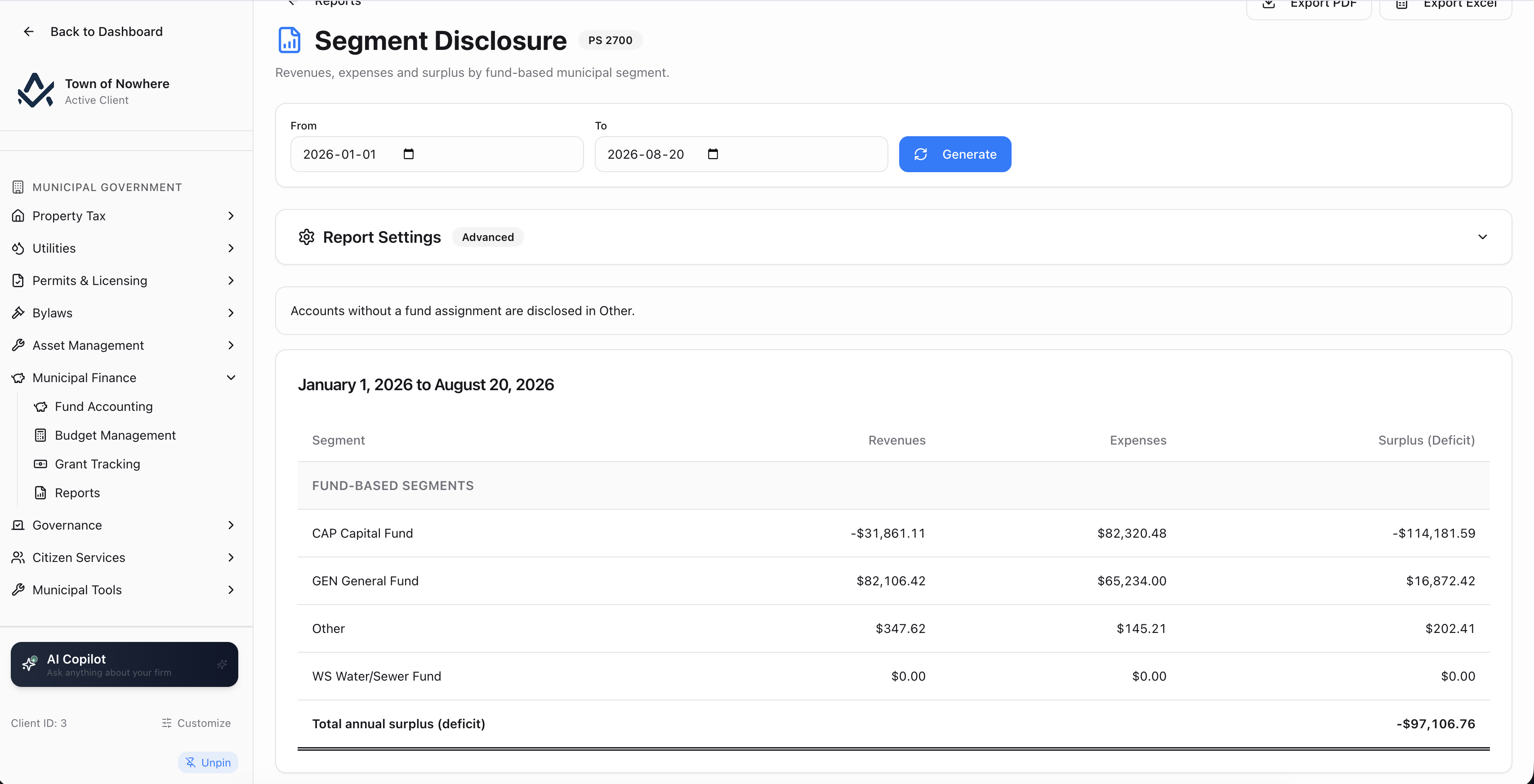
PS 2700 segment disclosure, driven by fund assignments or a custom segment map.
Segment disclosure settings. Segment basis is either your current fund assignments, or a custom segment map with a named bucket for anything unmapped.
Deferred revenue settings. Source the schedule from GL deferred-revenue accounts, from the grant-tracking section, or from a manual continuity schedule.
Long-term debt settings. Source from GL debt accounts, a manual loan schedule, or GL plus manual rows. Manual rows capture account number, line or loan name, fund, opening, additions, reductions, closing, interest, rate, maturity and notes.
| Report | Standard | Filter | Content |
|---|---|---|---|
| Statement of Financial Position | PS 1201 | As at | Assets, liabilities, net debt, accumulated surplus |
| Statement of Operations | PS 1201 | Date range | Revenues, expenses, annual surplus or deficit |
| Statement of Change in Net Debt | PS 1201 | Date range | Annual surplus, non-financial asset changes, net debt movement |
| Statement of Cash Flow | PS 1201 | Date range | Operating, capital, investing and financing cash movement |
| Fund Balance Summary | PS 3050 | As at | Balances across operating, reserve, restricted and trust funds |
| Fund Balance Detail | PS 3050 | As at plus fund | Account-level fund balance detail |
| Reserve Fund Continuity | PS 3050 | Date range | Opening, additions, reductions and closing reserve balances |
| Budget vs Actual (Operating) | Fiscal year | Operating budget against actual revenue and expense | |
| Budget vs Actual (Capital) | Fiscal year | Capital budget against actual capital activity | |
| Long-Term Debt Schedule | PS 3230 | Date range | Opening debt, additions, repayments, closing |
| Deferred Revenue Schedule | PS 3100 | Date range | Deferred revenue additions, recognition and closing |
| Grant Continuity Schedule | PS 3410 | Date range | Grant receipts, revenue recognition and deferred balances by grant |
| Segment Disclosure | PS 2700 | Date range | Revenues, expenses and surplus by municipal segment |
Also included
Fund accounting that is structural, not cosmetic
Funds are structural, not a reporting afterthought. Chart-of-accounts accounts are assigned to funds, and historical activity can be restated when an account moves.
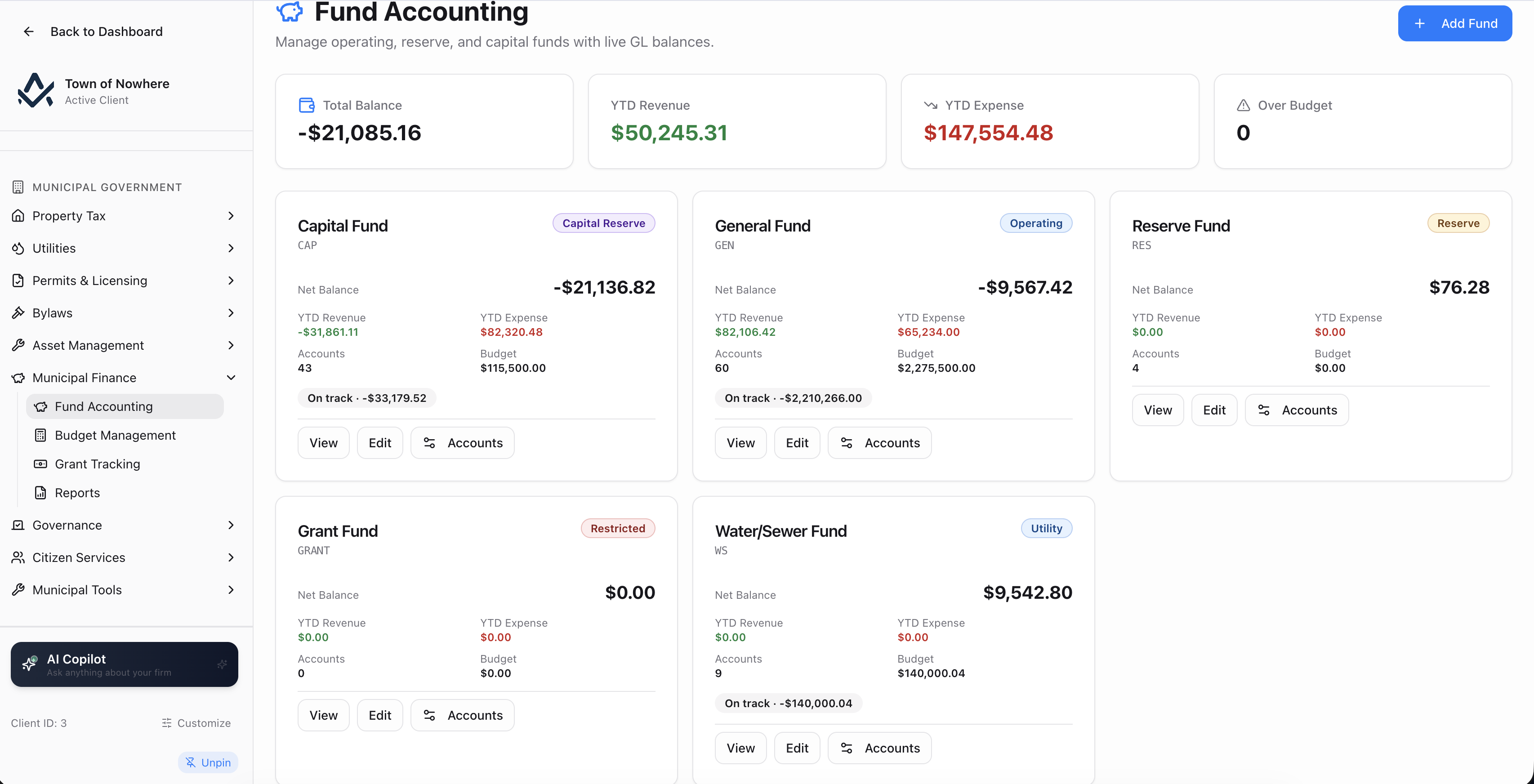
Funds with their assigned accounts, balances and over-budget flags.
Fund register. Fund code, fund type, fund name, description and an active flag.
Account assignment. An assignable-accounts picker with search, bulk assign and bulk unassign, plus a restate history option that re-attributes historical activity when an account changes fund, so prior-period fund balances do not silently break.
Funds summary. Balance, budget, year-to-date revenue, year-to-date expense and an over-budget count per fund.
Fund detail. The accounts in the fund with number, name, type and status, recent activity with date, description, account, debit and credit, and the grants held in that fund with grant number, awarded amount and end date.
Budget management. A municipal fund-scoped read of an active budget showing fund-level budget against actual with over-budget flags. Budget authoring itself happens in the platform’s main Budgets module.
Also included
PS 3410 transfers that recognise as you spend
Government transfers with eligible-expense matching, so revenue recognition against the deferred balance happens as the money is actually spent.
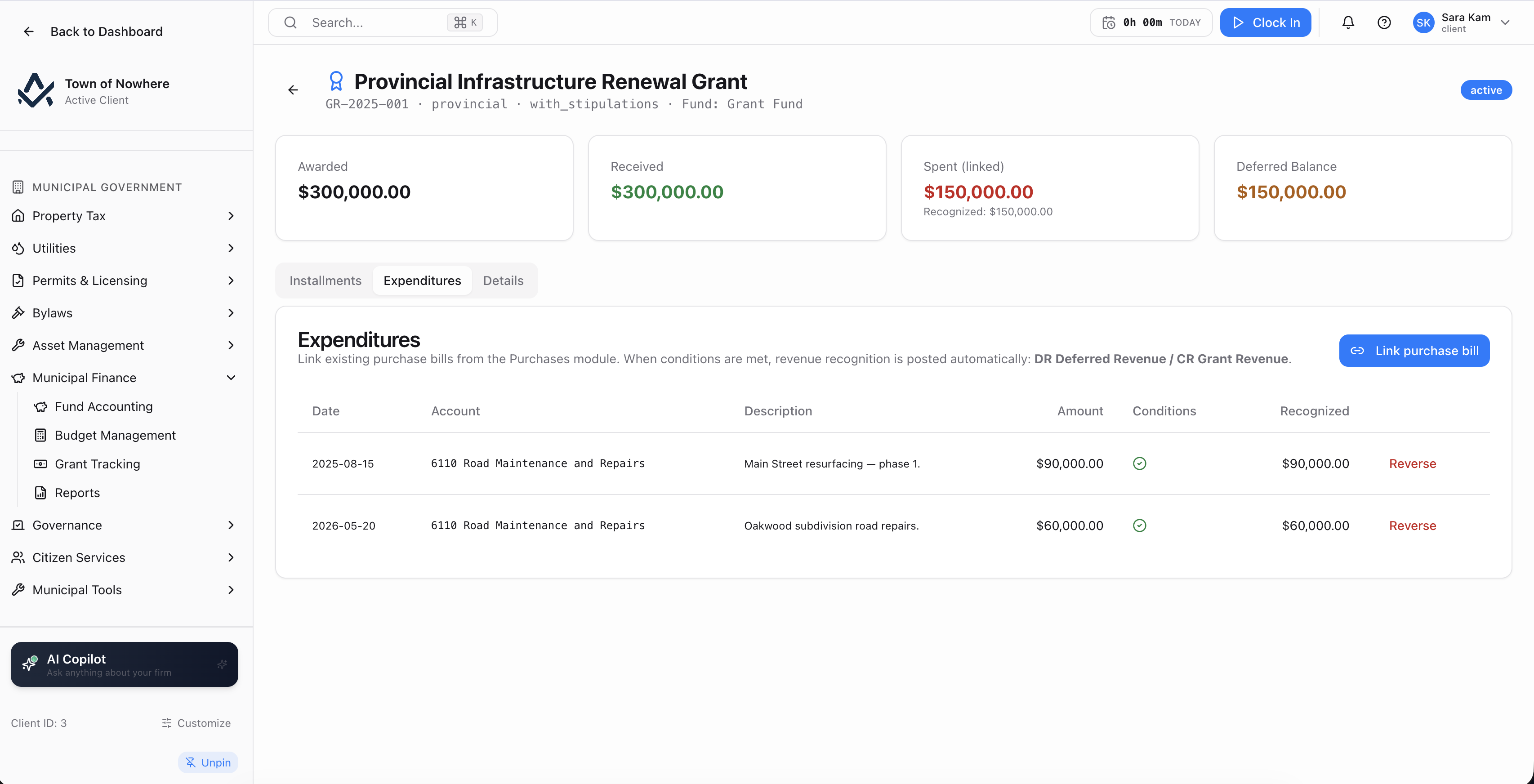
Awarded against received, spent and deferred, per grant.
What a grant carries. Grant number, source of federal, provincial, municipal or other, name, program, granting agency, agreement date, total awarded, start and end dates, PS 3410 category, fund, receivable account, bank account, deferred revenue account, revenue account, a list of eligible expense accounts, and purpose.
Instalments. Scheduled date and amount against received date and amount with a status, and a receive-instalment action taking received date, amount and bank account that posts to the GL.
Expenditures. Date, account, description, amount, whether the expenditure met grant conditions, and the revenue recognised as a result. Expenditures can be reversed.
Condition matching. The eligible expense account list drives automatic revenue recognition against the deferred balance, so the deferred and recognised split reflects actual eligible spending.
Reporting. A PS 3410 report per grant, a grants dashboard summarising the portfolio, and the Grant Continuity Schedule showing receipts, recognition and deferred balances by grant across a date range.
Also included
Build your own over live municipal data
Fourteen municipal data sources are registered in the platform’s custom report builder, each gated on its module entitlement.
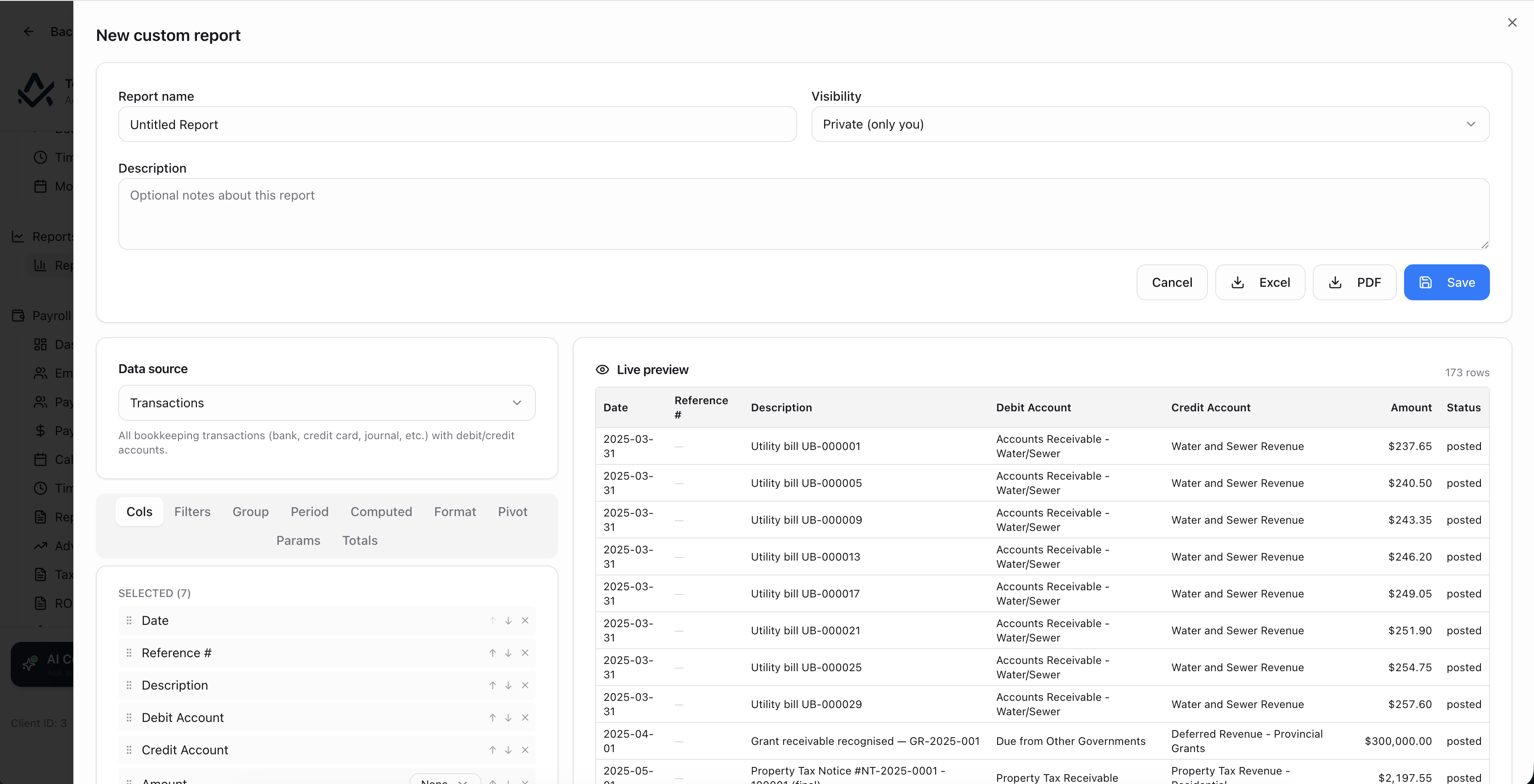
Municipal data sources sit alongside bookkeeping sources in the same builder.
The data sources. Tax notices, tax arrears, tax charges, tax collections, property units, property owners, unified ledger, AR aging, tax certificates, payment plans, tax exemptions, tax credits, assessment roll and funds.
The same builder. These sit alongside your bookkeeping data sources in one report builder, so a municipality builds municipal reports the same way it builds any other report, with scheduled delivery where that is enabled.
Gated by entitlement. A data source only appears if the plan carries the module it belongs to, so a municipality without Utilities never sees utility data sources.
Also included
PSAB reporting questions
Generated from live ledger data. Because every municipal module posts real journal entries to the same chart of accounts, the statements read from the ledger rather than from a separate reporting file that has to be kept in step.
Yes. The Segment Disclosure report has a segment basis setting. It runs off your current fund assignments by default, or off a custom segment map where you define the segments and name the bucket that catches anything unmapped.
The Long-Term Debt Schedule can be sourced from GL debt accounts, from a manual loan schedule you maintain in the report settings, or from both combined. Manual rows carry account number, loan name, fund, opening, additions, reductions, closing, interest, rate, maturity and notes.
In the platform’s main Budgets module. The municipal Budget Management screen is the fund-scoped read of it: you pick an active budget and see fund-level budget against actual with over-budget flags. It is a reporting view rather than a separate municipal budget builder.
Under PS 3510, on the property tax side. An aging-bucket table applies an uncollectible percentage per bucket to compute the estimated allowance, showing gross receivable, estimated allowance and net receivable. A Post ADA Journal Entry action writes the entry for a chosen amount and as-at date, and posting history records date, amount, transaction ID and who posted it.
The rest of the platform
Every module posts to the same ledger, so these are not integrations. They are the same system.
Property tax
Property Tax
Assessment roll, mill rates, notices, collections, arrears, penalty rules, tax sales and certificates.
ExploreAsset management
Asset Management
PS 3150 registry, amortisation, disposals, infrastructure, fleet, work orders and capital planning.
ExploreUtilities
Utilities
Accounts, meters, tiered rates, batch bill runs, deposits, receivables, AMI ingestion and tax-roll transfer.
ExploreGovernance
Governance
Meetings, agendas, minutes, resolutions with recorded votes, bylaw readings, committees and elections.
ExploreCitizen portal
Citizen Portal
A white-label public site on your own domain for balances, payments, applications, 311 and council information.
ExploreSee your statements come off the ledger
Bring a trial balance and a fund structure. We will map the accounts, assign the funds and produce the statement set your auditor asked for.