
Run the entire municipality on one general ledger
Property tax, utility billing, permits, bylaws, assets, PSAB reporting, council and citizen services in one platform. Every levy, bill, fee and fine posts straight to your chart of accounts, so month-end stops being a reconciliation project.
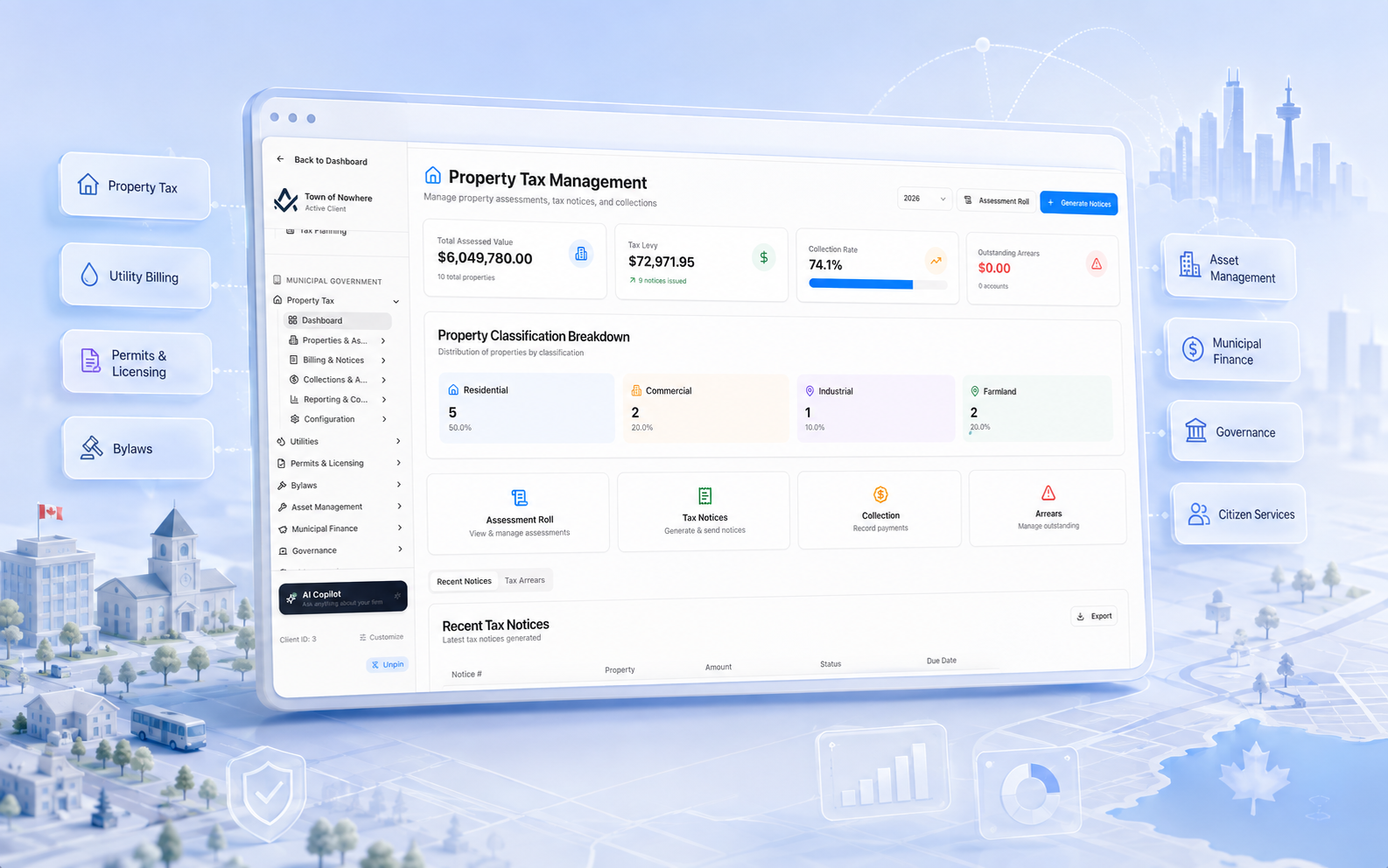
10
Modules on one ledger
141
Screens for your staff
13
Provinces & territories
13
PSAB statements
19
Public portal pages
Four systems, a folder of spreadsheets, and a month-end that never ends
Most municipalities run a tax system, a utility system, a permit system and an accounting package that none of them talk to. The reconciliation between them is the job. Awditify removes the seam entirely.
How it works today
How it works on Awditify
The sub-ledger is the ledger
Awditify Municipal is built on top of a full double-entry general ledger, not beside one. A tax levy, a utility bill, a permit fee, a bylaw fine, a cemetery plot sale, a facility booking and a recreation registration all post real journal entries to accounts you map once.
There is no nightly export, no sub-ledger reconciliation spreadsheet, and no second set of books.
Period locks nothing can slip past
Every posting routine checks the period lock before it writes. A closed period cannot be back-dated into, from any module, by any batch.
Reconciliation that ties out
Compare the GL against each sub-ledger at any date. Reconciliation groups map a sub-ledger to several accounts, so a split receivable still balances.
A void always has a reason
Notices, collections, certificates, utility bills and payments, permit and bylaw payments, transfers: every reversible document voids with a recorded reason.
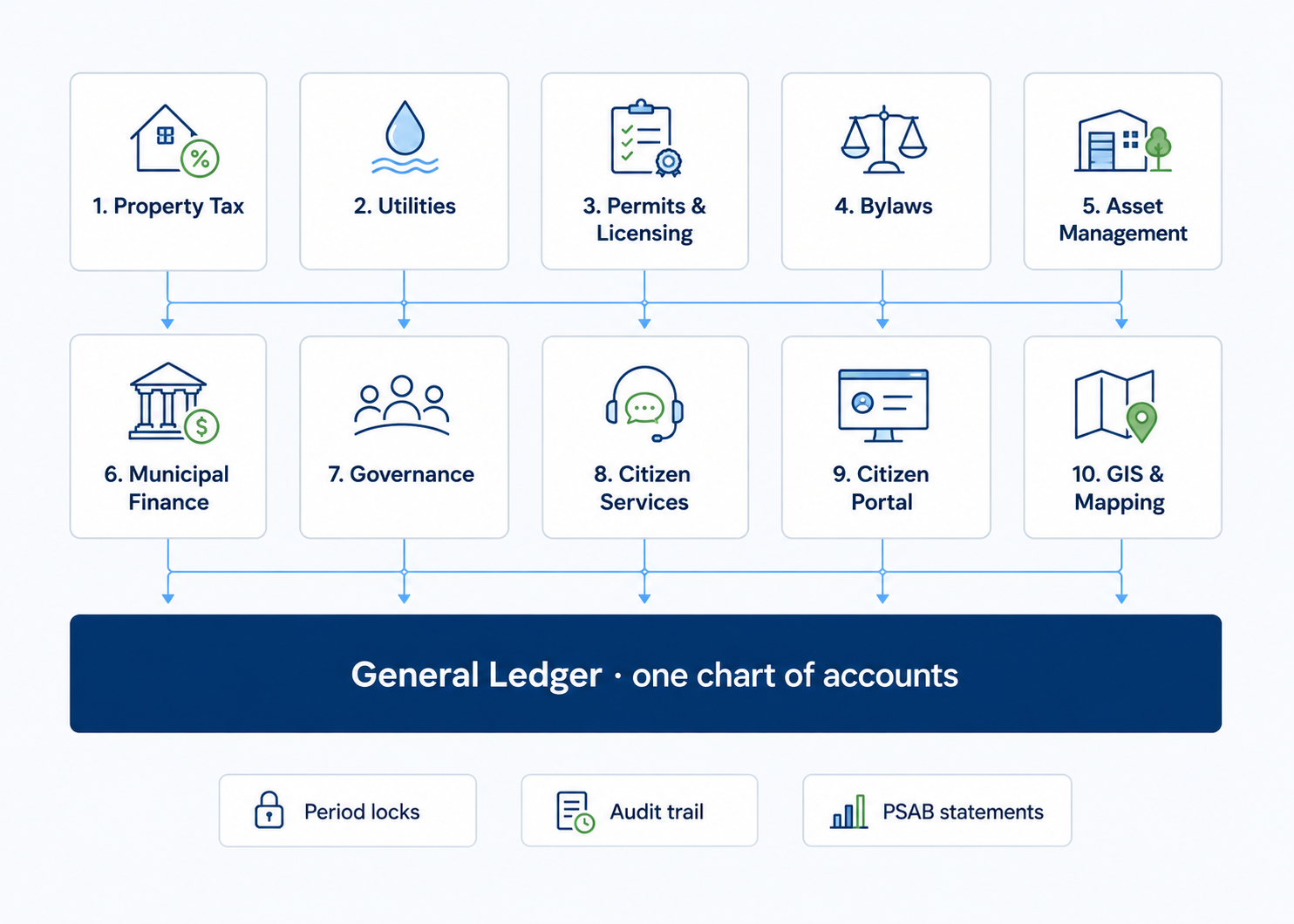
Ten modules, one chart of accounts, one set of period locks and one audit trail.
Ten modules your municipality already needs
Each one is a full module, not a checkbox. Open any card to see exactly what is inside.
Property Tax
Roll, mill rates, interim and final billing, collections, arrears, penalty rules, tax sales and certificates.
Explore the moduleUtility Billing
Accounts, meters, tiered rates, batch bill runs, deposits, receivables and statutory tax-roll transfer.
Explore the modulePermits & Licensing
Building, development, business, pet, event and custom permits with inspections, routing and plan review.
Explore the moduleBylaws & Enforcement
Registry, complaints, violations, ticket infractions, fines, appeals, payment plans and late-fee rules.
Explore the moduleAsset Management
TCA registry, amortisation posting, disposals, infrastructure, fleet, work orders and capital planning.
Explore the moduleMunicipal Finance
Fund accounting, PS 3410 grant tracking and the full statutory statement set from live ledger data.
Explore the moduleGovernance
Meetings, agendas, minutes, resolutions with recorded votes, bylaw readings, committees and elections.
Explore the moduleCitizen Services
Service requests that become work orders, recreation registration, facility bookings and cemetery records.
Explore the moduleCitizen Portal
A white-label public site for balances, payments, applications, 311, council information and results.
Explore the moduleGIS & Mapping
Your own base map, imported GeoJSON layers, parcel matching and maps inside every module that needs one.
Explore the moduleBill the whole roll in an afternoon
Batch-generate notices across the entire assessment roll, batch-send them, batch-post them, then let the nightly jobs handle arrears and penalties. The 40-screen property tax module runs interim and final cycles, supplementaries, requisitions, local improvements, collections, arrears, tax sales and certificates.
- Interim and final billing with automatic netting against what was already billed
- A penalty and interest rules engine with a dry run before anything is applied
- Arrears sweeps, payment plans, tax sales and council-approved write-offs
- Statutory defaults applied in one click for any Canadian province or territory
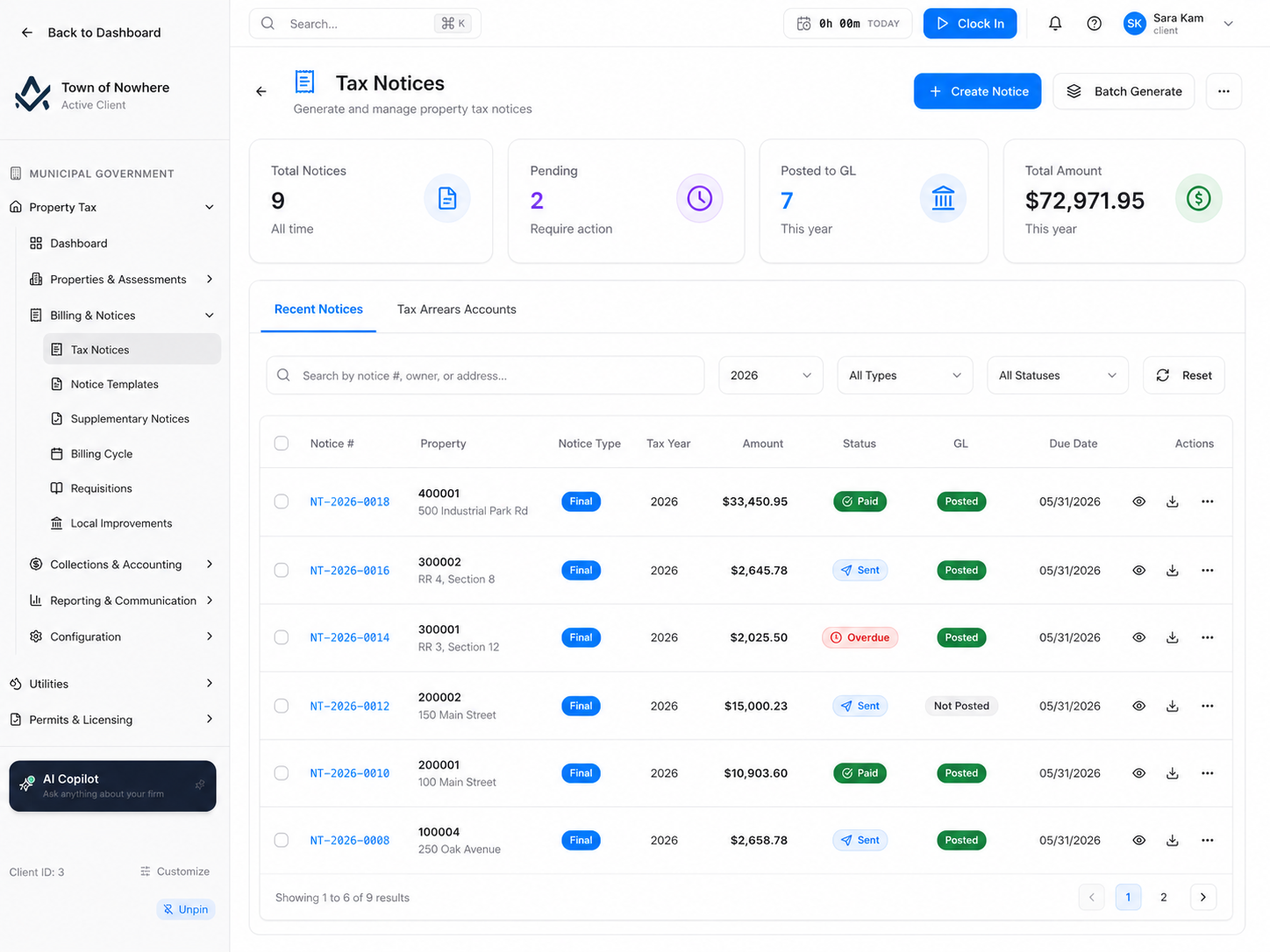
Live levy, collection rate and arrears for the selected tax year.
From meter read to money in the bank
Import the reads, preview the run, generate the bills and post them, with an approval gate on anything large. Thirteen rate types cover tiered water, flat waste, stormwater area charges and infrastructure levies, and unpaid accounts follow the statutory path onto the tax roll.
- Meters with multipliers and digit counts, so rollovers read correctly
- Batch runs by service type with an approval threshold you set
- Security deposits, leak adjustments, aged receivables and nine reports
- Utility arrears transfer to the property tax roll, previewed and reversible
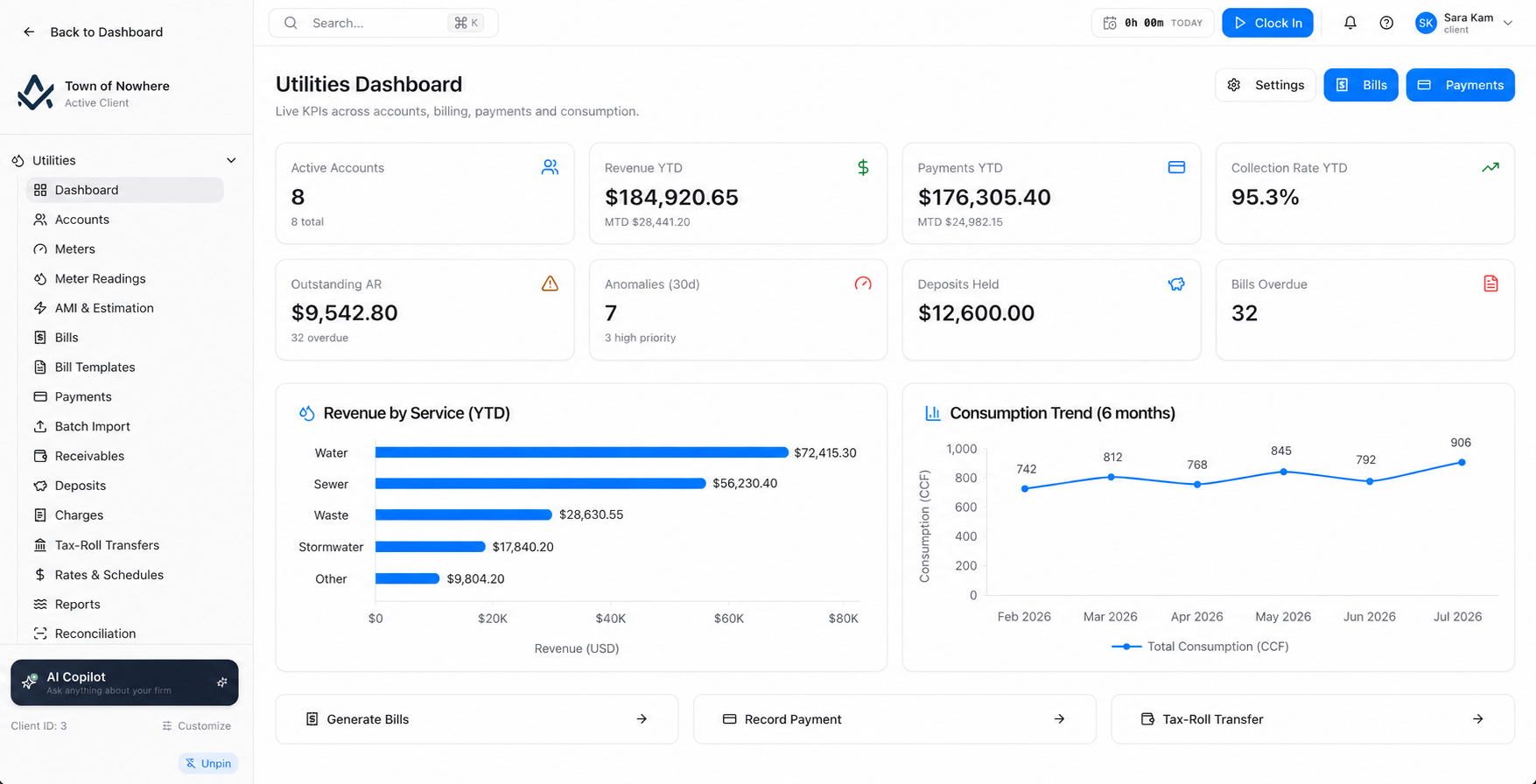
Accounts, receivables, collection rate and deposits held at a glance.
The front counter and the field, in the same system
A resident applies online, the application lands in the staff queue, the fee posts to the ledger, the inspection gets scheduled and routed, and the certificate prints. When a bylaw complaint becomes a violation, the fine becomes a receivable rather than a note in a binder.
- Six permit categories with inspections, day routing and plan review markup
- Contractor insurance tracking that can block a permit when coverage lapses
- Bylaw complaints, violations, tickets, appeals, payment plans and late-fee rules
- PS 3150 assets with amortisation, disposals, fleet, work orders and condition scoring
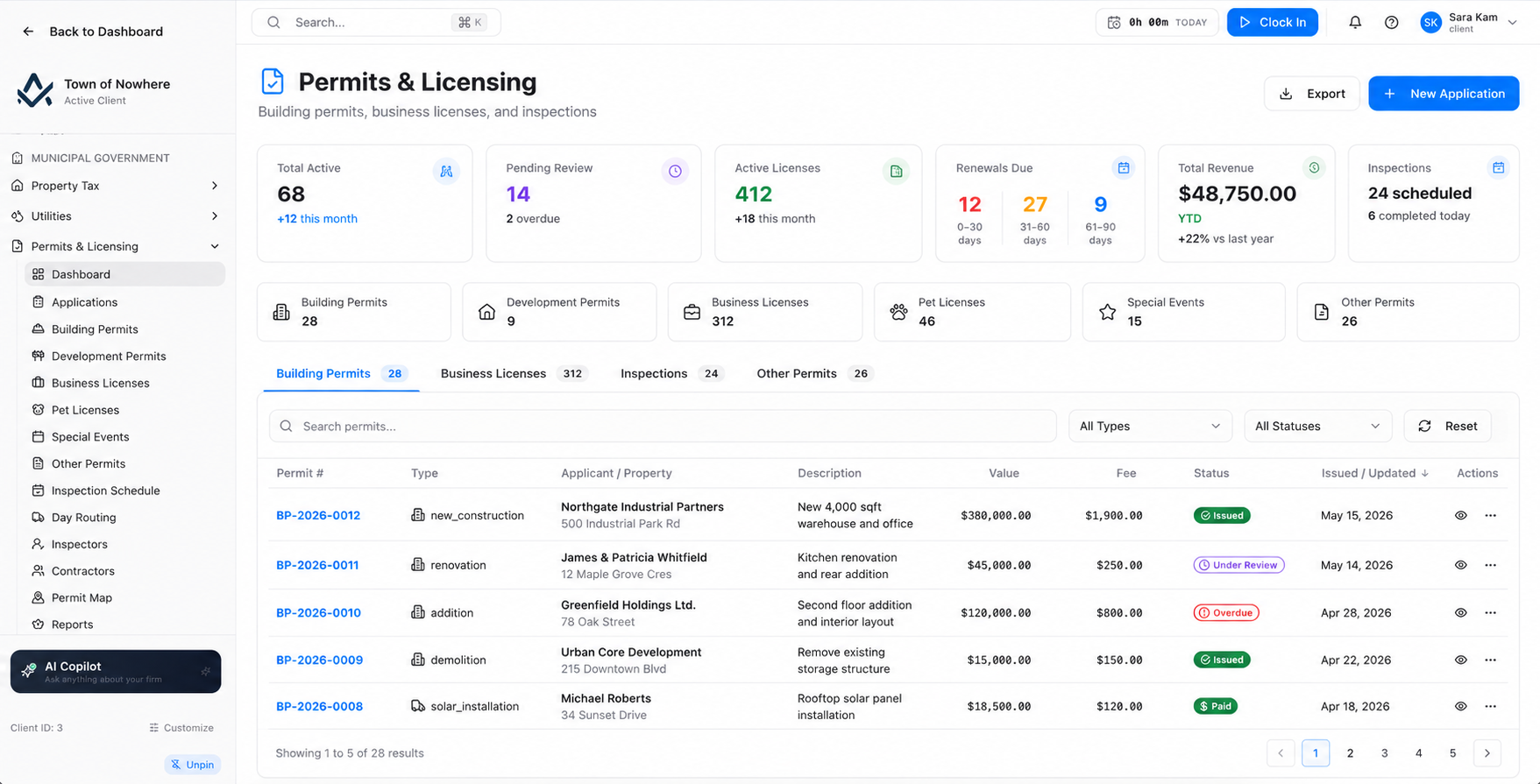
Portal-submitted applications waiting for staff review, across every category.
The statements your auditor asks for, already built
Because everything posted to one ledger, the PSAB statement set is generated rather than assembled. Thirteen statements and schedules, fund accounting with account assignment, and PS 3410 grant tracking that recognises revenue as eligible expenses are actually incurred.
- PS 1201, PS 2700, PS 3050, PS 3100, PS 3150, PS 3230, PS 3410 and PS 3510
- Per-report settings for segment basis, deferred revenue source and debt source
- Council meetings, agendas, minutes and resolutions with recorded roll-call votes
- The statutory three-reading bylaw workflow, committees and election administration
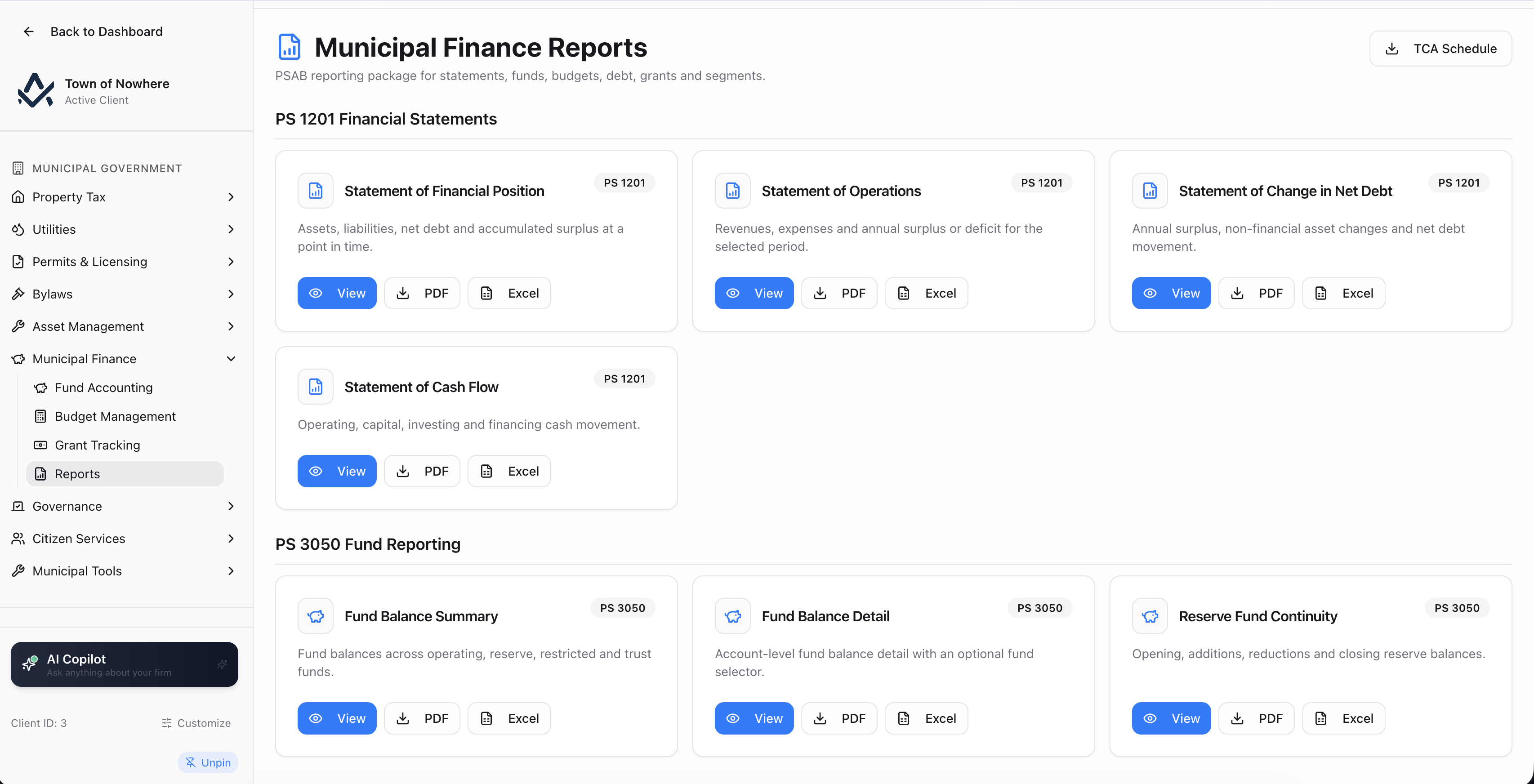
Thirteen PSAB statements and schedules, straight off the ledger.
Your town hall, open at 11pm
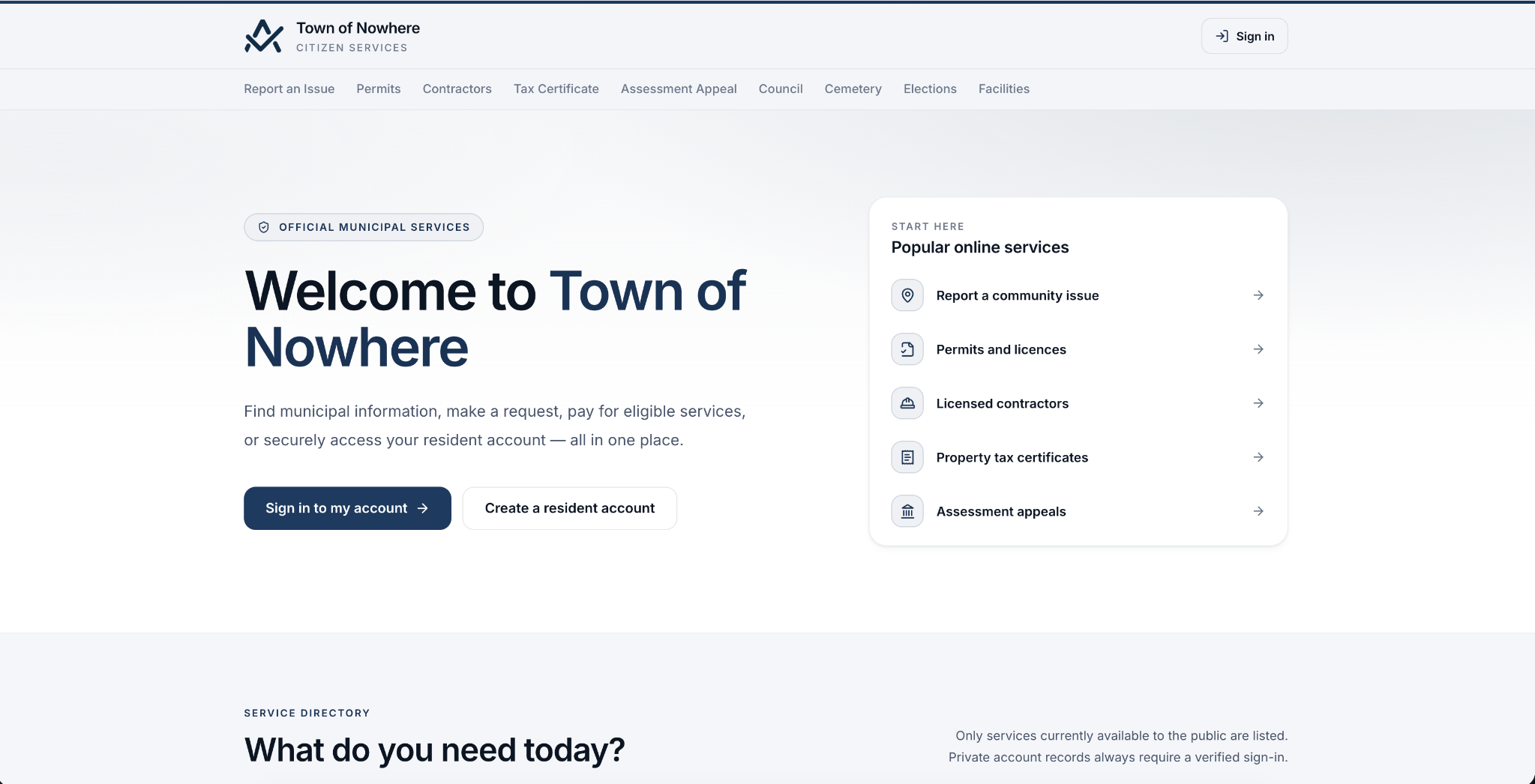
A white-label public site on your own domain, branded to the municipality. Residents check a balance, download a notice, pay a bill, report a pothole and read the minutes without phoning the office or standing at the counter.
Launch one service at a time. The portal is off until you enable it, and all twelve public pages default to unpublished. Publish exactly what your back office is ready to support.
Built by people who read the municipal statutes
These are the details that decide whether software actually fits a Canadian municipality, and the places most systems make you work around them.
Province config for all 13
Pick your province and apply its legislation, tax-sale minimum years, rate maxima, penalty structures, redemption period, classification schema and billing months in one action. Rates validate against the statutory ceiling.
Compound-on, made explicit
Every charge rule chooses its compounding basis: principal only, principal plus penalties, principal plus interest, or all charges. Interest on interest becomes a setting, not a workaround.
Bad meter reads never bill
AMI ingestion pushes anomalous readings into a pre-billing exception queue. Each is approved, corrected with a documented reason, or voided, and a readiness summary runs before the bill run.
Ties flagged, never decided
Election tabulation elects the top N per office and marks acclamations, but a tie at the cutoff is flagged for the clerk to resolve. The software does not decide an election.
Duplicate 311 caught upfront
Before a resident submits a report, the portal offers nearby existing ones so they can join instead of creating another. Multiple reporters attach to one request, each with their own photos.
Insurance lapses block issue
The contractor registry tracks insurance, bonds and trade tickets with expiry dates, and enforcement can be set to block permit issue outright when coverage has lapsed.
Approval gates where money moves
Write-offs, large utility bill batches, flagged communication rules, destructive local improvement changes and depreciation entries can all require an explicit second action before they post.
Requisitions that prove they balance
Education, library and transit requisitions carry a validate-balance action that ties the levied amount against what was collected and what was remitted to the board, so the position is provable rather than asserted.
Waitlists fair by default
Recreation waitlists run first come, first served. A priority override exists for operational and accessibility cases, but it requires a documented reason, so the exception is on the record.
Thirteen jobs that run while the office is closed
Each one filters to your municipality and evaluates in your own timezone, not server UTC. You wake up to the work already done.
PSAB coverage, standard by standard
Not a claim on a feature list. Each standard maps to a specific place in the product where it is implemented.
Financial statement presentation
Financial Position, Operations, Change in Net Debt, Cash Flow, plus current and non-current receivable classification
Segment disclosures
Segment Disclosure report on fund assignments or a custom segment map
Fund reporting
Fund Balance Summary and Detail, and Reserve Fund Continuity
Restricted assets and revenues
Deferred Revenue Schedule and deferred-revenue recognition on interim notices
Tangible capital assets
TCA registry, amortisation engine, WIP, disposals and the PSAS TCA schedule
Long-term debt
Long-Term Debt Schedule from GL accounts, a manual schedule, or both
Government transfers
Grant tracking with eligible-expense matching and the Grant Continuity Schedule
Tax revenue
Allowance for doubtful accounts, period-end accruals and revenue recognition
From a one-clerk hamlet to a full finance department
Same platform, same ledger. What changes is how many modules you turn on and how many people are in the room.
Hamlets & villages
One person runs tax, utilities, permits and the books. One login, one ledger, no re-keying between four systems.
- Tax notices and utility bills
- Online payments for residents
- PSAB statements without a consultant
Towns
A small finance team plus a public works crew and a bylaw officer, all needing to see the same records.
- Work orders tied to assets
- Bylaw fines as receivables
- Council agendas and minutes
Cities
Module depth, approval gates and reporting that stands up to an audit, with public services running at volume.
- Batch approval thresholds
- Segment disclosure and grants
- Full 311 and portal traffic
Counties & districts
Large rolls, linear infrastructure and requisitions across multiple boards and service areas.
- Requisitions and local improvements
- Linear asset condition scoring
- Capital planning and funding gaps
You do not migrate your own data. We do it.
Moving a municipality off a legacy system is not a weekend project for your clerk, and we do not hand you an import tool and wish you luck. Our team takes the extracts from your current system and loads them, section by section, with you reviewing the result before anything goes live.
You send the extracts
Whatever your current system can export: property and owner files, assessments, rate schedules, account balances, open notices and bills, and your trial balance.
We load and validate
Our team maps and loads each section, resolves the rejects with you, and reconciles the loaded balances back against the numbers your old system reported.
You sign off, then go live
You review the loaded roll, the receivables and the trial balance against your own records. Nothing becomes your live data until you are satisfied it ties out.
Scoped and quoted with your onboarding
Data migration is delivered as a professional service alongside implementation and training, priced against how many years of history you want carried across and what condition the extracts arrive in. Tell us what system you are on today and we will scope it.
Priced by the size of your municipality
Every tier ships the complete accounting system. What changes between them is capacity — seats, storage, and how many tax notices and utility bills you can generate in a year — plus how many of the eight departments arrive switched on. Any department can also be added to any tier from $15 a month, and eleven optional tools are licensed on top from $19.
Four tiers from $49 to $599 a month, with every department and optional tool priced individually.
What municipal teams ask first
A full municipal operations and accounting platform, built on top of a double-entry general ledger rather than beside one. Tax levies, utility bills, permit fees, bylaw fines, cemetery sales, bookings and registrations all post journal entries to the same chart of accounts your bookkeeping uses, under the same period locks and audit trail. The tax roll, the utility sub-ledger and the general ledger are the same data.
Yes, thirteen statements and schedules generated from live ledger data: Financial Position, Operations, Change in Net Debt, Cash Flow, Fund Balance Summary and Detail, Reserve Fund Continuity, Budget versus Actual for operating and capital, Long-Term Debt, Deferred Revenue, Grant Continuity and Segment Disclosure. Coverage spans PS 1201, PS 2700, PS 3050, PS 3100, PS 3150, PS 3230, PS 3410 and PS 3510.
All thirteen provinces and territories. Selecting one applies its statutory framework in a single action: governing legislation, tax-sale minimum years, maximum penalty and interest rates, penalty and interest structures, redemption period, the provincial assessment classification schema, interim and final billing months, whether education requisitions apply and the statutory notice content requirements. Rate entry is then validated against that province’s statutory maximum.
Yes, through the white-label citizen portal on your own domain. A resident links a property tax or utility account with an account number plus an access code, then views balances, downloads notices and bills, sees a consumption chart, pays online, opts into paperless billing, requests a payment plan and enrols in pre-authorized debit. Staff can also send signed pay links for a single notice, arrear or bill that need no account at all.
Through a rules engine, not a fixed percentage. A rule sets its method, scope, rate, start and end days, an optional calendar trigger, a cap, effective dates and a compound-on basis, and can be conditioned on a balance threshold or property classification. Preview Charges runs a dry run showing property, balance, days late, penalty and interest per row before anything is applied.
They follow the statutory path onto the property tax roll. Eligible accounts are filtered by minimum days overdue, the transfer is previewed before posting, and a posted transfer can be reversed with a reason. Automatic transfer after a configurable number of days is available in settings.
Yes, and that is how it is designed. The portal is off until you enable it, and all twelve public pages default to unpublished. Most municipalities start with tax and utility balances plus online payment, then add 311, permits, governance and recreation as the back office is ready.
You do not run the migration yourself. It is a professional service our team delivers alongside implementation and training. You send whatever extracts your current system can produce, we load and reconcile them section by section, and you review the loaded roll, the receivables and the trial balance against your own records before anything becomes live data.
It is scoped and quoted with your onboarding, priced against how many years of history you want carried across and the condition the extracts arrive in. Tell us what you are running today and we will scope it.
Pricing scales with the size of the municipality and the modules you licence. Current plans and figures are published on the pricing page, and the municipal team will quote add-ons against your roll size and module mix.
Yes. Awditify Municipal sits on the same platform as Awditify bookkeeping, so bank feeds, reconciliation, invoicing, payroll, GST/HST and the standard report set are all there. See all features.
Municipal software Canada
Public sector accounting software for local government finance teams
Awditify Municipal brings property tax software, utility billing software, permits, licensing, bylaw enforcement, tangible capital assets, governance, citizen services and PSAB financial statements into one Canadian cloud platform.
Use it as municipal government accounting software, local government accounting software or a municipal ERP when your team needs connected records instead of isolated tax, billing and reporting systems.
Property Tax
Roll, mill rates, interim and final billing, collections, arrears, penalty rules, tax sales and certificates.
Utility Billing
Accounts, meters, tiered rates, batch bill runs, deposits, receivables and statutory tax-roll transfer.
Permits & Licensing
Building, development, business, pet, event and custom permits with inspections, routing and plan review.
Bylaws & Enforcement
Registry, complaints, violations, ticket infractions, fines, appeals, payment plans and late-fee rules.
Asset Management
TCA registry, amortisation posting, disposals, infrastructure, fleet, work orders and capital planning.
Municipal Finance
Fund accounting, PS 3410 grant tracking and the full statutory statement set from live ledger data.
Governance
Meetings, agendas, minutes, resolutions with recorded votes, bylaw readings, committees and elections.
Citizen Services
Service requests that become work orders, recreation registration, facility bookings and cemetery records.
Citizen Portal
A white-label public site for balances, payments, applications, 311, council information and results.
GIS & Mapping
Your own base map, imported GeoJSON layers, parcel matching and maps inside every module that needs one.
Municipal pricing
Current plan tiers, what the standard municipal tier includes, and how add-ons are licensed.
See it running on your own roll
A municipal demo runs on your numbers, not a sample town. Bring a tax year, a rate schedule and a handful of accounts, and we will show the levy, the notice, the collection, the arrears sweep and the journal entry behind each one.