
311, recreation, bookings and cemetery in one place
The public-facing service side of the municipality, with each surface posting its revenue to the general ledger instead of living in a separate spreadsheet, and each one connected to the resident portal.
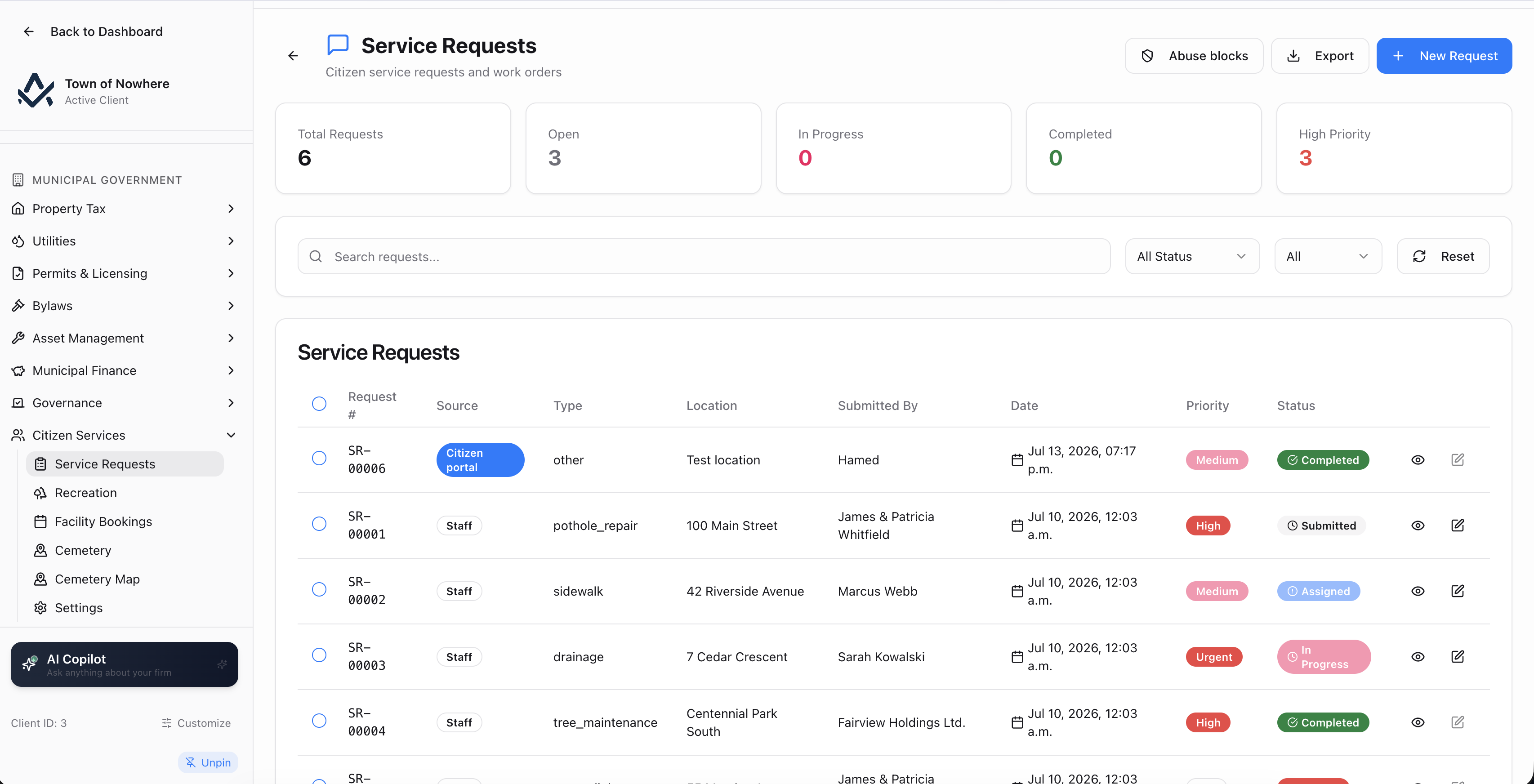
The 311-style queue, fed by staff intake and the public portal alike.
A pothole report should end up as a costed job
Service requests, recreation, bookings and cemetery all run in the same system as the ledger, so revenue posts where it belongs and a resident report turns into scheduled crew work with real cost against the asset.
8
Service request statuses
10
Recreation program categories
4
Cemetery tabs: plots, sections, interments, rates
4
Booking statuses from pending to completed
Request to work order
A service request spawns a municipal work order directly, so responding to the report carries hours, materials and a GL posting back to the asset.
Duplicates handled upfront
Nearby existing reports are offered before submission, and when duplicates do arrive, multiple reporters attach to one request with their own photos.
Waitlists that stay fair
First come, first served by default, with a priority override that requires a documented reason and tokenised promotion offers that expire on their own.
Perpetual care that reconciles
A configurable percentage of every plot sale routes to a restricted care fund, with a backfill for historical sales and a tie-out view that proves it.
Turn a resident report into scheduled work
A pothole report should become a scheduled crew job with its own costing, not a note in an inbox.
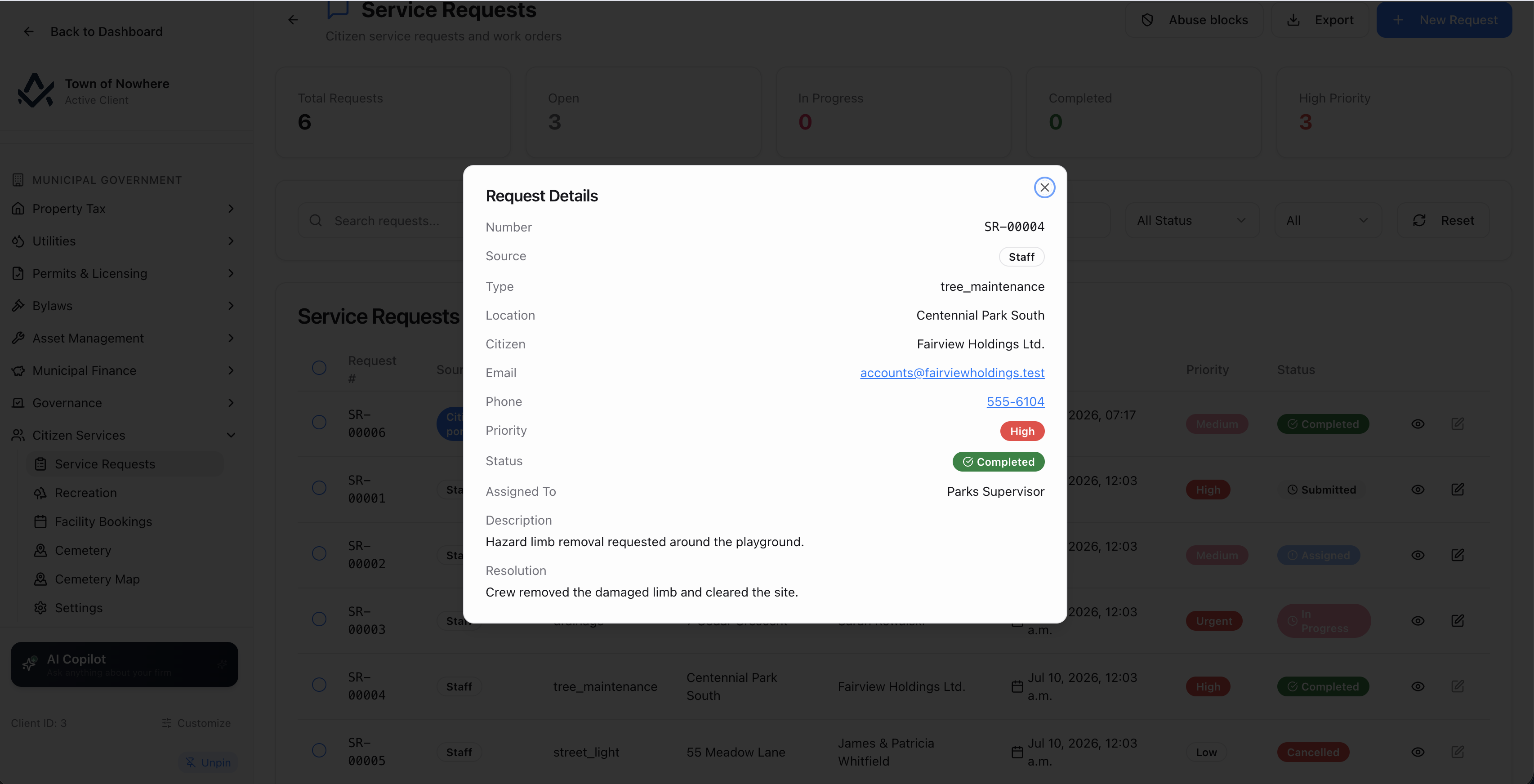
Reporters, photos, status history and the work order it generated.
The queue. Search and filter by status across submitted, acknowledged, assigned, in progress, completed, cancelled, closed and rejected spam, and by priority across urgent, high, medium and low. Columns show request number, source, type, location, submitted by, date, priority and status.
Requests from anywhere. Created by staff or arriving from the public portal, carrying request type, location, citizen name, description, priority and attachments. Multiple reporters can be attached to a single request when duplicates are merged, each with their own attachments.
Request to work order. A service request spawns a municipal work order directly, and work orders link to or unlink from requests from either side, so field work carries its cost back to the asset it was performed on.
Spam and abuse controls. Bulk reject spam, plus a 311 abuse blocklist keyed on email address or IP with a documented reason.
Your own categories. Service request categories are user-defined and drive both the staff queue and the public intake form, so the categories residents choose from match how your municipality is organised.
Also included
Programs, registrations and a fair waitlist
Programs, sessions and instructors, with a waitlist that is fair by default and auditable when it is not.
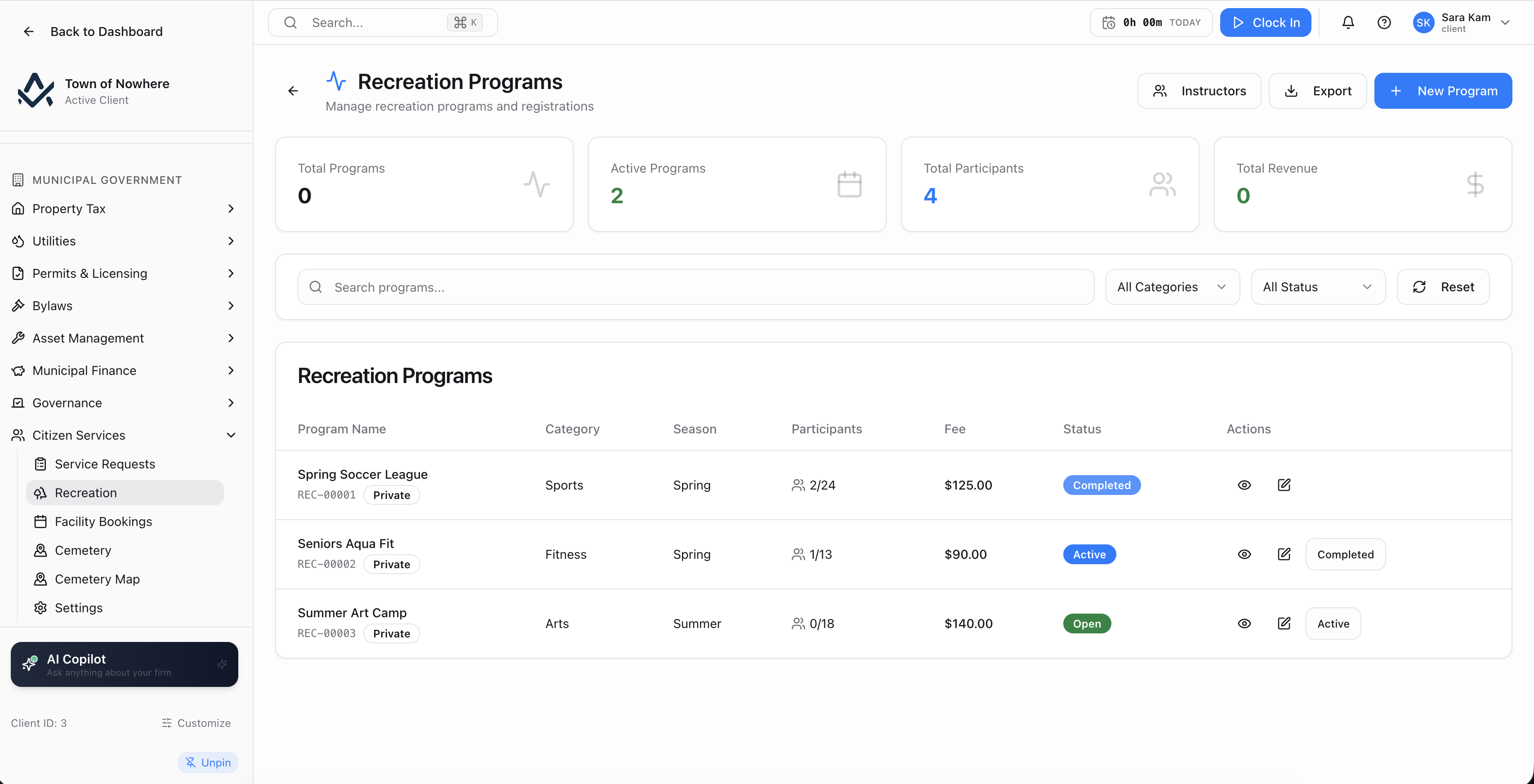
Program detail with registrations, waitlist and schedule in one file.
Programs. Ten categories covering sports, aquatics, fitness, arts, camps, music, outdoor, seniors, youth and general, with season, registration fee, maximum participants, location, a free-text instructor and a registered instructor from the roster, start and end dates, a registration deadline, and switches for show in citizen portal and allow online registration.
Registrations. Add a participant with name, email, phone, age and emergency contact, post the fee to the GL and view the fee transactions.
Waitlists. FIFO by default, with an explicit priority override that requires a documented operational or accessibility reason. Promotions send the citizen a tokenised offer link with an expiry, and unaccepted offers expire on a nightly job.
Instructors and sessions. A registered instructor roster with conflict handling set to off, warn or block, per-program sessions with day of week, date, start and end times, location and instructor, a per-instructor timetable, and a backfill tool that converts free-text instructor names into roster records with a preview.
Public side. Where published, residents see the catalogue with a category filter and search, availability showing spaces available or program full with waitlist open, dates, schedule, location and registration deadline, and signed-in residents register online or join the waitlist.
Also included
Real availability, recurring series, no double bookings
Halls, arenas and meeting rooms with real availability, recurring series and blackout dates for maintenance.
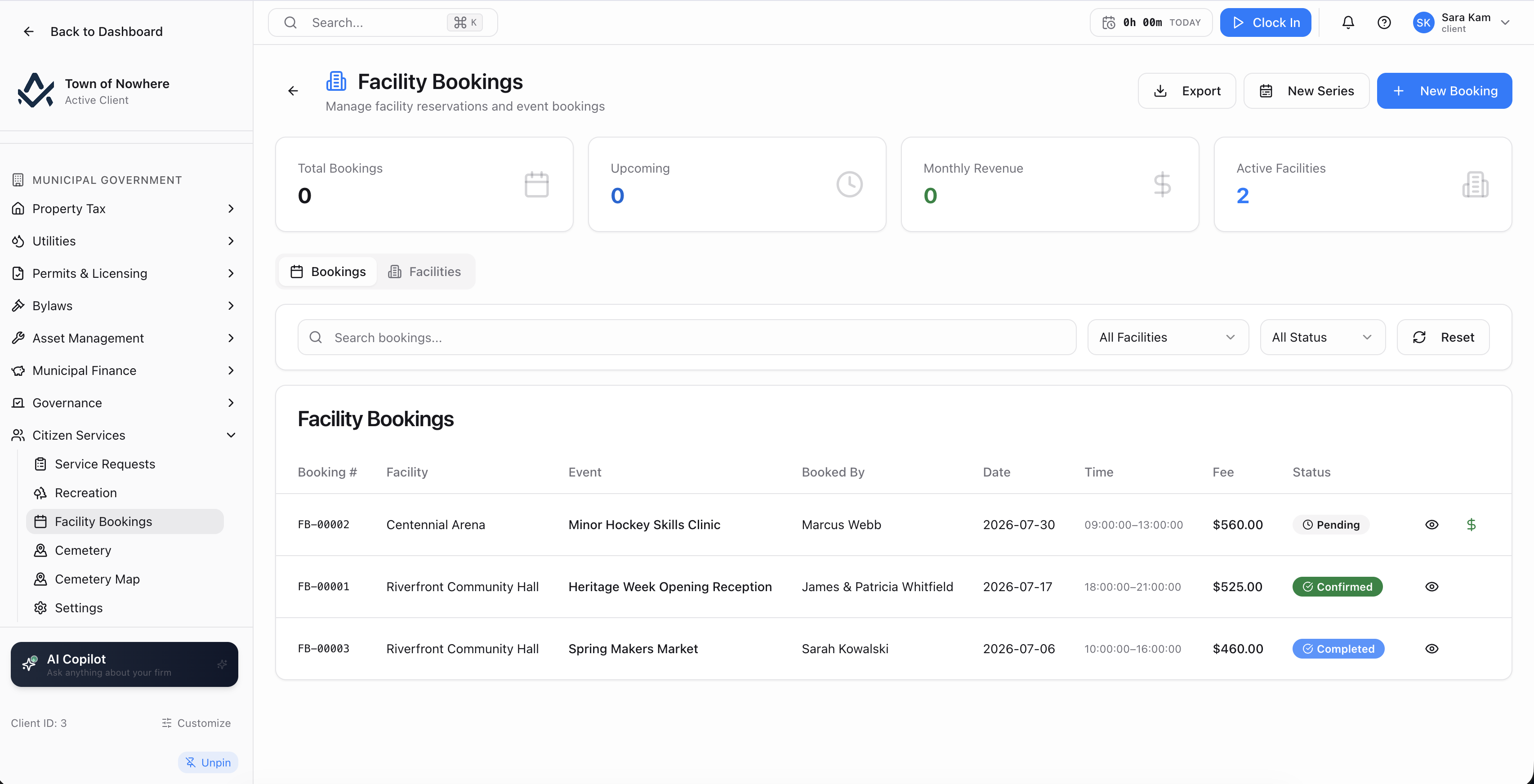
Bookings and recurring series, with facilities and blackout dates behind them.
Bookings. Customer, facility, event name, booked-by contact with phone and email, date, start and end time, rental fee and special requirements, moving through pending, confirmed, in use, completed and cancelled. Post the fee to the GL and view fee transactions.
Recurring series. Preview a series by facility, event name, frequency, days of week, start date, until date, times, per-booking rental fee, additional charges and purpose, with per-occurrence conflict handling of skip or book anyway. Create the series, then edit this and future occurrences from a chosen date with new times, fees or charges.
Facilities. Name, code, type, capacity, address, a public description, amenities, public photo URLs, accessibility features, hourly, half-day and full-day rates, deposit percentage, contact details and internal staff-only notes.
Blackout dates. Start, end and reason, blocking booking windows for maintenance or municipal use.
Public availability. The portal availability calendar reads directly from this, showing busy blocks, and verified accounts can submit a booking request with the estimated rental fee and deposit portion shown before they submit.
Also included
Plots, interments and a care fund that ties out
Plots, sections, interments and rates, with a perpetual care fund that reconciles rather than being estimated at year-end.
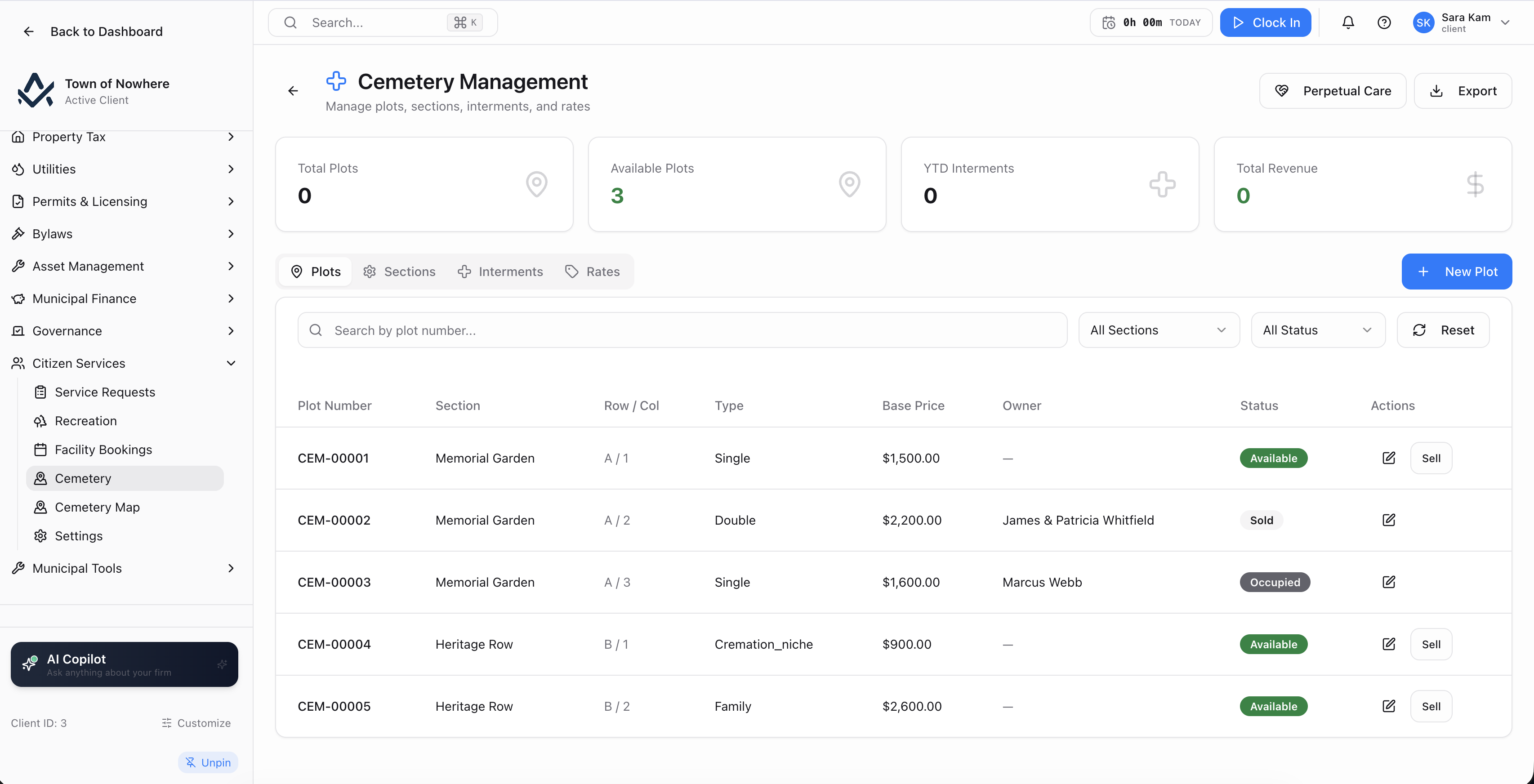
Plots, sections, interments and rates, with perpetual care routed to a restricted fund.
Plots. Plot number, section, row and column, type, base price, owner and status, filtered by section and status. A Record Plot Sale captures owner name, email, phone, purchase date and sale price, posting revenue to the GL.
Sections and rates. Section name, code, description, total plots and available count, alongside a rate table of rate type, amount, plot type and effective date.
Interments. Deceased name, date of birth, date of death, interment date, interment type and funeral home, with an interment fee posting to a chosen bank or cash account, and support for blank fees on historical records.
Perpetual care. A configurable care-fund percentage routes a share of plot revenue to a restricted care fund. A backfill tool previews plot and care fee, applies the conversion for historical sales, and a tie-out view reconciles the fund.
Cemetery map. Where GIS is licensed, sections and plots plot on the map with a section filter, a generate-grid tool that creates a plot grid for a section from its geometry, and the ability to merge adjacent plot cells into a single larger plot.
Public search. Residents search interment records by name and optional year of death, with results showing section and plot and a plot map link where the cemetery map is licensed.
Also included
Citizen services questions
Yes, directly. A service request spawns a municipal work order, and work orders can be linked to or unlinked from requests from either side. The work order then carries hours, labour and material cost, resulting asset condition and a GL posting, so the cost of responding to the report lands against the asset.
Before a resident submits, the portal offers nearby duplicate reports so they can join an existing one instead of creating another. When duplicates do occur, multiple reporters can be attached to a single request, each with their own attachments, so the record stays single while everyone who reported it is tracked.
By default yes, FIFO. A priority override exists for operational and accessibility situations, but it requires a documented reason, so the exception is recorded rather than invisible. Promotions go out as a tokenised offer link with an expiry, and unaccepted offers expire on a nightly job.
Where the booking calendar is published, residents see the facility list with description, amenities, accessibility features, capacity and rates, plus an availability calendar showing busy blocks. Verified account holders submit an online booking request with event name and type, organisation, date, times and contact details, and see the estimated rental fee and deposit portion before submitting.
A configurable care-fund percentage routes a share of every plot sale to a restricted care fund account. For municipalities converting historical records, a backfill tool previews the plot and computed care fee before applying, and a tie-out view reconciles the fund against the plot sales that fed it.
The rest of the platform
Every module posts to the same ledger, so these are not integrations. They are the same system.
Citizen portal
Citizen Portal
A white-label public site on your own domain for balances, payments, applications, 311 and council information.
ExploreAsset management
Asset Management
PS 3150 registry, amortisation, disposals, infrastructure, fleet, work orders and capital planning.
ExploreBylaws & enforcement
Bylaws & Enforcement
Registry, complaints, violations, tickets, fines, appeals, payment plans and a late-fee rules engine.
ExploreGIS & mapping
GIS & Mapping
Your own base map, GeoJSON layer import, parcel matching and maps inside every module that needs one.
ExploreGovernance
Governance
Meetings, agendas, minutes, resolutions with recorded votes, bylaw readings, committees and elections.
ExploreSee a resident report become a costed job
From the 311 submission with a photo and a map pin, through the duplicate check, into a work order, out to the asset it was spent on.