
Property tax software that runs the whole roll
Forty screens covering the complete property tax lifecycle, with statutory defaults for thirteen Canadian provinces and territories, a real charge-rules engine, and every levy, payment, penalty and write-off posting to the general ledger.
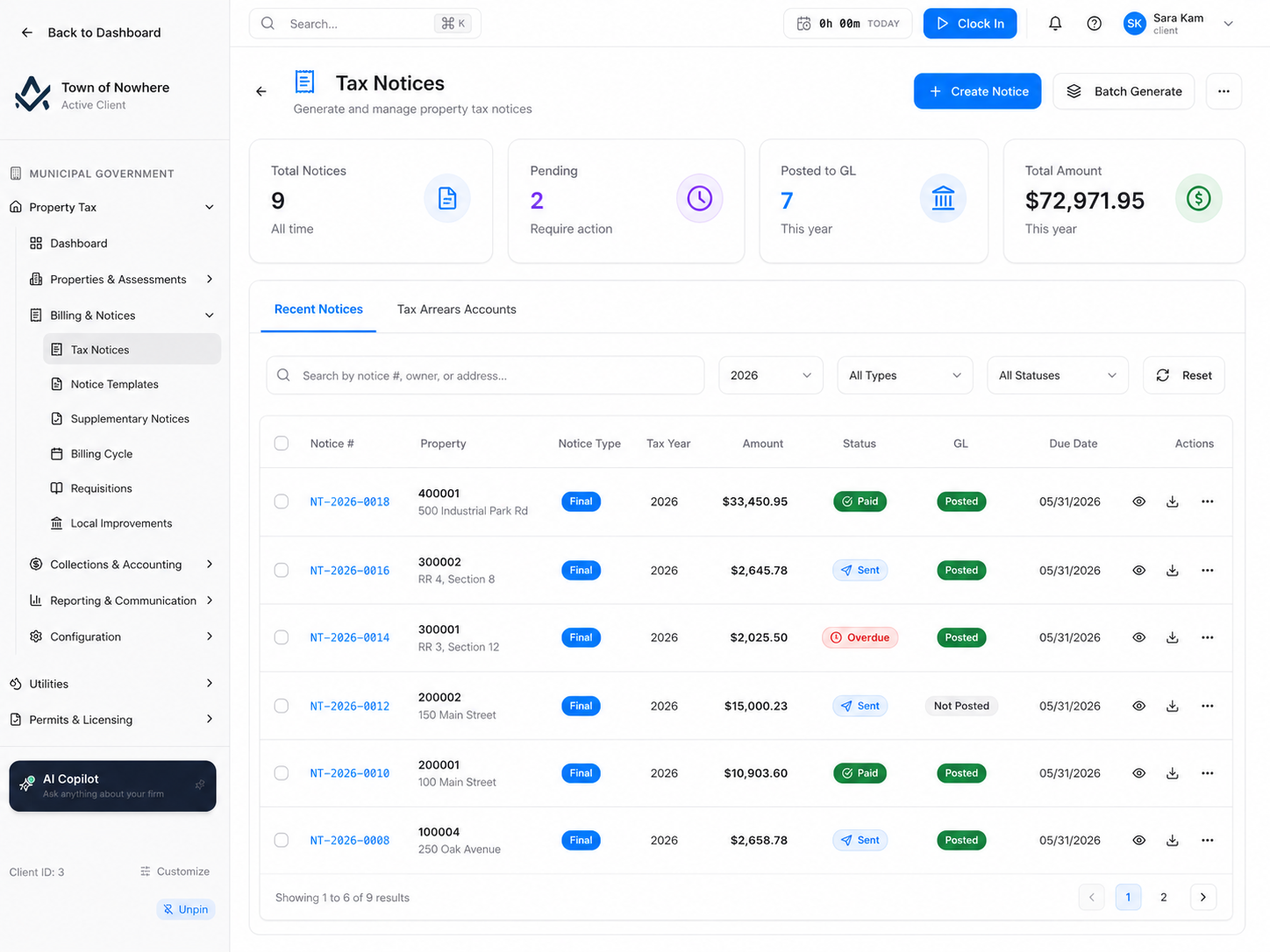
Levy, collection rate, arrears and tax-sale-eligible counts for the selected tax year.
The tax year, start to finish, without leaving one screen
Import the roll in the spring, batch-generate notices, batch-send them, batch-post them, then let the nightly jobs sweep arrears and apply penalties while the office is closed. What used to be a week of clerical work becomes an afternoon and a review.
40
Screens across the module
13
Provinces and territories with statutory defaults
4
Notice types: interim, final, supplementary, adjustment
7
Arrears statuses tracked to tax sale
Bill the whole roll at once
Batch generate, batch send, batch PDF, bulk post and recalculate across every property, tracked as a monitored operation with a downloadable result.
Statutory limits enforced
Pick your province and the legislation, tax-sale years, rate maxima and classification schema apply. Rates validate against the statutory ceiling on entry.
Arrears that manage themselves
A nightly sweep moves eligible overdue notices into arrears, then the charge engine applies your penalty and interest rules and can post them automatically.
Every dollar in the ledger
Levies, collections, penalties, write-offs, allowances and accruals all post journal entries, and a reconciliation screen ties the sub-ledger to the GL at any date.
One place your roll actually lives
Three registers that stay in step. Properties hold no values, assessments hold the year-by-year numbers, and owners consolidate across every parcel they hold.
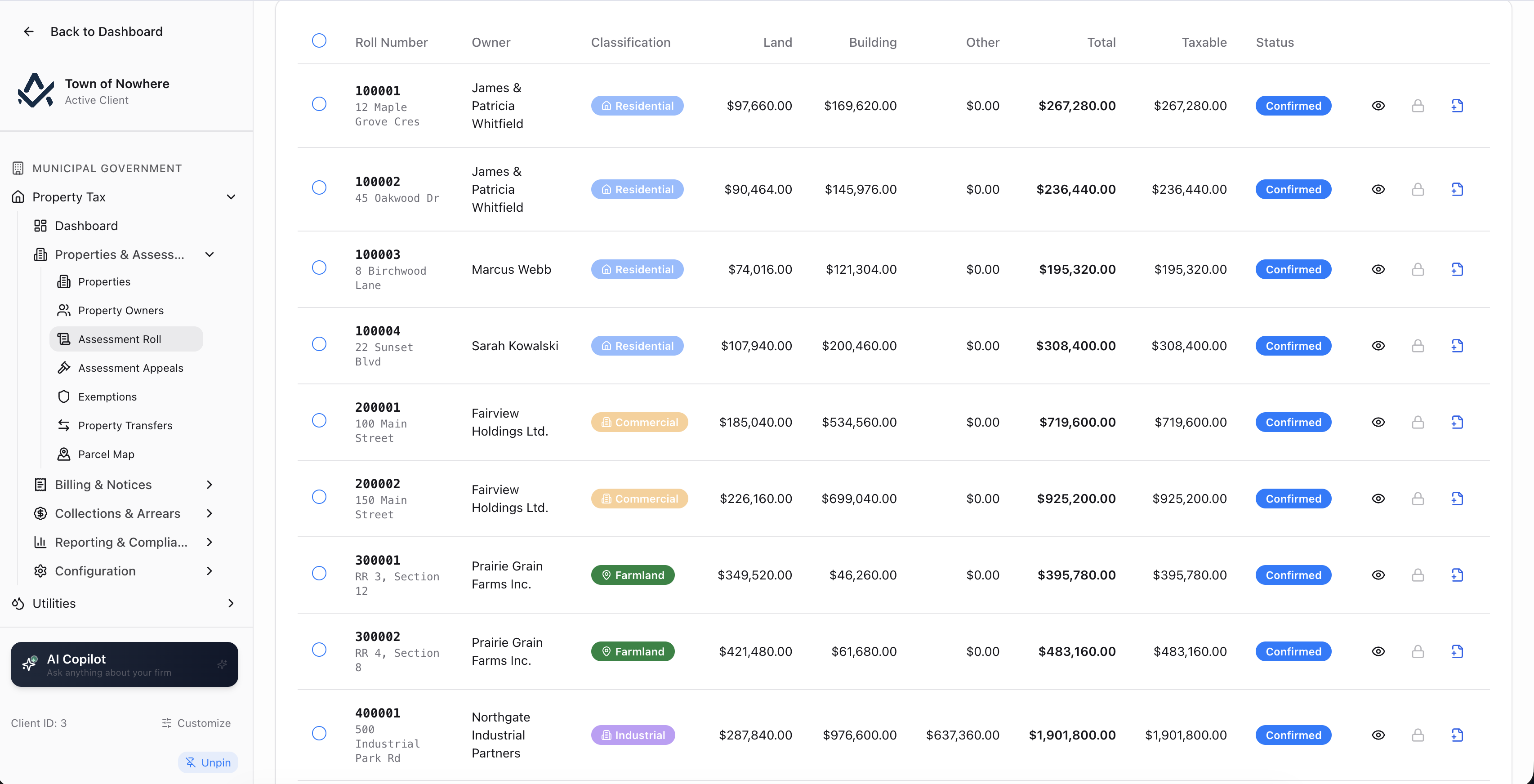
The per-year roll, filtered by classification and status.
Property register. One row per parcel with roll number, civic address, legal description, type and assessment count. Search across roll number, address and legal description, filter by six property types, and import from CSV or Excel with alias detection that can create or link the owner record in the same pass.
Nine-tab property file. Ledger with running balance, assessments, tax notices, payments, arrears, charges, exemptions, certificates and appeals, plus latitude and longitude with a map picker when GIS is licensed.
Owner register with a consolidated file. Search by name, email, phone or company, import with deduplication on account number, and open a seven-tab owner file covering ledger, properties, notices, payments and credits, arrears, charges and payment plans across every property the owner holds.
Assessment roll per year. Classification from the province-specific list with class code and subclass, land, building and other values, and a taxable-value source switch that is either manual and imported or auto-computed as a percentage of assessed value.
Bulk roll work. Multi-select bulk status change and delete, copy assessments from one year to another, create a revised assessment off an existing one, and a guided import with an import-as-revised mode.
Also included
Notices that calculate themselves, correctly
The billing engine handles interim and final cycles, netting, minimums, exemptions, requisition levies and local improvement charges, then produces branded PDFs and pay links.
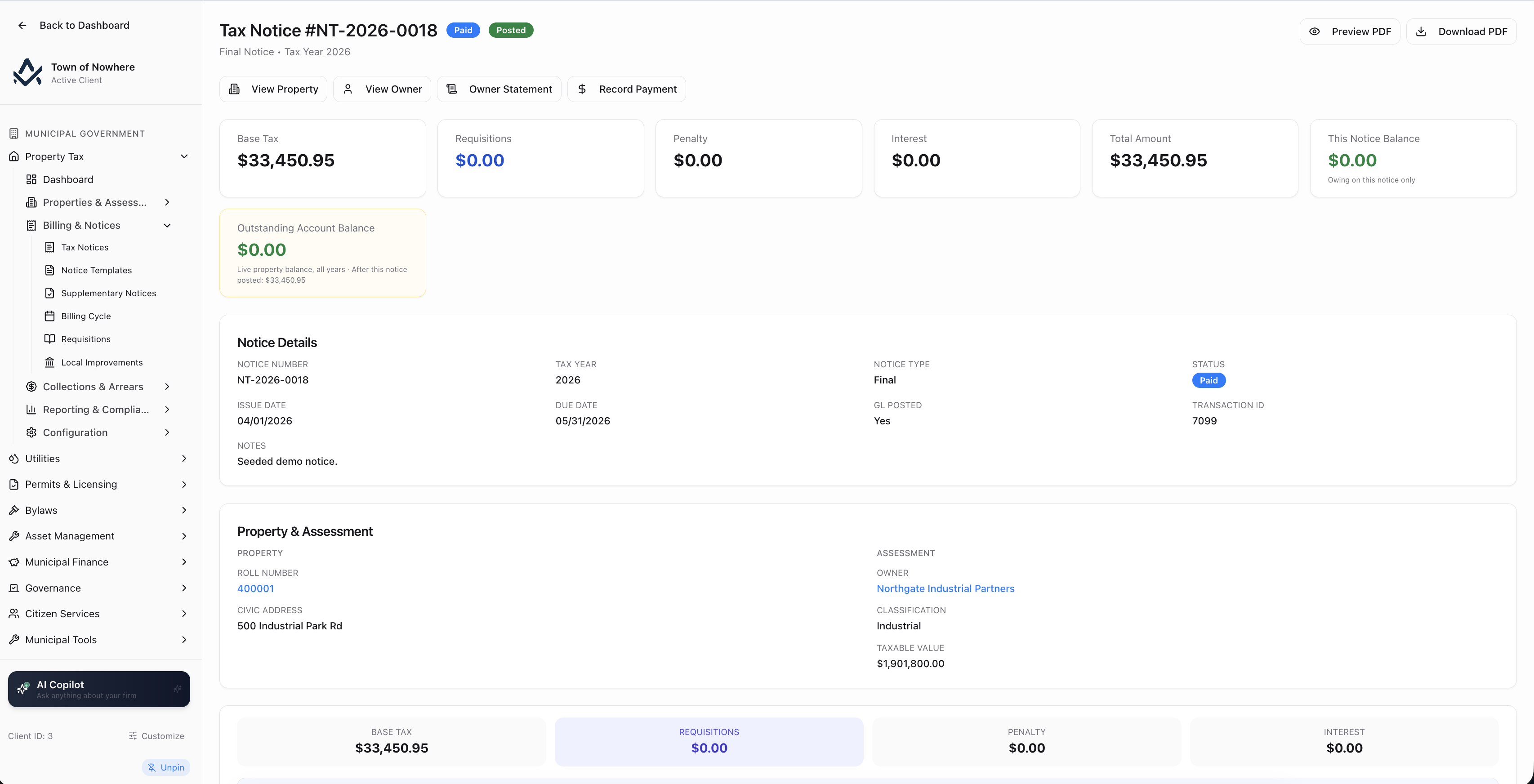
Rate name, classification, mill rate and amount per line, with requisitions and local improvements shown separately.
Notice actions, single and batch. Create with a live per-rate calculation breakdown, edit, post to GL, change status, email, generate a pay link, download the PDF, void with reason. In batch: generate across the roll, generate supplementary, send, download PDFs, bulk post, bulk void and recalculate totals, all tracked as batch operations with a status endpoint.
What the calculation engine covers. Interim and final billing, final-notice netting against the interim already billed, minimum-tax rules, exemptions applied whole-notice or to specific mill rates only, requisition levies, local improvement levies and deferred-revenue recognition on interim notices.
Requisitions. Education, library, transit and custom requisitions with mill rate, requisition amount, revenue and expense accounts, applicable classifications and a collect-on-exempt-properties switch. Per requisition: levy detail, regenerate levies, remittance recording and a validate-balance action that ties levied against collected against remitted.
Local improvement charges with amortisation. Bylaw number, project type, total cost, calculation method including flat per property and per frontage metre, interest rate, amortisation years and scope. Per bylaw you get a properties tab with per-property overrides, a full amortisation schedule, a payoff quote and lump-sum payoff recording.
Supplementary notices with visible derivation. Generated from an original notice plus a revised assessment, with a reason such as new construction, demolition, rezoning or appeal decision, and a dialog showing original amount, revised tax, annual difference, effective date, remaining months and the proration formula.
Branded notice templates. Primary and text colour, notice title, custom message, optional payment-instruction and penalty-warning blocks, an assessment-complaint deadline line, logo, letterhead and footer uploads, and a live preview PDF before saving.
Also included
Chase arrears with rules, not spreadsheets
Where most municipal systems stop at a flat penalty percentage, this is a configurable rules engine with a dry run, a sandbox and a full run history.
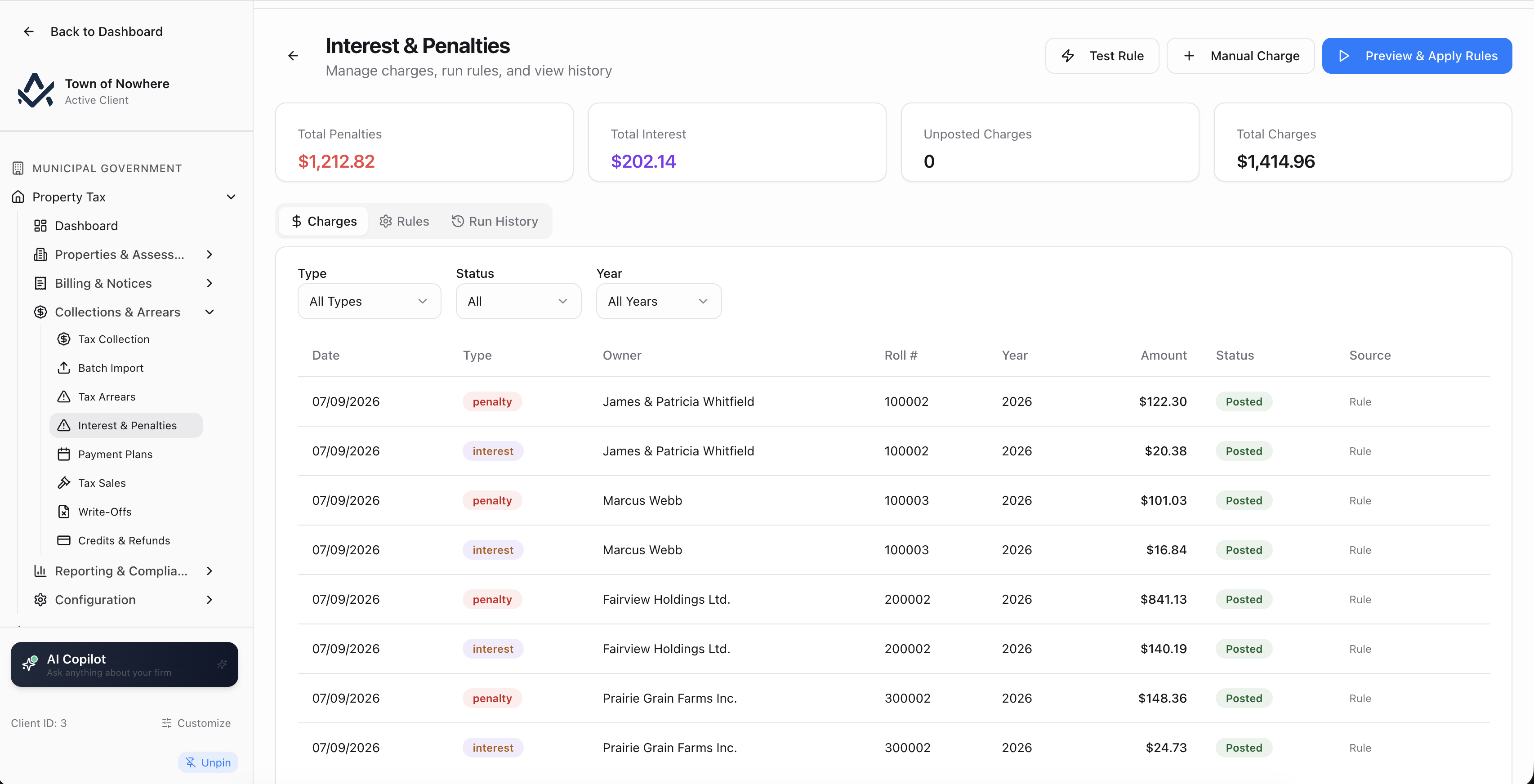
The rule table, with the preview run and the calculation sandbox alongside it.
Payments and receipting. Six methods covering online, counter, cheque, EFT, pre-authorized and wire. Payments post to the GL, generate a receipt number and can be voided with a reason. Allocation across years is configurable as oldest first, newest first or proportional.
Batch import. Bank lockbox, teller batch or third-party collection files, with a preview grid showing row, roll number, amount, date, method, reference and match result before you commit.
Arrears sub-ledger. Filter by outstanding, active, payment plan, tax-sale eligible, tax-sale registered, paid or written off. Transfer overdue sweeps every eligible unpaid notice, transfer selected takes a chosen set, and eligibility is configurable as N days after due date, the first day after fiscal year-end, or the last day of fiscal year-end.
Charge rules in detail. Method of percentage, flat fee, per day or per month. Applies-to scope of all, current year only or arrears only. Days after due date to start, an optional end, an optional calendar trigger, a cap, sort order, effective dates, a condition of balance threshold or property classification, an apply-once-per-notice switch, and a compound-on basis of principal only, principal plus penalties, principal plus interest or all charges.
Preview before you charge. A dry run shows property, balance, days late, penalty, interest and total per row. A Test Rule Calculation sandbox computes a single charge from a balance, days past due, rate and method. A history tab logs every run with notices touched, charges created, totals, who triggered it and any errors.
End of the line. Payment plans with frequency, instalments, interest and down payment. Tax sales with additional, advertising, legal and registration costs posting to the GL, a Flag Eligible sweep against the province’s statutory minimum years, and redemption processing. Write-offs move through pending, approved and posted, optionally routing through the allowance for doubtful accounts.
Also included
The reports the auditor and the lawyer ask for
Everything an auditor, a lawyer or a council report asks for, generated from the same ledger the notices posted to.
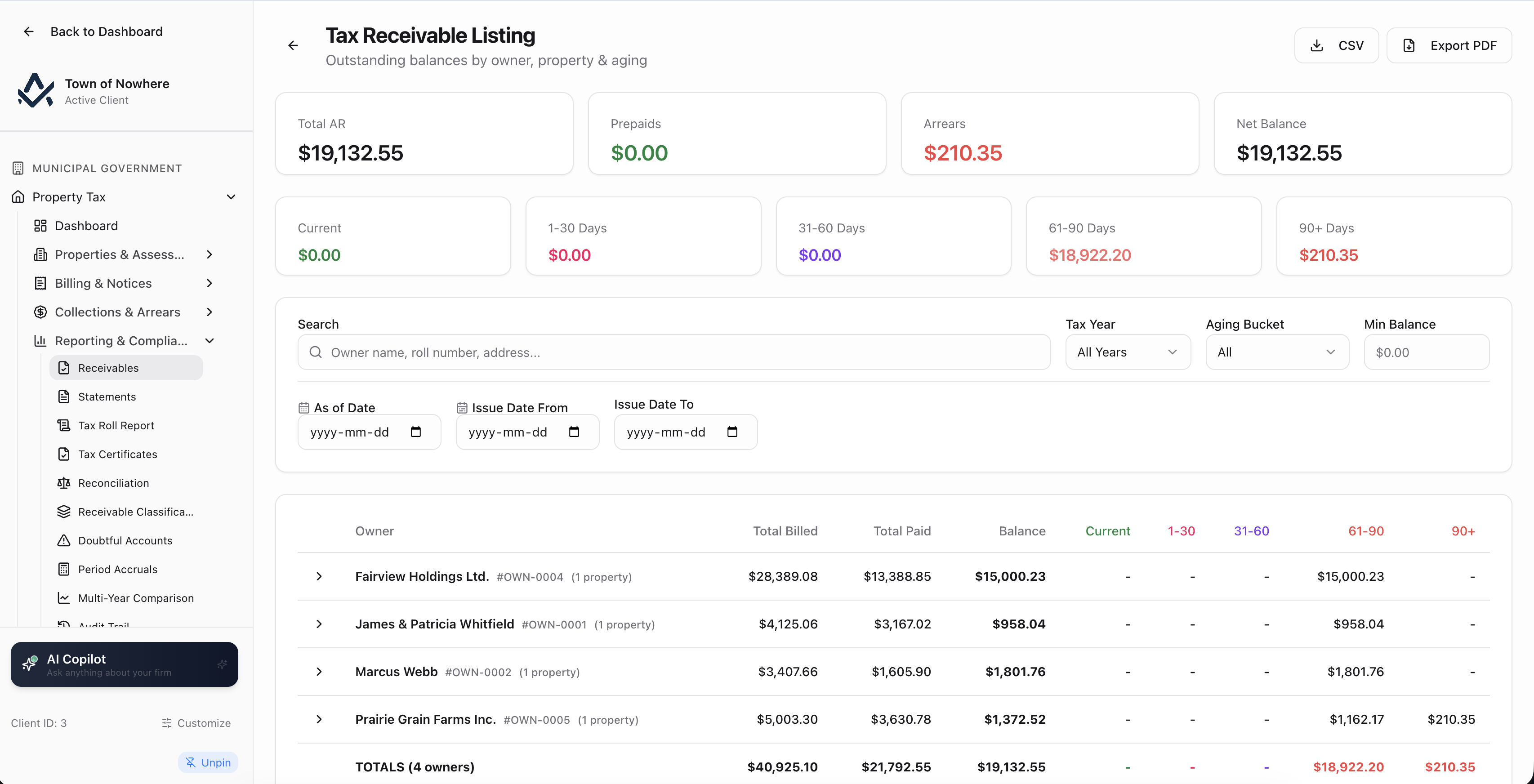
Owner-level receivables with aging buckets and drill-down to the underlying transactions.
Receivables with aging. Owner-level listing with current and 1 to 30, 31 to 60, 61 to 90 and 90 plus buckets, a minimum-balance filter, an issue-date range and a transaction detail drill-down. PDF export.
Statements of account. Per property or across all properties, with a summary of levied, paid and balance and a dated debit, credit and running-balance ledger underneath. PDF and Excel for the whole run, plus per-property PDFs and a consolidated owner statement.
Tax certificates. Lawyer and title-company requests with certificate type including custom types, fee amount, validity window and notes. Issue, void with reason, record the payment and download the PDF. Fees post to the GL, certificates auto-expire on a nightly job, and the property balance is never exposed before issuance.
Reconciliation that fits your chart. GL versus sub-ledger as at a chosen date, with configurable reconciliation groups that map each sub-ledger to one or more GL accounts under a custom label.
PSAB compliance screens. PS 1201 receivable classification split across past due, current and non-current for both notices and arrears. PS 3510 allowance for doubtful accounts with an aging-bucket table, uncollectible percentages, an estimated allowance and a Post ADA Journal Entry action with posting history. Period accruals for interest and penalties with post and reverse.
Tax roll report and multi-year comparison. The statutory roll listing with assessed value, taxable value, total tax, paid and balance, and a year-over-year metric table for trend and benchmark analysis.
Also included
Pick your province, get your statutes
Set the province once and the statutory framework follows. Everything else lives in five settings tabs.
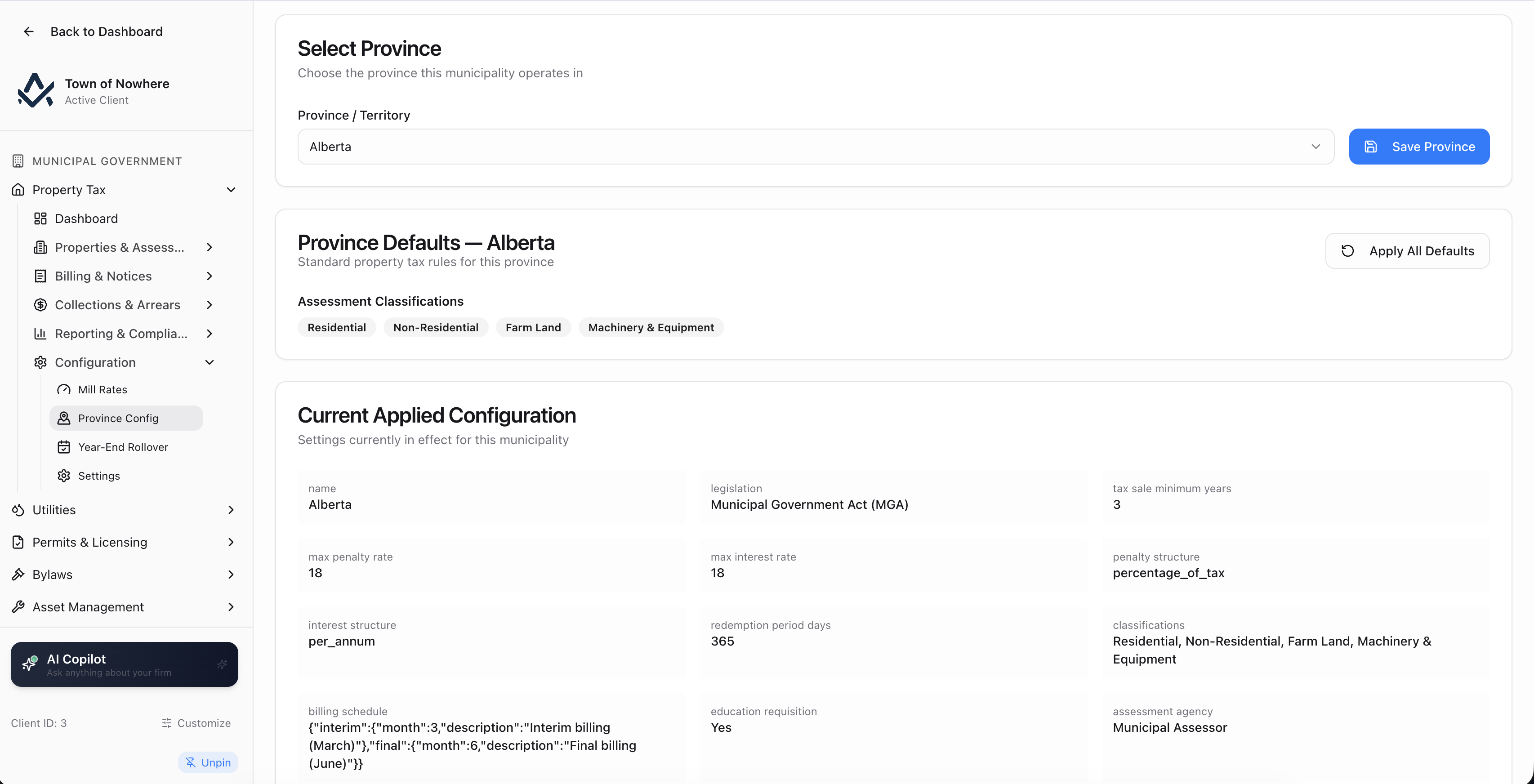
Select a province or territory and apply its statutory framework in one action.
Mill rates. Per classification and per year, with rate name, the mill rate itself, an optional revenue account and a description. Rates that have been used are deactivated rather than deleted.
Settings, five tabs. General covers province, allocation method, certificate validity days, the portal appeal-filing window, tax-sale minimum years, current tax year, fiscal year-end month, billing months, arrears-transfer basis, number prefixes and the cumulative charge cap. GL Accounts maps receivable, revenue, penalty and interest revenue, bank, refund, AFDA and deferred-revenue accounts. Tax Year Rules holds per-year charge rules and minimum-tax rules. Classifications holds your classification tree. Automation controls auto-posting, auto-calculated penalties, auto-transfer schedules and a dry-run switch.
Year-end rollover. A preview-then-execute flow with four independently selectable options: transfer unpaid notices to arrears, copy charge rules forward, flag tax-sale-eligible arrears and advance the current tax year.
| Province config carries | Example of shipped depth |
|---|---|
| Governing legislation | Alberta under the MGA, British Columbia under the Community Charter and Vancouver Charter, Quebec under the Loi sur la fiscalité municipale |
| Tax-sale minimum years and redemption period | Alberta at three years, used by the Flag Eligible sweep in arrears |
| Maximum penalty and interest rates | Alberta at 18 percent, validated on rate entry so a rule cannot exceed the ceiling |
| Penalty and interest structures | Quebec carries a per-month penalty and interest structure rather than an annual rate |
| Assessment classification schema | Four classes in Alberta, nine statutory classes in British Columbia, six in Quebec including 6-plus unit immovables and vacant serviced land with French and English labels |
| Interim and final billing months | Drives the billing cycle defaults and the interim instalment months |
| Education requisitions and assessment agency | Whether education requisitions apply, and which agency issues assessments |
| Statutory notice content requirements | Feeds the notice template so printed notices carry what the province requires |
Also included
Property tax questions
Yes. Each assessment carries a taxable value source switch. It is either manual or imported, in which case you supply the taxable value directly, or auto-computed as a percentage of the assessed value.
An exemption carries a type, a percentage, start and end dates, a bylaw number, a reason and notes, and can be scoped to specific mill rates only rather than the whole notice. Multiple properties can be attached to a single exemption record, and exemptions move through active, pending, expired, revoked and denied.
Property Transfers records the ownership change with tax proration. You pick a transfer type, a proration method of daily, monthly or none, and an arrears responsibility of purchaser, vendor or split with percentage shares. A preview endpoint shows the computed split before you commit, and a posted transfer can be voided with a reason.
Yes, where the citizen portal is enabled and appeals are published. A resident files against assessed value, classification or an exemption, supplying the value they believe correct, grounds and a verified email, and receives an appeal number plus a tracking page. The filing window is enforced from the property tax settings. Each appeal also carries a Hold Collections switch that suspends collection activity while it is live.
Only if you configure it to. Each charge rule sets its compound-on basis explicitly: principal only, principal plus penalties, principal plus interest, or all charges. Interest on interest is therefore a deliberate setting rather than a hidden behaviour, and a cumulative charge cap can be applied across all rules at the settings level.
The rest of the platform
Every module posts to the same ledger, so these are not integrations. They are the same system.
Utilities
Utilities
Accounts, meters, tiered rates, batch bill runs, deposits, receivables, AMI ingestion and tax-roll transfer.
ExploreMunicipal finance
Municipal Finance
Fund accounting, PS 3410 grant tracking and thirteen PSAB statements generated from live ledger data.
ExploreCitizen portal
Citizen Portal
A white-label public site on your own domain for balances, payments, applications, 311 and council information.
ExploreGIS & mapping
GIS & Mapping
Your own base map, GeoJSON layer import, parcel matching and maps inside every module that needs one.
ExploreBylaws & enforcement
Bylaws & Enforcement
Registry, complaints, violations, tickets, fines, appeals, payment plans and a late-fee rules engine.
ExploreRun your own tax year in the demo
Bring a tax year, a rate schedule and a few accounts. We will show the levy, the notice, the collection, the arrears sweep and the journal entry behind each one.